
Trading in Pokémon TCG Pocket has finally arrived, but it’s not as simple as swapping any card with anyone. To trade, you must be friends with the other player, and trades are limited to cards of the same rarity from select expansions like Genetic Apex and Mythical Island. Each trade consumes Trade Stamina and may require Trade Tokens depending on the card’s rarity, adding strategic layers to how you exchange and collect cards. These restrictions aim to keep the trading fair and balanced while preventing exploits, making every trade a thoughtful decision in your quest to complete your deck.
Trades will come at the cost of Trade Tokens and Trade Stamina, and will allow you to get your hands on cards you’ve been missing or cards that you want to hoard. There are a few rules to trading, so you can’t trick other players into trading one of their full art cards for one of your twenty copies of Sizzlipede or send an entire binder over to another account.
If you’re new to trading, there is a lot of information to take in all at once with how trading works, generating trade tokens, all of the rules, and more. But, we’ve made it a little easier for you to understand by summarizing it all!
Here’s how trades work in Pokémon TCG Pocket and the rules behind trading.
Update (March 14): The Pokémon Company announced upcoming changes to the trading system. We’ve edited the article to reflect this.
How to trade in Pokémon TCG Pocket
To trade in Pokémon TCG Pocket, you must first add the player you want to trade with to your friends list, as trades are only possible between friends. Then, go to the “Social Hub” and select the “Trade” option to start a trade. You can only trade one card at a time, and the cards must be of the same rarity. Trading rarer cards requires spending Trade Tokens, which are earned by dismantling duplicate cards or completing missions, while each trade consumes Trade Stamina that regenerates over time. After selecting the card to offer, your friend must respond with a card of matching rarity and spend the corresponding Trade Tokens and Stamina. Both players must confirm the trade for it to complete. Cards with flair must be traded with flair, and traded cards remain in your collection database even if they are your only copy. Currently, only cards from certain sets like Genetic Apex and Mythical Island are tradable, with specific restrictions on card rarities and trade costs.
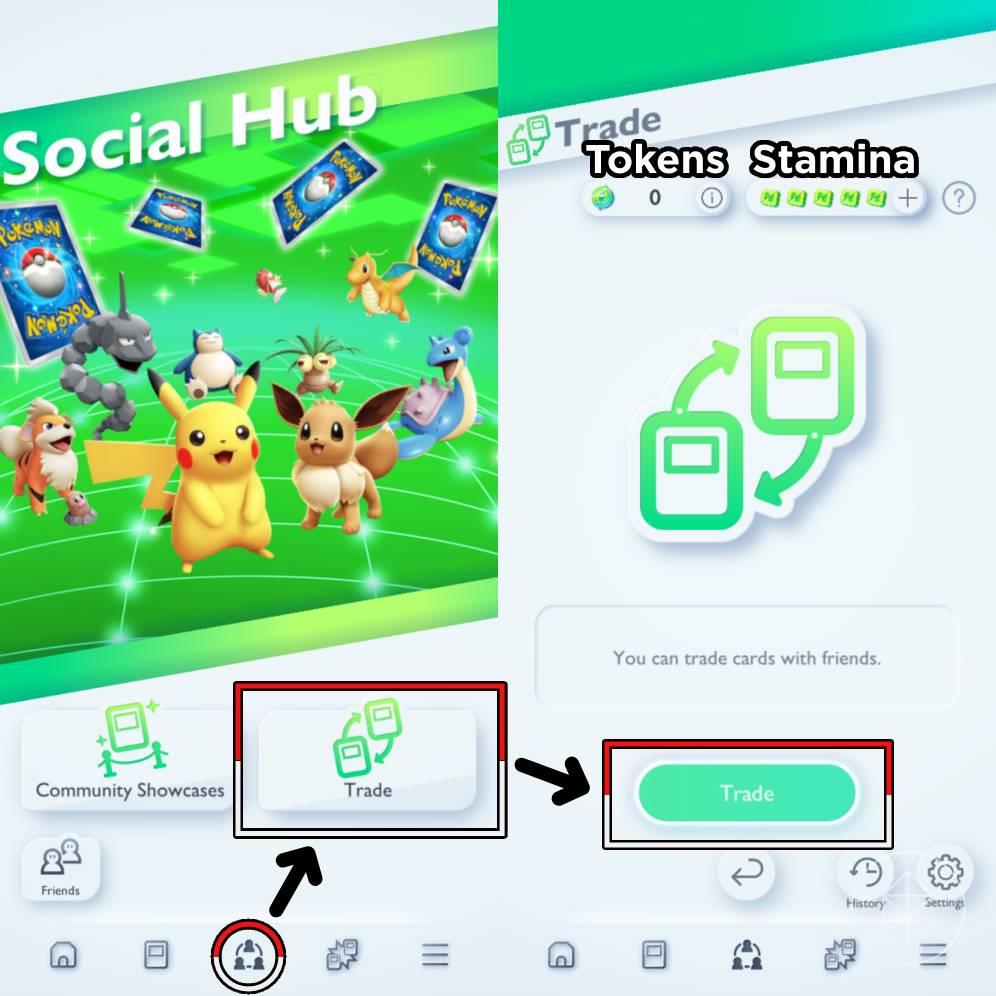
Prior to trading, make sure your Pokémon TCG Pocket app is updated to the latest version. Go to the Pokémon TCG Pocket store page on either the App Store on iOS devices or Google Play store on Android devices and update it.
To trade, head over to the “Social Hub” tab and click on the unlocked “Trade” button.
Here is where you’ll find the trade menu – along with your Trade Tokens and Trade Stamina at the top of the screen. From the trade menu, you can either initiate a trade or respond to a trade offer, but first, you’ll need to follow the trading rules.
Upcoming Trade changes
In a trade update coming at “the end of Autumn 2025,” Trade Tokens will be discontinued and replaced with shinedust. Currently, shinedust is a currency earned after you open booster packs and can be used to obtain flairs, but developers Creatures Inc. and DeNA are looking to expand the currency to cover trading as well.
Once the update is live, Trade Tokens can be converted to shinedust, and you should be able to trade more cards than before.
Additionally, you’ll be able to share which cards they’re looking to trade for with the addition of a new in-game feature.
Pokémon TCG Pocket trading rules and restrictions
Trading in Pokémon TCG Pocket is governed by several key rules and restrictions to ensure fairness and prevent exploitation. Players can only trade cards with friends, and trades must involve cards of the same rarity-one Diamond cards can only be exchanged for other one Diamond cards, and so forth. Additionally, trading requires the use of Trade Stamina, which regenerates over time or can be replenished with in-game items, and Trade Tokens, which are consumed when trading cards of three Diamond rarity or higher. Only cards from specific sets, such as Genetic Apex and Mythical Island, are currently tradeable, and rare or promotional cards like gold Charizard EX remain locked to their original owners. Flair on cards must be matched in trades, and only one trade can be active at a time. These restrictions help maintain balance and prevent unfair trades or mass transfers between accounts.
There are five official rules that you must follow in order to trade in Pokémon TCG Pocket:
- You need one Trade Stamina to trade. One trade stamina will regenerate every 24 hours, but you can reduce the time with Poké gold and Trade Hourglasses.
- Cards must be of the same rarity.
- Trading a card with flair must be matched with another card with flair.
- Promo cards and cards with a rarity of two golden stars or higher cannot be traded. Additionally, certain high-rarity cards and cards from certain expansions cannot be traded. To see the full list of tradable cards, check the “Detailed trade list” in your app, which can be found by clicking the “?” icon beside your Trade Stamina.
- To trade rare cards (two diamonds) or higher, you need Trade Tokens. To get more, see our guide on how to get Trade Tokens.
To trade in Pokémon TCG Pocket, go to the ’Social Hub’ and click the ’Trade’ button. You can only trade with friends, and trades must be of the same card rarity. You will need Trade Stamina to conduct a trade, which replenishes over time, or you can use Trade Hourglasses. For cards of three Diamond rarity or higher, Trade Tokens are needed, which are earned in-game. When trading, you must adhere to the trading guidelines.
Rarity |
Trade Tokens required |
|---|---|
| Common (one diamond) | |
| Uncommon (two diamonds) | |
| Rare (three diamonds) | 120 |
| Normal ex (four diamonds) | 500 |
| Full art (one star) | 400 |
Although these weren’t stated in the in-game trade rules, here’s some more information you should know:
- You can only have one trade at a time. Whether you’ve started or received a trade offer, you are not able to start another trade until the current trade has been completed. If you don’t want your trades to be slowed down by trade offers, you can turn off all incoming trade offers by selecting the “Settings” button in the bottom right corner of the trade menu.
- You can trade cards no matter how many copies you have – meaning you can trade cards that you only have one copy of.
With these rules in mind, you’re now free to initiate a trade or respond to a trade in Pokémon TCG Pocket!
How to initiate a trade in Pokémon TCG Pocket
To initiate a trade in Pokémon TCG Pocket, first ensure your app is updated to the latest version. Then, go to the ’Social Hub’ by tapping the middle icon on the main menu and select the ’Trade’ option. From there, tap the ’Trade’ button to open your friends list and choose the friend you want to trade with. Next, select the card you wish to offer for trade, keeping in mind that you can only trade cards of the same rarity. After sending the trade request, wait for your friend to respond with their offer. Once they do, you can review their card and decide whether to accept or decline the trade. Completing a trade consumes Trade Stamina, and trading cards of three Diamond rarity or higher also requires Trade Tokens, so manage these resources accordingly.
To initiate a trade, follow the steps below:
- Select the “Trade” button and choose a friend to trade with.
- Choose a card to send in the trade.
- Wait for your friend’s response.
- Refresh your trade menu to find a “Trade response received” notification.
- Select the “Trade” button to view your friend’s trade offer, and either accept or reject the trade.
- If you accepted the trade, receive your new card from the completed trade. If you rejected the trade, start the process over!
How to respond to a trade offer in Pokémon TCG Pocket
To respond to a trade offer in Pokémon TCG Pocket, first go to your trade menu where you will find any incoming trade proposals from friends. Review the card they are offering and decide if you want to proceed. If you like the card, select one of your own cards of matching rarity to offer in return and continue. If the offer is not appealing, you can decline it and wait for another proposal. Once your friend responds and both parties agree, refresh the trade menu to see the confirmation notification, then finalize the trade to receive your new card.
To respond to a trade, follow the steps below:
- Go to your trade menu to find a trade offer from a friend.
- View the offered card and decide to either proceed with the trade or reject the offered card.
- If the card is to your liking, select a card of yours with the same rarity to trade and continue onto the next step. If not, reject the trade offer and wait for another offer.
- Wait for your friend’s response.
- Refresh your trade menu to find a “Trade agreement reached” notification.
- Select the “Trade” button to complete the trade and receive your new card.
How do trade rules in Pokémon TCG Pocket prevent card scams
The trade rules in Pokémon TCG Pocket prevent card scams by enforcing several strict limitations: trades can only occur between in-game friends, and only cards of the exact same rarity can be exchanged, ensuring no player can trick another into trading a rare card for a common one. Additionally, only select cards from specific sets like Genetic Apex and Mythical Island are tradable at launch, further controlling the card pool to reduce scam risks. Trades consume Trade Stamina and, for higher-rarity cards, Trade Tokens, which act as a cost and limit the number of trades, discouraging exploitative mass trading or scams. These rules collectively create a balanced, fair trading environment that protects players from losing valuable cards unfairly.
How do rarity restrictions in Pokémon TCG Pocket stop card scams
Rarity restrictions in Pokémon TCG Pocket prevent card scams by requiring trades to be made only between cards of the exact same rarity, ensuring no player can deceive another by exchanging a rare card for a common one. This rule limits the possibility of unfair trades and protects players from losing valuable cards without equal compensation. Additionally, certain high-rarity cards, such as those with two golden stars or higher and promotional cards, cannot be traded at all, further safeguarding rare and valuable cards from being exploited or scammed. These rarity-based trade limitations create a controlled environment that reduces fraudulent trading practices and maintains fairness within the game’s trading system.
