
Step into the undead apocalypse with a fresh perspective-literally. Modern Warfare 3 Zombies now lets you switch seamlessly between the classic first-person view and a strategic third-person mode, giving you a wider field of vision to spot lurking threats and plan your next move. Whether you’re on PC or console, mastering this camera switch could be the key to surviving the zombie hordes in style.
In this Modern Warfare 3 Zombies guide, we’ll teach you how to swap between first-person and third-person perspectives whenever you’d like.
How to switch to third-person in MW3 Zombies
To switch to third-person perspective in Modern Warfare 3 Zombies, if you are using a controller, simply press and hold the down button on the D-Pad. This will instantly change your view to third-person, giving you a wider perspective of your surroundings and your character. Pressing the same button again will switch you back to first-person view. For PC players using keyboard and mouse, you need to press “Esc” to open the menu and select the option to switch between first-person and third-person perspectives. You can also set a custom keybind for this action to make switching easier. This feature is exclusive to Zombies mode and can be toggled anytime during gameplay, helping you better anticipate zombie attacks and navigate the map.
When you load into your Zombies match and take control of your character, you’ll be able to swap to third person. There doesn’t appear to be any way to swap to third-person before the match starts, but the game will remember your chosen perspective for subsequent games.
- On Windows PC, hit the escape key and select the “switch to third-person” button at the top of the menu. If you’re using a controller on PC, hit pause and select the same option.
- On PlayStation and Xbox consoles, all you need to do to swap to third-person is hold down on the D-Pad.
To swap back to first-person, just repeat the process while you’re already in third-person.
Why play MW3 Zombies in third-person?
Playing Modern Warfare 3 Zombies in third-person offers significant advantages, primarily by expanding your field of vision to include what’s behind and around your character. This increased situational awareness helps you spot incoming zombies and loot more easily, which is crucial in the open-world setting of the mode. Additionally, third-person allows you to sprint in one direction while looking in another, enhancing your ability to navigate and strategize during intense encounters. Although aiming down sights is disabled in this view, switching between first- and third-person perspectives on the fly lets you balance precision and awareness, making third-person an invaluable tool for survival and tactical play in MW3 Zombies.
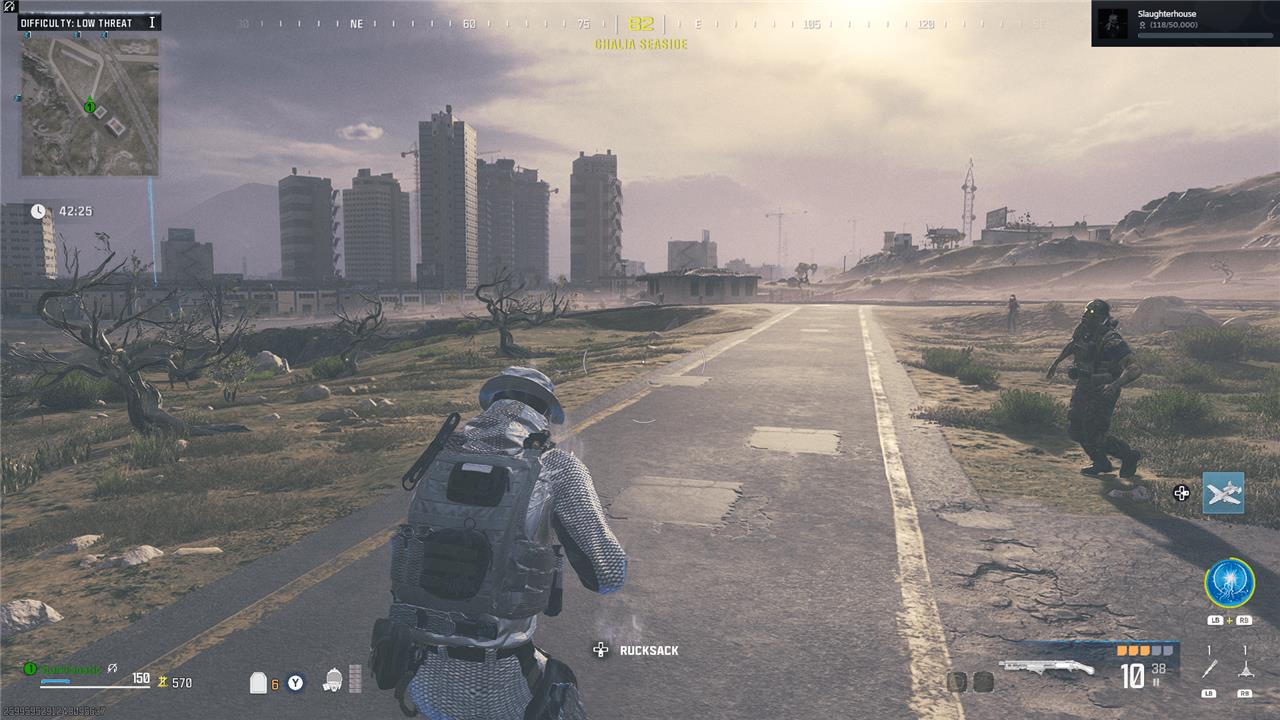
Zombies are primarily melee enemies in Modern Warfare 3’s Zombies mode, and they like to rush up and hit you in the back. Third-person helps mitigate this a bit, allowing you to instantly determine where a zombie is attacking you from. You also instantly know what is attacking you, whereas in first-person you can spin around and be surprised by an unwanted Hellhound.
The downside of third-person is that you may struggle to aim a bit more when you’re not shooting through a scope, making Zombie headshots slightly more difficult to hit with your standard rifle.
For more Modern Warfare 3 guides, see how to switch to Tactical Stance, and check our guides on the best Striker loadout, best MCW loadout, and best AMR9 loadout.
How can I instantly switch to third-person in MW3 Zombies on PC and consoles
To instantly switch to third-person view in Modern Warfare 3 Zombies on consoles, simply press and hold the down button on your controller’s D-pad. This toggles between first-person and third-person perspectives seamlessly during gameplay.
On PC, if you are using a keyboard and mouse, you need to press the Escape key to open the pause menu, then select the “Switch to third person” option at the top left of the screen. This will change your perspective, though it is not an instant toggle like on consoles. If you are playing on PC with a compatible controller, you can use the same D-pad down button method as on consoles to switch instantly.
In summary:
-
Console (controller): Press and hold down on the D-pad to toggle third-person view instantly.
-
PC (keyboard/mouse): Press Esc, then select “Switch to third person” from the menu.
-
PC (controller): Use the D-pad down button to toggle instantly like on consoles.
What is the quickest way to toggle third-person in MW3 Zombies on PC and consoles
The quickest way to toggle third-person view in Modern Warfare 3 Zombies is as follows:
-
On consoles (PlayStation, Xbox): Press and hold the down button on the controller’s D-pad. This instantly and smoothly switches between first-person and third-person perspectives during gameplay.
-
On PC with a controller: Use the same method as consoles by holding down on the D-pad to toggle instantly.
-
On PC with keyboard and mouse: Press the Escape key to open the pause menu, then select the “Switch to First/Third Person” option on the right panel. This method is not an instant toggle but switches the perspective smoothly.
For keyboard and mouse users who want faster toggling, setting a custom keybind for switching to third-person in the keybinds menu is recommended.
In summary, holding down the D-pad down button on a controller is the fastest and most seamless way to toggle third-person view in MW3 Zombies across all platforms that support controllers.
