
Master the art of space combat in Starfield by learning how to precisely target enemy ship engines and disable them without destruction. This tactical approach lets you board, loot, and even commandeer ships, turning foes into valuable assets rather than debris. Unlock the Targeting Control Systems skill, strip shields with lasers, then unleash EM weapons on engines to immobilize your prey-perfect for hostage rescues, multi-ship battles, and maximizing your spoils across PC and Xbox.
How to target engines in Starfield
To target engines in Starfield, you first need to unlock the Targeting Control Systems skill from the Tech Skill Tree, which requires just one skill point at Rank 1. Once unlocked, you can lock onto an enemy ship by pressing ’E’ on PC or ’A’ on Xbox, and when the target lock is confirmed, press ’R’ on PC or ’X’ on Xbox to enter targeting mode. This slows down time and zooms in on the ship, allowing you to select specific subsystems like the engines. By focusing your attacks on the engines, you can disable the ship without destroying it, making it possible to board and capture it. Increasing your skill rank further improves lock-on speed and damage to subsystems, enhancing your combat effectiveness.
To do this, you’ll need a specific skill in the Tech skill tree: Targeting Control Systems. This “unlocks ship targeting functionality” and upgrades in the tree will allow you to lock on to ships faster.
Once you have this unlocked, you can use it on ships by aiming your reticle on them and starting the lock on process by pressing E (PC) or A (Xbox). After the target locks, press R (PC) or X (Xbox). This will zoom in on the ship and time will slow down. You can then select the target ship’s engine by using the arrow keys (PC) or the left stick (Xbox). After selecting it, you can fire off your ballistics or lasers as usual and it’ll aim specifically at the engines.
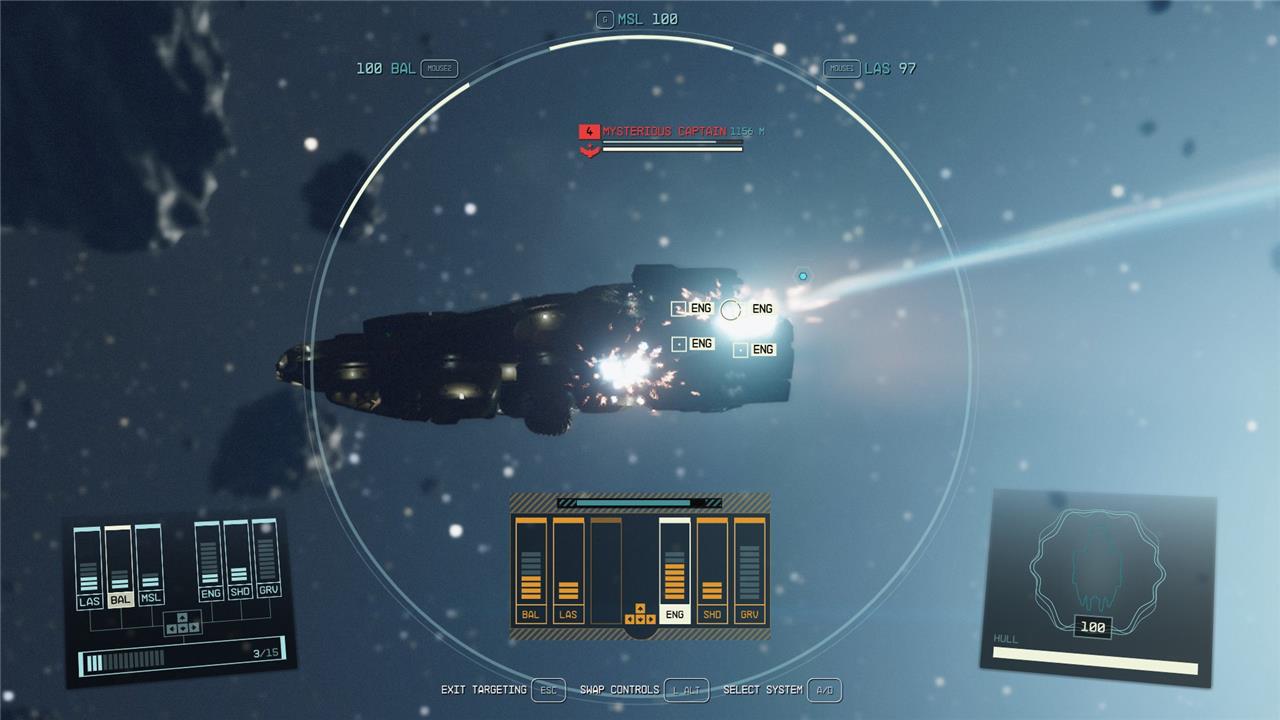
Once the engine indicators turn red, you’ll be able to approach the ship easily, since it won’t be able to move Be careful, as if you continue to shoot the ship until its health bars are completely depleted, it still will explode.
How to loot exploded ships
To loot exploded ships in Starfield, first locate the destroyed ship and get within 500 meters of it. You will see a chest icon over the wreckage indicating lootable containers. Approach slowly and press the interaction key (default E on PC or A on Xbox controller) to open the loot menu. From there, you can collect various items such as credits, crafting materials, ship parts, and consumables. Using the scanner can help highlight loot containers in the area, making it easier to find all available resources. Remember, loot is not collected automatically, so you must manually interact with each container to gather the spoils from the destroyed ship.
How can I disable ships without destroying them in Starfield
To disable ships in Starfield without destroying them, follow these key steps:
-
Strip the enemy ship’s shields first using laser or beam weapons to expose its systems.
-
Unlock and use the Targeting Control Systems skill from the Tech tab, which lets you lock onto specific parts of the ship such as engines, shields, and grav drives.
-
Lock onto the enemy ship and slow down time to target its engines specifically. Use weapons that deal electromagnetic (EM) damage-these deal minimal hull damage but effectively disable ship systems like engines and shields.
-
After disabling the engines with EM weapons, use additional EM attacks to prevent the crew from repairing the ship.
-
Once the ship’s engines and shields are disabled, you can move in close to dock and board the ship, allowing you to loot or commandeer it without destroying it.
This method is especially useful for missions requiring you to capture ships intact or rescue hostages, and it works on both PC and Xbox platforms.
What are the most effective EM weapons for disabling ships in Starfield
The most effective electromagnetic (EM) weapons for disabling ships in Starfield are:
-
Tatsu 501EM Suppressor: The top EM weapon, delivering a massive 100 EM damage, making it extremely effective at disabling ship systems without destroying the hull. It has average range and fire rate but excels in raw EM damage output.
-
Tatsu 500EM Suppressor: Close behind the 501EM with 87 EM damage, offering a solid balance of power and reliability for disabling enemy ships.
-
Firebolt 4000 Suppressor: Offers 78 EM damage with a good fire rate, striking a balance between speed and disabling power.
-
Fulminator 8000 Suppressor: Recommended for boarding and hijacking builds, it provides high EM damage (58) and decent range, making it excellent for shutting down enemy ship systems quickly.
-
Nullifier 1750 Suppressor: Known as the best EM weapon for quickly disabling ships, it deals 48 EM damage and becomes available at higher character levels with the Starship Design skill. It’s favored for its efficiency in disabling engines and shields to facilitate boarding.
-
EMP-500 Suppressor: A strong early-to-mid game EM weapon with 45 EM damage, accessible at character level 12, making it a good stepping stone before unlocking higher-tier suppressors.
For best results, combine these EM suppressors with laser weapons to strip enemy shields first, then use EM weapons to target and disable engines and other critical systems without causing hull damage, enabling you to board and capture ships intact.
