
In Monster Hunter Wilds, mastering the art of weapon swapping mid-hunt can turn the tide of battle in your favor. For the first time in the series, players can carry and switch between two weapons on the fly-thanks to your trusty mount, the Seikret. Learn how to set up your primary and secondary weapons at camp, then call upon the Seikret to seamlessly switch gear during the heat of combat, adapting your strategy to any monster’s weakness without missing a beat.
How to set primary and secondary weapons in Monster Hunter Wilds
To set your primary and secondary weapons in Monster Hunter Wilds, first visit any camp and enter the tent. Access the “Equipment Menu” and select “Change Equipment,” where you can choose your primary and secondary weapons from your available arsenal. Make sure to place your main weapon in the primary slot, as this is the weapon you will start with on your hunt. The secondary weapon will be carried by your mount, the Seikret, allowing you to switch weapons mid-hunt by mounting it and pressing the designated button (X on PC or Right D-Pad on consoles). This feature lets you adapt your combat style dynamically during battles.
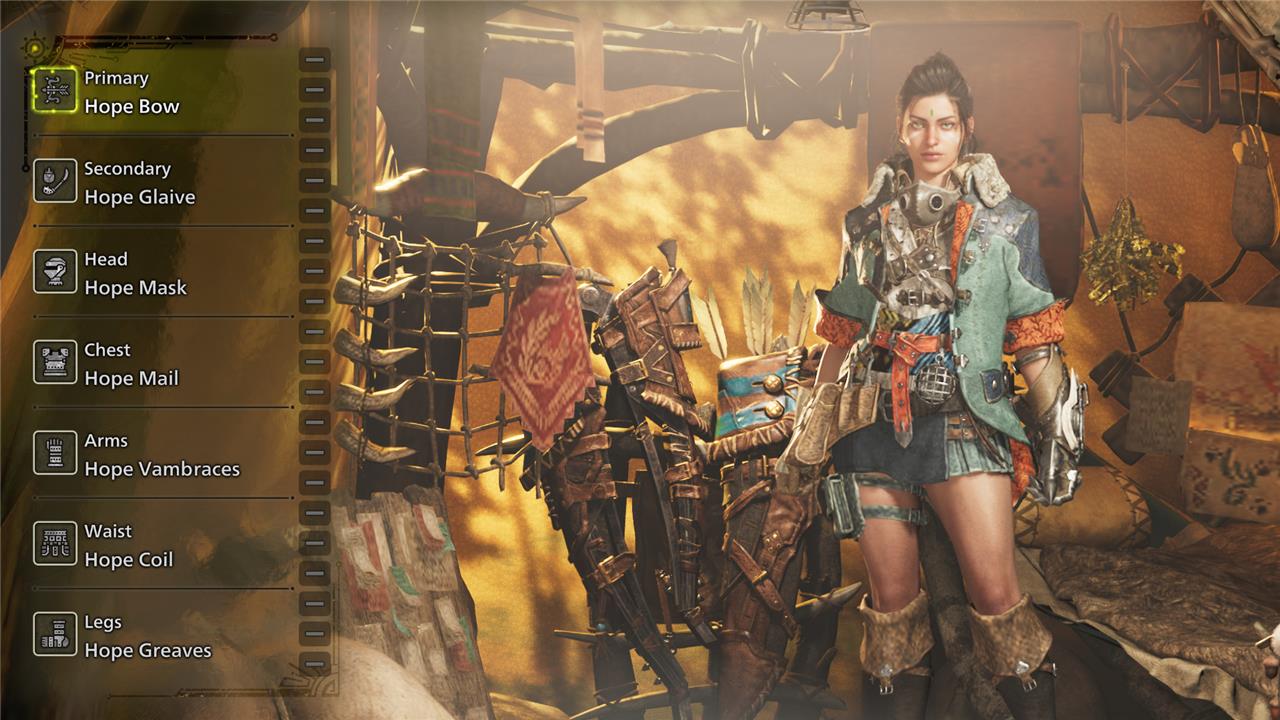
Before you head out on a hunt, you’ll need to set your weapon loadout at any camp:
- Enter the tent and switch over to the “Equipment Menu.”
- Select the “Change Equipment” button where you’ll see your equipped weapons and armor pieces.
- Select either your primary or secondary weapon to open a new menu with every available weapon.
- Choose your two desired weapons.
Make sure to set your main weapon in the primary slot as it’ll be the weapon you start with.
How to change weapons in Monster Hunter Wilds
To change weapons in Monster Hunter Wilds, first set up your primary and secondary weapons at any camp by entering your tent, opening the Equipment Menu, and selecting Change Equipment. Here, you can choose which weapons to equip as your primary and secondary options. During a hunt, you can switch between these two weapons by calling your mount, the Seikret, and pressing “X” on PC or the Right D-Pad on consoles. This action will have your character mount the Seikret and swap to the other weapon. Keep in mind that weapon switching can only be done while mounted, so avoid swapping weapons when under attack to prevent interruption.
To change weapons in Monster Hunter Wilds mid-hunt, you’ll need to call your Seikret, then press “X” on PC or “Right D-Pad” on Console to switch to your weapon for the one in the sheath.
How does mounting Seikret unlock quick weapon swaps in Wilds
Mounting your Seikret in Monster Hunter Wilds unlocks quick weapon swaps by allowing you to access your secondary weapon stored on the mount. When you mount the Seikret, you can press right on the D-pad (controller) or the ’X’ key (PC) to instantly switch to your secondary weapon without needing to return to camp. If you’re not mounted, pressing the switch button will automatically call your Seikret, mount it, and swap weapons in one smooth action. This system leverages the Seikret as a mobile weapon carrier, enabling seamless mid-hunt weapon changes to adapt to different combat situations. However, switching weapons requires mounting the Seikret, and the swap can be interrupted if you get hit during the animation.
Why is mounting Seikret necessary for quick weapon swaps in Wilds
Mounting the Seikret is necessary for quick weapon swaps in Monster Hunter Wilds because the Seikret physically carries your secondary weapon in its pouch, acting as a mobile weapon carrier. You can only access and switch to your secondary weapon while mounted on the Seikret, as the weapon is stored on the mount rather than directly on your character. Pressing the weapon swap input when not mounted will automatically call and mount the Seikret, enabling the swap. This design ties weapon swapping to mounting the Seikret, making it an integral part of the mechanic and encouraging strategic use of the mount during hunts.
