
Before you chart a course across Starfield’s thousand worlds, there are 23 crucial things every explorer should know-secrets that can mean the difference between a legendary journey among the stars and getting lost in the cosmic void. From mastering ship upgrades and picking the right background to navigating Bethesda’s ever-evolving universe with its latest updates and DLC, this guide arms you with the essential knowledge to survive-and thrive-across the Settled Systems, whether you’re playing on PC or Xbox.
Everyone’s playthrough will be a little different
Everyone’s playthrough of Starfield will be a little different due to the game’s extensive customization and branching narrative elements. Players can choose from various personality traits and backgrounds that influence skills and story outcomes, making each journey unique. Additionally, the New Game Plus feature introduces multiple universes that can drastically alter characters and storylines, offering fresh variations on subsequent playthroughs. This diversity in choices and game worlds ensures that no two experiences are exactly alike, encouraging players to explore different paths and strategies in the vast galaxy of Starfield.
Sure, there’s the whole “your choices have consequences” part to any sprawling RPG, but, in Starfield, the variation goes a little deeper. The settled planets and major cities you’ll visit are all predefined, so they won’t change or differ between players, but some smaller things on planets (like caves or bases) do appear to be randomly generated and randomly located. And that means some missions will have you visiting different systems, planets, and moons than other players.
Don’t spend too long choosing a background and trait(s)
When creating your character in Starfield, don’t spend too long agonizing over your background and traits. While backgrounds determine your starting skills and can influence some dialogue options, every skill can be unlocked later, so your initial choice isn’t set in stone. Traits have pros and cons and are more impactful since you can’t gain new ones as you progress, but you can remove traits if needed, though that reduces your total traits. The game allows you to change your character’s appearance anytime for a small fee, so it’s best to pick something that feels right and jump into the game rather than overthinking it.
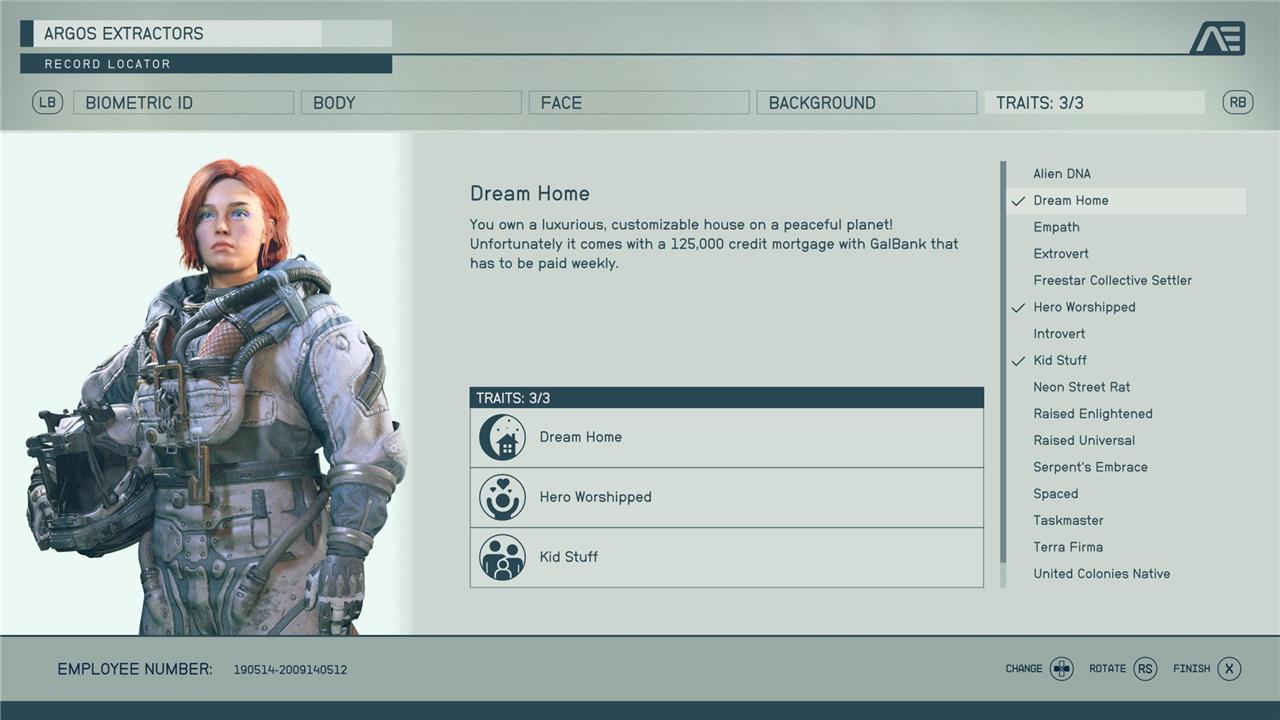
During “One Small Step,” Starfield’s first campaign mission, you’ll be directed to choose a background (a backstory for your character that also determines three skills you start the game with) and up to three traits (optional perks that both help and hinder your character). Don’t fret over your choice too much. Sure, you’ll get some bonus dialogue options here and there, but nothing that significantly alters the story. Instead, you should focus your choices on which skills you want to start the game with.
If you can’t choose, our guides on the best backgrounds and best traits can help you decide.
Play the main story missions for a while
To get your bearings in Starfield, focus on the main story missions early on. These missions introduce you to the game’s mechanics, factions, and the wider universe. Additionally, progressing through the main story will help you level up and unlock new skills, providing a solid foundation for exploring other activities.
We won’t go into any details due to spoilers, but we do recommend you play through the main story missions until you complete “Into the Unknown.” After you beat the first two missions, you get three missions you can tackle in any order. “Into the Unknown” rounds out the story of Starfield, and not playing that far before you wander off the critical path leaves out a huge part of the game.
It’s worth mentioning in the same breath that you should also maybe step away from the main quest for a bit after this mission. The main quest is doable at a low level, if you just want to mainline it, but you’ll have a better time if you don’t get randomly killed by a high level enemy mid-campaign.
You can join every faction
In Starfield, you have the unique opportunity to join every major faction in the game, allowing you to experience diverse storylines and missions from multiple perspectives. The five main factions you can join are Constellation, United Colonies, Freestar Collective, Crimson Fleet, and Ryujin Industries. Joining these factions is not mutually exclusive, so you can be a member of all of them, although managing conflicting loyalties may become a challenge as some factions are rivals or outright enemies. This flexibility enriches your gameplay by unlocking various rewards, missions, and insights into the galaxy’s political and social dynamics.
You can join four factions in Starfield: the United Colonies Vanguard, the Crimson Fleet, the Freestar Rangers, and Ryujin Industries. Every factions offers sweet gear, a ton of XP5, and missions that are far more interesting than your average side quest (and are in some cases more compelling than the main story). Best of all, you don’t have to commit to just one. You can join them all at the start.
Many features are locked behind skills
In Starfield, many of the game’s features and abilities are locked behind a comprehensive skill system divided into five categories: Physical, Social, Combat, Science, and Tech. Each skill has four ranks, and unlocking higher tiers requires investing skill points earned through leveling up and completing challenges. This means that to access certain gameplay mechanics-such as advanced combat techniques, persuasion options, or technical abilities-you must specialize and invest skill points strategically. Consequently, players need to plan their skill progression carefully, as many important features and perks remain inaccessible until the corresponding skills are sufficiently developed and ranked up.
Starfield’s skills do more than just improve abilities. A lot of the game’s mechanics are locked behind the first level of an associated skill – which means you’ll have to put at least one skill point into that skill to even use the ability.
This includes things like pickpocketing (Theft), using a boost pack (Boost Pack Training), seeing a Stealth Meter (Stealth), targeting specific systems on an enemy ship (Targeting Control Systems), and several kinds of upgrades to your suit, ship, weapons, and outposts that won’t become available until you drop a point into their Skills.
Get the Boost Pack Training, Security, and Persuasion skills ASAP
To maximize your early gameplay in Starfield, prioritize unlocking the Boost Pack Training, Security, and Persuasion skills as soon as possible. Boost Pack Training is essential for operating jetpacks, allowing you to boost jump and gain superior mobility in combat and exploration; it unlocks with just one skill point and improves with upgrades that reduce fuel consumption and increase regeneration. Security is crucial for accessing valuable loot behind advanced locks and terminals, with higher skill levels granting access to expert and master lockpicking perks that significantly enhance your advantage. Persuasion boosts your chances of success in dialogue options, opening alternative quest paths and rewards, making it a key skill for smoother interactions and better outcomes. Together, these skills provide a powerful combination of mobility, access, and influence that will give you a strong start in the vast universe of Starfield.
Starfield has a lot of skills – a total of 82 (with four ranks each). Aside from the three skills you get from your background, there are a few that will make your life a lot easier right from the beginning of the game, specifically Boost Pack Training, Persuasion, and Security. We explain why in our guide to the best skills.
Use auto-hack and auto-persuade often
Auto-Persuade is a powerful feature in Starfield that allows you to streamline persuasion encounters by letting the game automatically select the best dialogue options for you. As you successfully persuade NPCs, an Auto-Persuade ring fills up, and once full, you can activate it to instantly fill the persuasion gauge, greatly increasing your chances of success without the stress of choosing each line yourself. To access this feature, you must first unlock the Persuasion skill, which can be chosen at character creation or gained through leveling up. Using Auto-Persuade often saves time, conserves valuable ammo by avoiding combat, and helps you navigate tricky conversations more efficiently, making it an essential tool for smoother gameplay in Starfield.
Once you get the Persuasion and Security skills, you’ll find more methods to get through several situations. And as you hack and persuade more people, you’ll bank “auto-persuade” and “auto-slot” options into your conversations and hacks respectively.
You’ll generate these bypasses pretty quickly as you play. In the case of a Persuasion attempt, it results in an automatic success. Auto-slot, meanwhile, places one ring on your digipick for you instead. You can see if you have any auto-slots or auto-persuades banked by looking in the bottom right corner of your screen.
Navigating and fast travel involve a lot of menus
Navigating and fast travel in Starfield require frequent menu interactions, as players must open the map or starmap to select destinations for both planetary and star system travel. Fast travel is accessed through the menu where you pick locations on the planet’s surface or choose star systems for grav jumps, often involving multiple steps such as allocating power to your ship’s grav drive and confirming travel points. This process can feel menu-heavy due to the game’s vast scale and the need to manage routes, fuel, and discovered nodes, making it essential to get comfortable with the menus early on to move efficiently across the galaxy.
Navigating the stars of Starfield’s Settled Systems involves a lot of digging through menus. It can take a bit to get used to. You’ll have a lot of options to fast travel – both on a planet’s surface and between systems and planets – but it takes a bit of work to unlock and there are some unexpected restrictions on what you can and can’t do. We break it all down in our guide to how fast travel actually works in Starfield.
’Set Course’ is the most helpful button in your menu
The “Set Course” button in Starfield’s menu is arguably the most helpful feature for navigation and fast travel. By selecting this option, you can instantly plot a course to your current tracked mission objective, saving you from the hassle of manually searching through the galaxy or system maps. This streamlines your gameplay by allowing quick access to mission locations, making exploration and quest progression much more efficient and less time-consuming.
As we mentioned above, you’re going to need to get used to the star menu if you want to go anywhere in Starfield. That is, at least, until you discover the “Set Course” button, which in the bottom right of your pause screen. If you hit Set Course, the game will automatically pull up the fast travel location or planet for your current quest. This is a great way to quickly jump back to the Lodge or to a planet that you’ve never been to before.
We didn’t notice the Set Course button until hours into our playthrough, but it instantly improved our collective experience once we found it.
Use your scanner to figure out where to go
Using your scanner in Starfield is essential for navigation and exploration. By activating the scanner (LB on controller or F on PC), you can reveal points of interest, resources, flora, fauna, and planetary traits around you, helping you decide where to go next. The scanner highlights objects to scan, shows distance to objectives, and even creates an arrow trail on the ground to guide you to your destination. It also allows you to access the surface map for fast travel to previously visited locations and highlights NPCs, enemies, and collectible items, making exploration more efficient and rewarding.
Once you get to a planet or a ship to do the next mission objective, you’ll have markers on your HUD for your objective(s) and any extra optional objectives. There won’t, however, be a way to differentiate between those. Pulling up your handscanner with LB on console or F on PC lets you see exactly what each blue diamond represents.
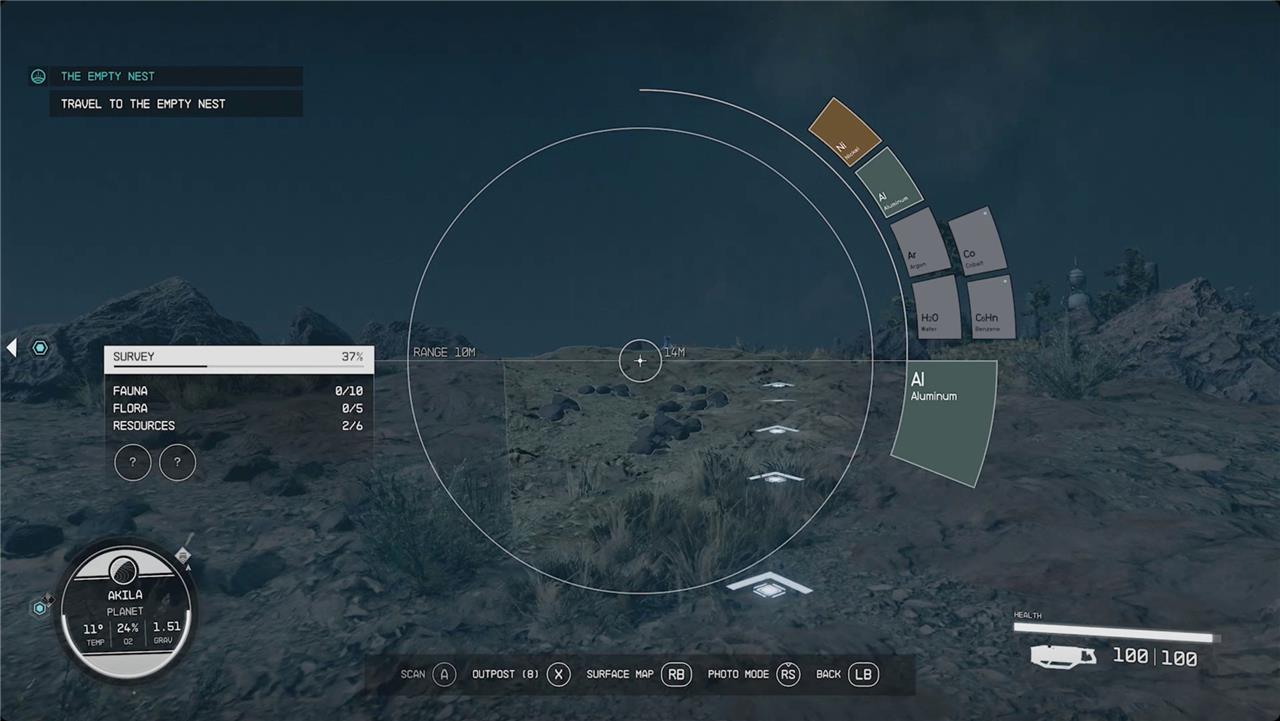
The scanner also (usually) highlights a route for you to follow to reach the next (non-optional) objective. Which is great because cities can be pretty labyrinthine, ships are deceptively hard to work through, and buildings with multiple floors can be baffling. Having a glowing path is a big help. That said, we included “usually” in the last sentence because sometimes it just. doesn’t put down a path to follow, so your mileage may vary.
While we’re on the topic of moving around in cities.
Read signs
In Starfield, learning to read signs and environmental cues is crucial for smooth exploration and quest progression. Pay close attention to visual markers, quest indicators, and map icons that guide you through missions and help locate important resources or points of interest. The game’s interface and star map provide clear directions for fast travel and objective tracking, allowing you to navigate vast star systems efficiently. Mastering these signs early on will save you time and enhance your overall gameplay experience as you explore planets, engage in combat, and complete quests.
There’s no minimap in Starfield (and the surface map is not really useful for finding your way around a city), so figuring out what buildings are vendors in cities requires a bit of work on your part. First, every large settlement will have yellow information kiosks scattered around. They’ll usually have a commerce section that lists all the places of business and their neighborhood.
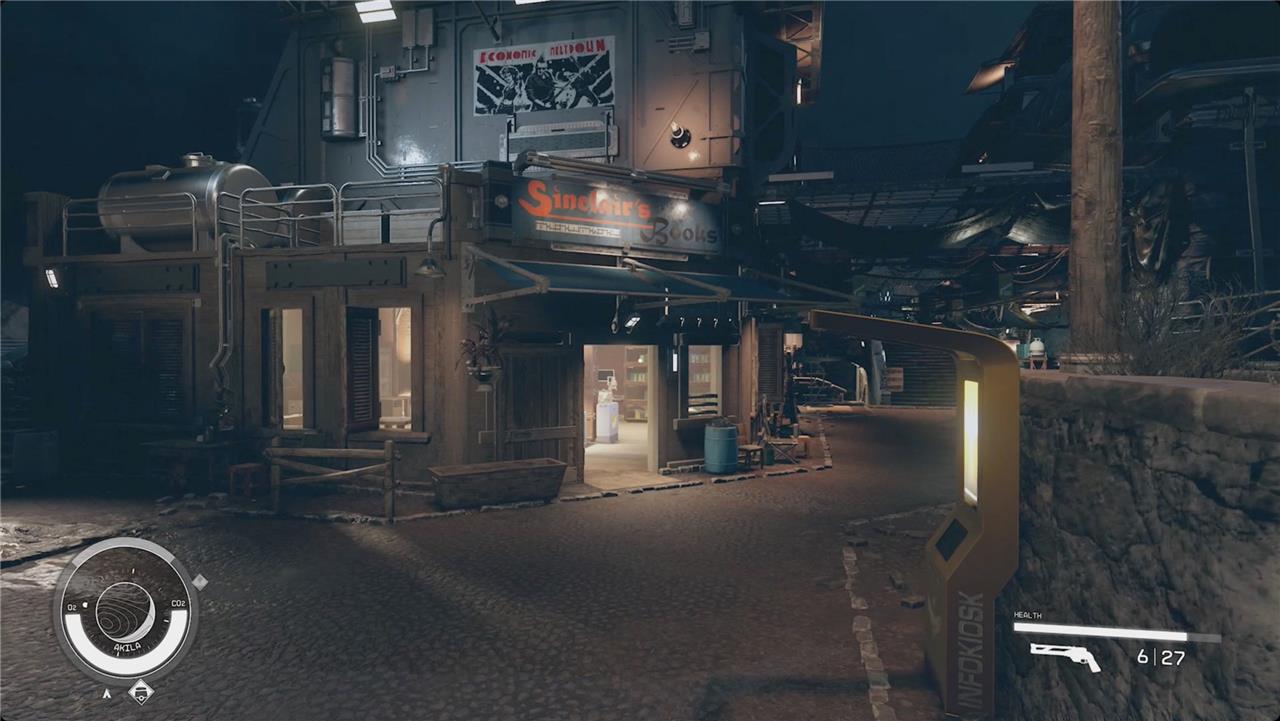
Once you know what you’re looking for, read the signs on buildings. There will also usually be signposts and arrows pointing the way to various points of interest. You won’t be able to navigate by a minimap, so you’ll just be relying on those signs and each store’s signage.
Some doors are just doors, while other doors have switches
In Starfield, not all doors are created equal-some simply open with a button press, while others require you to interact with switches or power sources to unlock them. For example, certain doors are linked to power switches that need to be connected to a power source like a solar panel before they can be activated. This mechanic adds a layer of complexity and strategy, especially when managing outposts or security systems. Learning how to link these switches properly can allow you to control multiple devices or defenses, making your gameplay experience more engaging and interactive.
Navigating the various bases and outposts you find throughout the Settled Systems is a hassle all on its own (see our note on using the scanner to find a path above). As you’re making your way through those places, though, you might run into doors that you can’t open.
You can open most doors just by approaching them and then interacting. Some airlocks work this way too. Occasionally, though, you might find doors that don’t pop up the “open” prompt. For those, look around for a nearby switch or button (or, even more rarely, a computer).
You can equip multiple weapons
In Starfield, you aren’t limited to just one weapon at a time-you can equip and quickly access multiple weapons for different combat situations. To do this, open your inventory, navigate to the Weapons section, and mark your chosen guns as “Favorites” (press B on PC or Y on Xbox controller). This action brings up the quickslot or weapon wheel menu, where you can assign each weapon to a specific slot. During gameplay, you can then instantly swap between your favorited weapons by pressing the corresponding hotkey (1-9, Z, [ ] on PC) or using the D-pad on Xbox, letting you adapt on the fly without pausing the action. This system is essential for managing different ammo types and combat scenarios, ensuring you’re always ready for whatever the galaxy throws at you.
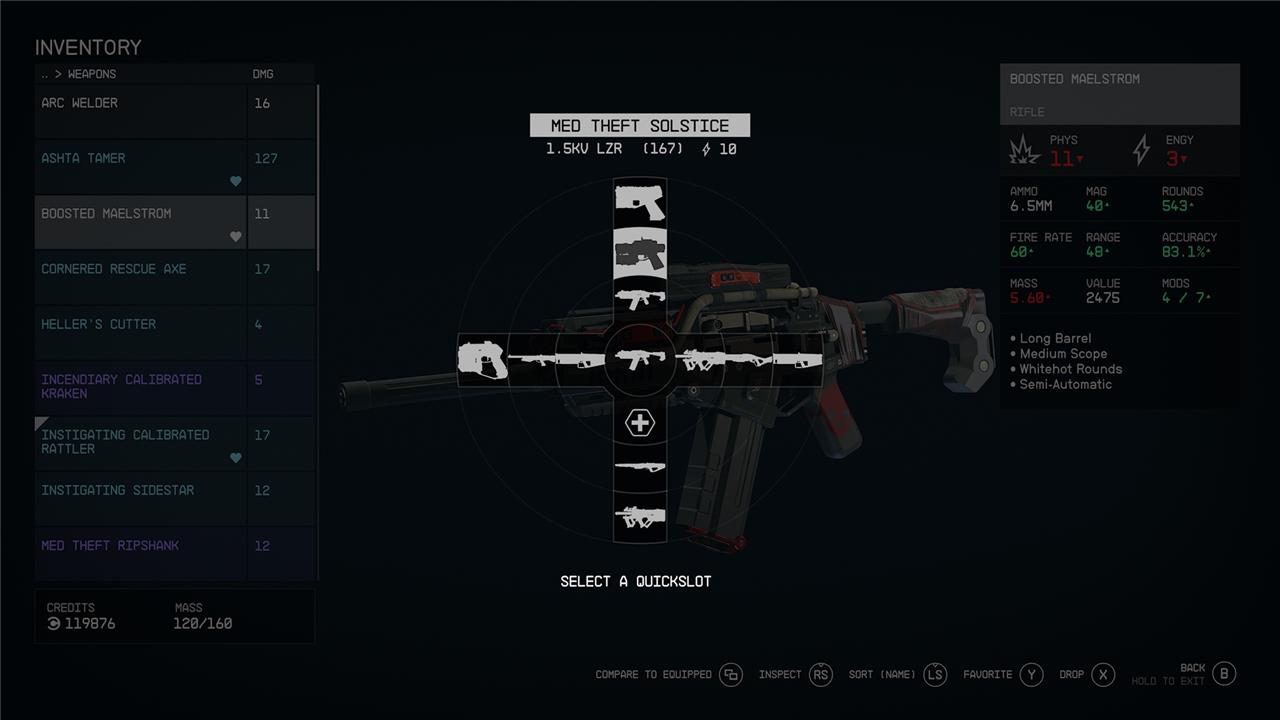
It’s not immediately apparently, but you don’t need to open up your inventory and tab through five different submenus every time you want to switch weapons. By using the favorite feature, you can equip multiple weapons on your quickslot menu – technically up to 12, though you may want to reserve a slot for healing items.
There are lots of kinds of ammo
Starfield features a wide variety of ammunition types, each tailored to specific weapons, making it essential for players to keep track of which ammo their favorite guns require. Ammo types range from physical calibers like .27 Caliber and .50 Caliber to energy-based rounds such as MI Arrays and LZR Cartridges, as well as specialized shotgun shells and particle fuses. This diversity means you’ll often carry multiple ammo types simultaneously, especially as you acquire more weapons throughout your journey. Fortunately, ammo in Starfield has no weight limit, allowing you to stock up without worrying about encumbrance. To stay prepared, always check the ammo compatibility of your weapons and ensure you have enough supply before heading into combat.
Starfield’s weapons don’t have broad categories of ammo (like rifle or pistol) that they fire. Instead, weapons require a specific ammunition type from a list of dozens. Take note of what ammo your favorite weapons use so you can buy extra.
In general, you should just always pick up ammo. And you never have to worry about finding too much because.
Ammo (and some other things) weigh nothing
In Starfield, ammo and some other items weigh nothing by default, allowing you to carry as much ammunition as you want without worrying about inventory weight. However, this can be changed if you enable the Ammo Weight Difficulty Setting, which assigns a small fixed weight to ammo pieces, making inventory management more realistic and challenging. Without this setting, you can stockpile vast amounts of ammo without any penalty, simplifying resource management during your space adventures.
Luckily, all ammo has zero mass, so you’ll never fill up your inventory with it if you just loot every ammo drop you see. Similarly, med packs and digipicks (that’s Starfield for “lock pick”) weigh nothing. You can pick up all of this stuff with abandon.
Free med packs
In Starfield, maintaining a steady supply of Med Packs is crucial for survival, especially when facing tough enemies and hazardous environments. Med Packs can be found throughout the galaxy by exploring outposts, enemy camps, and medical containers that glow blue or green, often located on walls, benches, or cupboards. You can also purchase Med Packs from doctors and vendors, with Talia O’Shea at The Well in New Atlantis being a notable supplier. Vendors restock their inventories every 24 hours, allowing you to buy more if you have enough credits. Additionally, sleeping in medical bay cots, such as those at Wells Med Bay, can replenish medical supplies. To enhance healing efficiency, investing skill points in the Medicine skill under the Science tree boosts the healing strength and speed of Med Packs. For faster recovery in combat, Trauma Packs are superior, healing more health in less time. Utilizing these methods ensures you stay well-prepared for the dangers of Starfield’s universe.
While you’re looting your way across the Settled Systems, you’ll need to watch for a little red arrow next to the item you’re considering. If it’s there, taking that item is stealing and might get you into trouble.
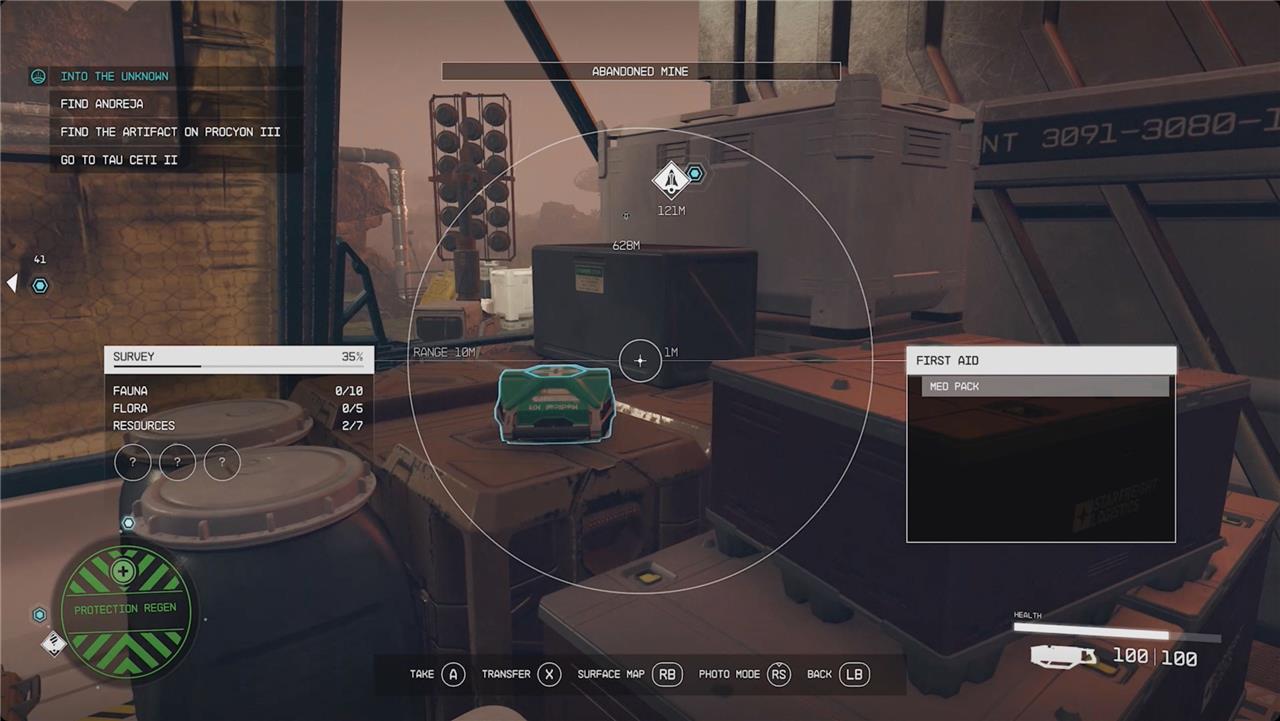
A useful exception to this seems to be first aid stations, for the most part. You’ll see a lot of them around. Most (but not all) of the time, the med pack or other Aid item inside is safe to take no matter where you are. Keep an eye out for the green lockers on the wall for free healing. But watch for the red icon!
You don’t have to wear that
In Starfield, you don’t have to stick with the outfit your character starts wearing during customization or early gameplay. While customizing your character’s appearance, keep in mind that the game shows your character in whatever gear they currently have equipped, which can sometimes obscure changes if it’s bulky or covers the face, like a hazmat suit. Fortunately, you can visit Enhance locations scattered across the Settled Systems to completely redo your character’s appearance for a fee of 500 credits, allowing you to change everything except your Background and Traits, which are fixed once chosen. This means you can experiment with looks and styles without worry, ensuring your character’s appearance fits your vision as you explore the galaxy.
A 21st-century truth apparently holds true in the 24th century, too: A suit looks way better than a spacesuit. In your inventory, under the spacesuits tab, you can tap RB (on Xbox) to either show or hide your spacesuit when you’re in a settlement, making it so you walk around in your street clothes (the attire submenu) instead. You can do the same to your helmet, under the helmets tab.
Value is not the same as sell price
In Starfield, the value displayed for an item is not the same as the price vendors will pay you when selling it. Typically, vendors buy items at a fraction of their listed value, often starting around 13-15%, and this can be increased somewhat by investing in the Commerce skill, which can raise the sell price up to about 40%. However, even with maxed Commerce, you won’t receive the full value shown in your inventory because vendors need to make a profit, buying low and selling high, similar to a pawn shop system. This means the item’s market value and its sell price are distinct, so managing expectations about selling profits is important when trading in Starfield.
Sure, you’ll use some of the loot you pick up because it’s better than what you have equipped, but, for the most part, you’re filling your inventory with stuff to sell. When you look at any item in your inventory, it will have a value – the number of credits it’s worth.
The important thing to note here, though, is that value is not the same as the price a vendor will pay you. The sell price starts out around 13% of the value. You can improve those numbers by putting points into the Commerce Skill.
Generally speaking, weapons and gear (suits, helmets, and packs) are worth the most. They’re also the heaviest things, though.
Use the trade kiosks every time you land on a planet
Using the Trade Authority kiosks every time you land on a planet in Starfield is a smart strategy to efficiently manage your inventory and earn quick credits. These kiosks, typically found near shipyards or city entrances, allow you to sell items you no longer need without the hassle of visiting a full shop. While kiosks only buy items and do not sell, they provide a convenient way to offload excess gear, especially since their available credits replenish every 24 in-game hours. This makes them an essential stop to keep your inventory light and your funds steady as you explore the galaxy.
Getting the proper value for your items is one thing, but finding a vendor with enough credits for you to offload all your stuff is another problem altogether. Many of the vendors in Starfield have a pitifully sized wallet when you try to sell to them, and specialty shops will only take some of your items – you cant sell a pistol to a clothier, for instance.
However, every planet (that has a spaceport) has a yellow trade kiosk located near the shipmaster. This kiosk will buy anything you have to sell – even stolen goods – and resets its credit reserves daily. So even if you drain it of cash, you can come back the next day and sell even more.
You can mine asteroids for resources
In Starfield, you can mine asteroids for valuable resources by simply blasting them with your ship’s weapons until they explode, revealing mineral deposits that you can loot from up to 500 meters away. This method is available early in the game and can yield a variety of materials including iron, water, nickel, aluminum, gold, platinum, and even rare resources like palladium and ionic liquids. Asteroid mining is a quick and effective way to gather resources while exploring space, though it requires finding asteroid fields near planets and being prepared for potential pirate encounters. Upgrading your ship’s cargo capacity and weaponry can optimize your mining efficiency, making it a worthwhile activity during your travels across the galaxy.
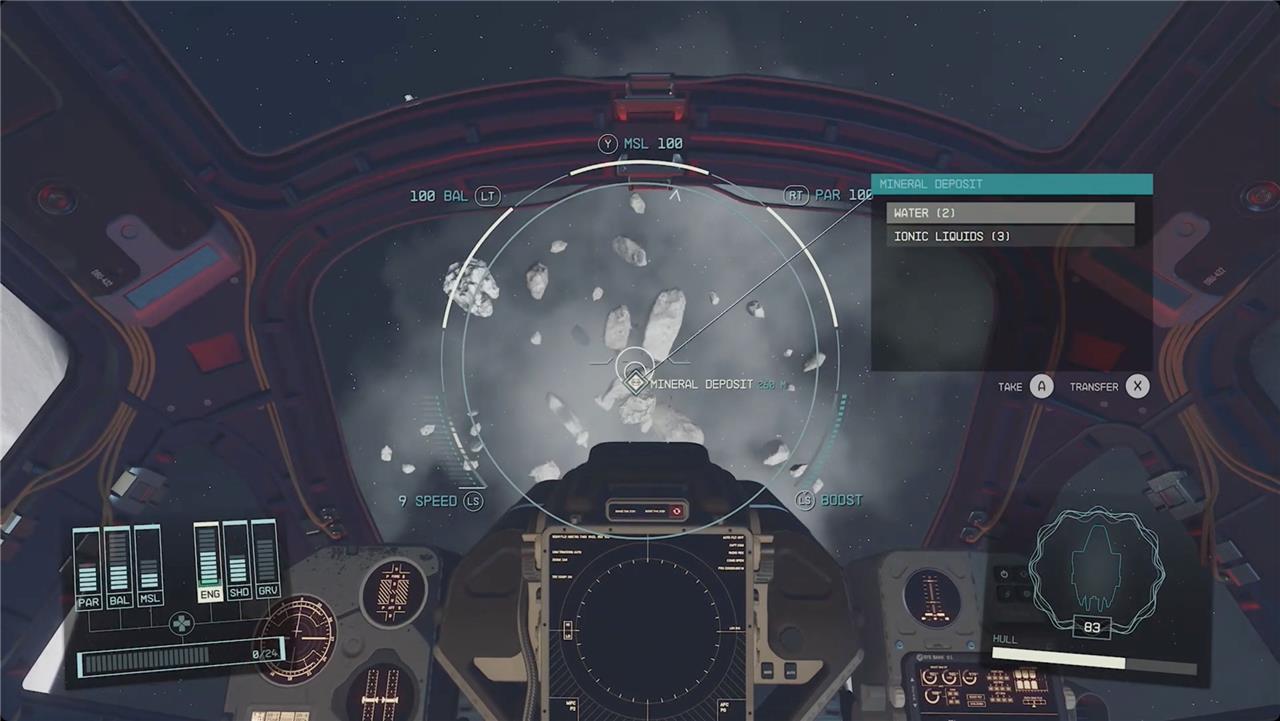
Starfield doesn’t actually mention this, but you can shoot asteroids from your ship. When they’re destroyed, they’ll leave behind a mineral deposit. If you target it and then get within 500 meters, you’ll be able to pick it up for a few resources – usually things like iron or water.
You can get a house at the start
If you choose the Dream Home trait at the start of Starfield, you can get a luxurious, customizable house on the planet Nesoi in the Olympus System early in the game. To access it, you need to complete the first two main missions, which unlocks the Dream Home side quest. Afterward, you can travel to Nesoi and visit your house, although you must pay a 125,000 credit mortgage at GalBank in New Atlantis to own it fully. Until then, you pay a smaller 500 credit fee each time you enter. This trait offers a unique early-game base but comes with financial responsibilities right from the beginning.
If you pick the Dream Home trait during character creation, you’ll start with a free house. You only have to pay 500 credits a week, and you can choose to foreclose your house if you don’t want to pay for it anymore.
The flashlight is kind of useless
The flashlight in Starfield is widely regarded as underwhelming and somewhat ineffective. Players have noted that its illumination is inconsistent, sometimes barely lighting up the area around the reticle, making it difficult to see in dark environments. Additionally, the mechanic requires holding down a button to activate, which can be unintuitive, and its usefulness is limited compared to expectations from similar games. Some players even consider it almost useless without mods that enhance its brightness and functionality.
Hold down F on PC or LB on console to activate your flashlight (when you’re on a planet’s surface). The flashlight’s area of effect isn’t very big, so you may want to just increase your screen’s brightness as you trek through some of the darker caves.
Yes, console commands exist. on PC
Yes, console commands do exist in Starfield, but they are exclusive to the PC version of the game. To access them, players can open the command console by pressing the Tilde (~), Grave (’), or “@” key depending on their keyboard layout. Once open, a variety of commands can be entered to manipulate gameplay, such as toggling god mode, adding items, unlocking doors, or altering NPC behavior. These commands are not case-sensitive and can significantly enhance or alter the gaming experience. However, console commands are not available on Xbox, although modding and other cheat methods may become accessible in the future.
Sorry, Xbox players, this trick doesn’t apply to you, but if you’re playing on PC and want to cheat your way into a bazillion credits – or to turn on god mode to avoid a tricky battle – you totally can. You can activate console commands by pressing the ’ key on your keyboard. Many of the console commands are the same from Skyrim and Fallout games, so Bethesda veterans should already know what to do.
What are the top secrets new players should discover in Starfield
Top secrets new players should discover in Starfield include:
-
Talk to every named NPC you encounter and don’t rush the main quest; side quests enrich the experience and reveal hidden lore.
-
Join every faction simultaneously, as the game allows it without penalty, opening up diverse questlines and rewards.
-
Master lockpicking and pickpocketing early to access valuable loot and gear otherwise unavailable.
-
Learn to pilot your ship well, since space combat is challenging and you’re most vulnerable in the cockpit.
-
Utilize Research Stations both on your ship and in locations like The Lodge to unlock advanced tech and upgrades.
-
Discover hidden locations such as the secret entrance to House Va’Ruun’s abandoned embassy in New Atlantis, accessible through specific quests.
-
Customize loading screens by using Photo Mode to add personal flair and make long load times more enjoyable.
-
Recognize planet names as tributes to real-life space pioneers, adding depth to the exploration experience.
-
Complete the “Top Secrets” mission to unlock a unique ship and powerful weapons early in the game.
-
Explore off the beaten path to find hidden mechanics and secrets that enhance gameplay beyond what the main story reveals.
These secrets reward curiosity and careful exploration, helping new players thrive in Starfield’s vast universe.
What hidden mechanics can enhance my exploration in Starfield
Hidden mechanics that can enhance your exploration in Starfield include:
-
Mining asteroids while flying through asteroid fields by shooting them to break apart and loot valuable resources, which helps gather materials for outposts and crafting.
-
Speeding up mining by holding down both attack and aim buttons to power up the mining cutter for faster ore extraction, though it drains power faster, so use short bursts.
-
Using the Scanner mode to fast travel directly to points of interest without opening the map, allowing seamless and immersive planetary travel.
-
Building outposts in low-patrol systems near the start of the game to serve as safe storage for contraband or excess cargo, improving inventory management during exploration.
-
Taking advantage of XP buffs by sleeping before quests, consuming special foods like alien tea, and investing in nutrition perks to maximize experience gain while exploring.
-
Recognizing gear modifiers such as calibrated, refined, advanced, and superior, which improve weapon and armor stats, allowing you to keep favorite gear effective throughout your journey.
-
Using electromagnetic (EM) weapons on your ship to disable enemy ships effectively, making boarding easier during space combat.
-
Scanning animals, plants, and planetary traits to earn significant XP, encouraging thorough exploration of each world’s ecosystem.
These hidden mechanics reward attentive and strategic play, making exploration more efficient, immersive, and rewarding in Starfield.
