
A new perspective is shaking up Fortnite Battle Royale-first-person mode changes how every shot, angle, and ambush feels. Here’s how to explore this fresh way to play and see the island through a whole new lens.
Update (Feb. 7): As expected, this method has been patched, so you can no longer use it to play first-person Fortnite Battle Royale. Original story follows.
You can start playing FortniteBattle Royale in first-person now, kind of. It’s a little janky, and it’s not 100% in first-person: Rather, some guns will change your perspective to first-person when you scope in. It seems like Twitter, but for now, you can test out this funky first-person camera option.
Due to the buggy nature of Fortnite Battle Royale‘s first-person camera, we don’t think this is an intended feature, so it may get removed. Camera angles when dropping from the bus, sprinting, and doing other actions warped into weird perspectives, making us believe that this “feature” isn’t really ready for use. As of this writing, we can confirm that the method below does work for enabling it.
This feature does not turn the game into full first-person mode. It just makes some of the guns change to first-person when you scope. Some guns, like the Red-Eye Assault Rifle, already do this in the normal third-person mode. However, this adds more guns to the list, like the Machine SMG.
<
To do this, you’ll need access to Save the World, Fortnite’s PvE component. If you’ve ever bought specific skin bundles, you may already own Save the World, but if not, you’ll need to buy it.
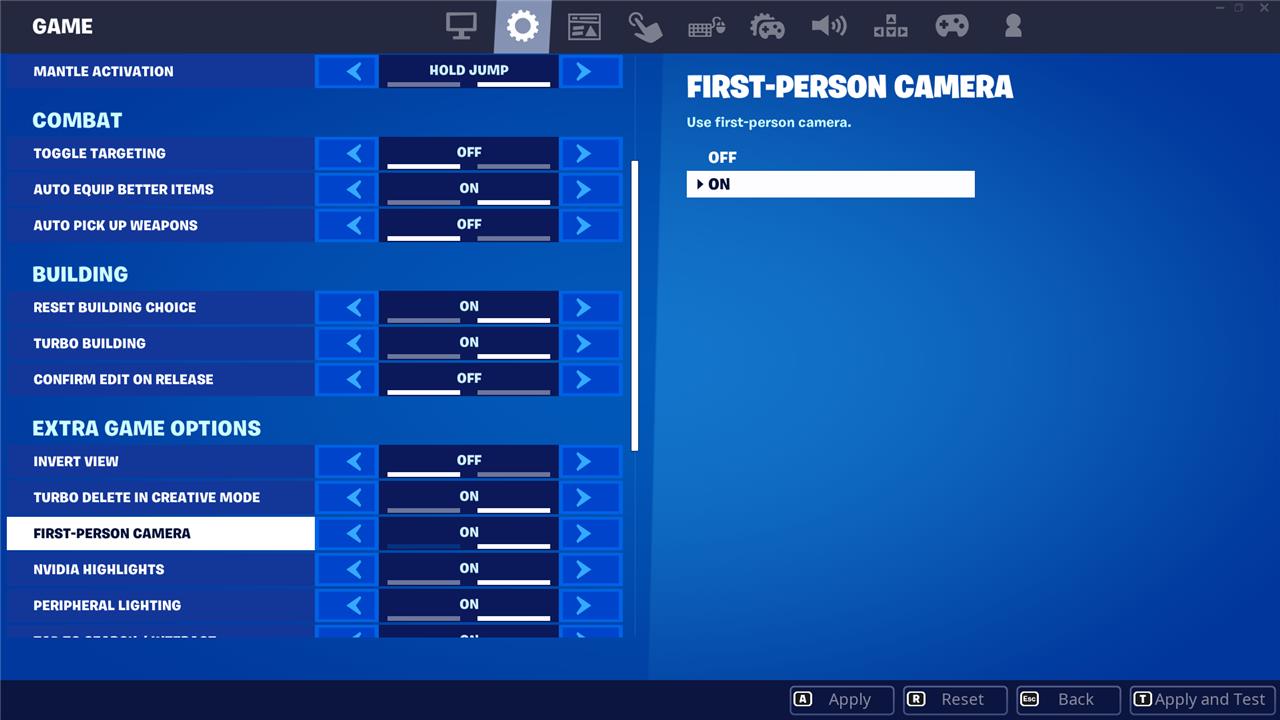
Once you own Save the World, you can change to first-person by doing the following:
- Change your gamemode from the main Fortnite screen to Save the World and load in.
- Open the settings.
- In the “game” settings, toggle to turn on the “first-person camera” under the “extra game options.”
- Leave Save the World and reselect a Battle Royale gamemode from the menu.
Once you jump in to your Battle Royale game, you’ll notice something off about the animation when your character is jumping off the bus. If they look a little funny, like the image below, that means that it’s working.
Best Creative maps for first-person Fortnite Battle Royale
Several top Fortnite Creative maps emulate first-person Battle Royale-style gameplay using devices like the First-Person Camera, offering close-quarters combat, free-for-alls, and recreations of classic maps.
Top Shooter Maps
These focus on Battle Royale-like action with guns, eliminations, and compact zones.
| Map Name | Code | Description |
|---|---|---|
| First Person OG Tilted | 1489-6973-6659 | Free-for-all at Tilted Towers with six loadouts; vertical fights keep it intense. |
| First Person Gun – Nuketown | 7201-9558-1398 | 12-player gun game on Nuketown needing 40 kills to win; winner calls a nuke. |
| Nuketown First Person | 8147-1395-4645 | Close-quarters chaos with premade loadouts, mimicking Call of Duty style. |
| First Person Tilted Free For All | 4245-7901-2619 | Iconic Tilted Towers POI in first-person for thrilling drops and fights. |
Non-Shooter Alternatives
For variety beyond pure BR shooting, try horror or parkour with first-person views.
-
Mannequin Horror First Person (1043-6226-1284): Survive against mannequins in a tense horror setup.
-
First Person Parkour 600 (3367-8643-7975): Race through 600 escalating stages with lava and chasms.
To play: Search codes in Fortnite Creative lobby, enable first-person via map devices, and queue solo or with friends. Popularity shifts, so check Discover tab for “First Person” filters.
How to load and play these first-person Creative maps
Loading and playing first-person Creative maps in Fortnite is straightforward using island codes from community recommendations. These maps automatically enable first-person via built-in devices once you load in.
Access Creative Mode
Start from the main Fortnite lobby and switch to Creative for public maps-no building or editing required.
-
Select Change next to your current mode, then pick Creative (or Solo Creative for privacy).
-
Confirm and load into the Creative hub (lobby with portals).
Load a Specific Map
Use the island code to directly queue published maps like First Person OG Tilted (1489-6973-6659).
-
Press Enter Island Code or the search icon in the Creative lobby (above the Discover/Play buttons).
-
Type or paste the full code (e.g., 1489-6973-6659), then hit Submit or Enter.
-
Select the featured island image, then Play (solo, duo, or squad as available).
Enable and Play First-Person
Maps activate first-person on spawn via the First Person Camera device-often automatic or triggered by holding a weapon/pickup.
-
Start the session (match); your view snaps to first-person.
-
Interact with any map prompts (e.g., “E to Swap” for toggle if present).
-
Controls remain standard: WASD movement, mouse aim, weapons fire normally-scoped aiming may toggle back to third-person on some maps.
Tips for Best Experience
Queue with friends via party code for squads; respawn rules vary by map (e.g., FFA elim-only).
-
Check Discover tab for “First Person” tags if codes fail (maps update frequently).
-
Exit via lobby pause menu; replay by re-entering code.
