
In Pacific Drive, your car is more than just a vehicle-it’s a survival lifeline that can develop bizarre and frustrating quirks, from doors flinging open unexpectedly to headlights turning off mid-drive. Fixing these glitches isn’t as simple as a quick repair; it’s a challenging diagnostic puzzle that requires mastering the enigmatic Tinker Station. This guide reveals how to decode and conquer your car’s quirks on PC and PlayStation, turning what feels like a maddening guessing game into a manageable, even satisfying, mechanic’s challenge. Dive in to keep your ride reliable as you navigate the treacherous Zone.
Our Pacific Drive guide will walk you through diagnosing and fixing your car’s quirks, and will tell you everything you need to know about how to use the tinker station.
How to use the tinker station in Pacific Drive
To use the Tinker Station in Pacific Drive, approach the device located next to the Charging Station in the Auto Shop and activate it to open the diagnostics screen. The interface has four columns where you input information about your car’s quirk: first, select the car part where the issue originates; second, specify the action triggering the quirk (e.g., opening or closing a door); third and fourth columns further define the cause and effect relationship. After entering your guess, the station will indicate if the diagnosis is correct. Upgrades like the Investigator Module can help by marking correct guesses. Once diagnosed, switch to the Fixes tab to see the required materials-usually a Mechanic’s Kit or similar-to repair the quirk. Confirm the fix, and the Tinker Station will use the materials from your inventory to resolve the issue, restoring your car’s proper function.
Very early on in Pacific Drive, you’ll get an objective to use the tinker station to diagnose your car’s quirks, but you won’t get any explanation about how that process works.
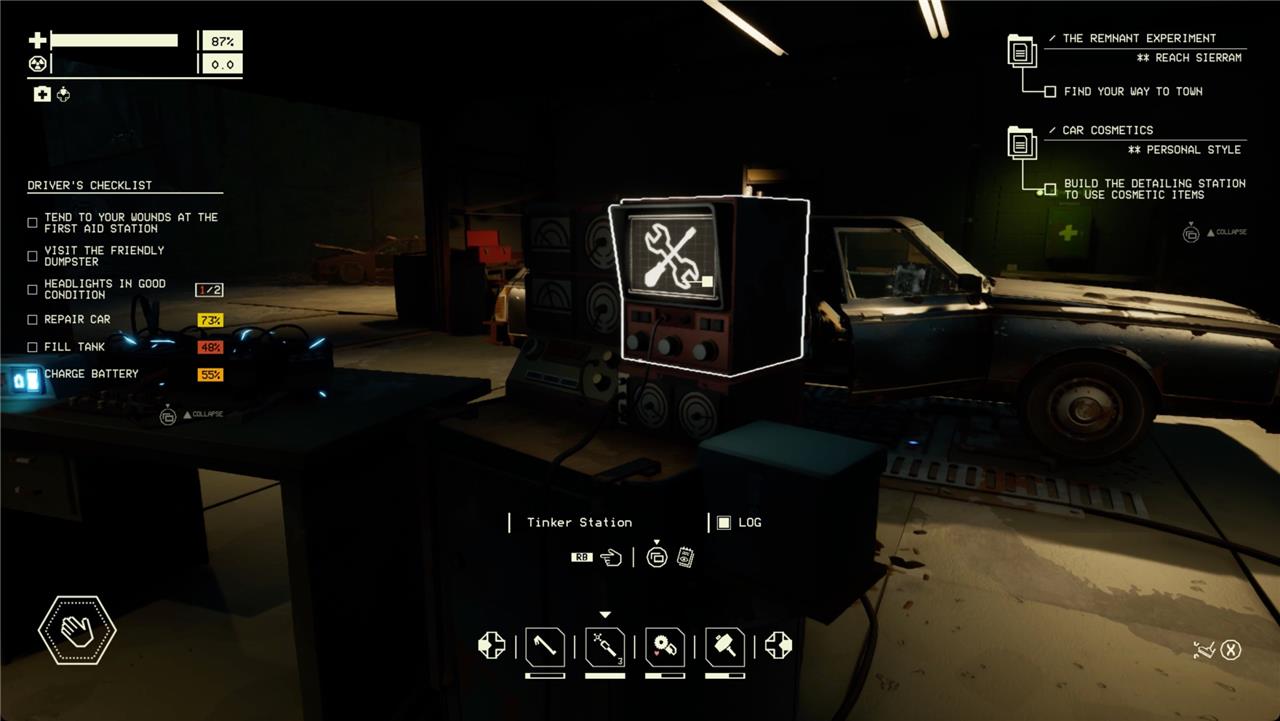
Right next to where you park in the auto shop, you’ll find the tinker station – it’s just to the right of the charging station. It’s a computer with a crossed wrench and screwdriver displayed on the screen. Interacting with it lets you diagnose your car’s quirks.
The tinker station has a pretty simple interface, but the game doesn’t actually explain how it works. You’ve got four columns – lists of car parts, actions, another car part, and another action. You can think of these columns as a way to explain the cause and effect of a quirk, with the cause on the left and effect on the right.
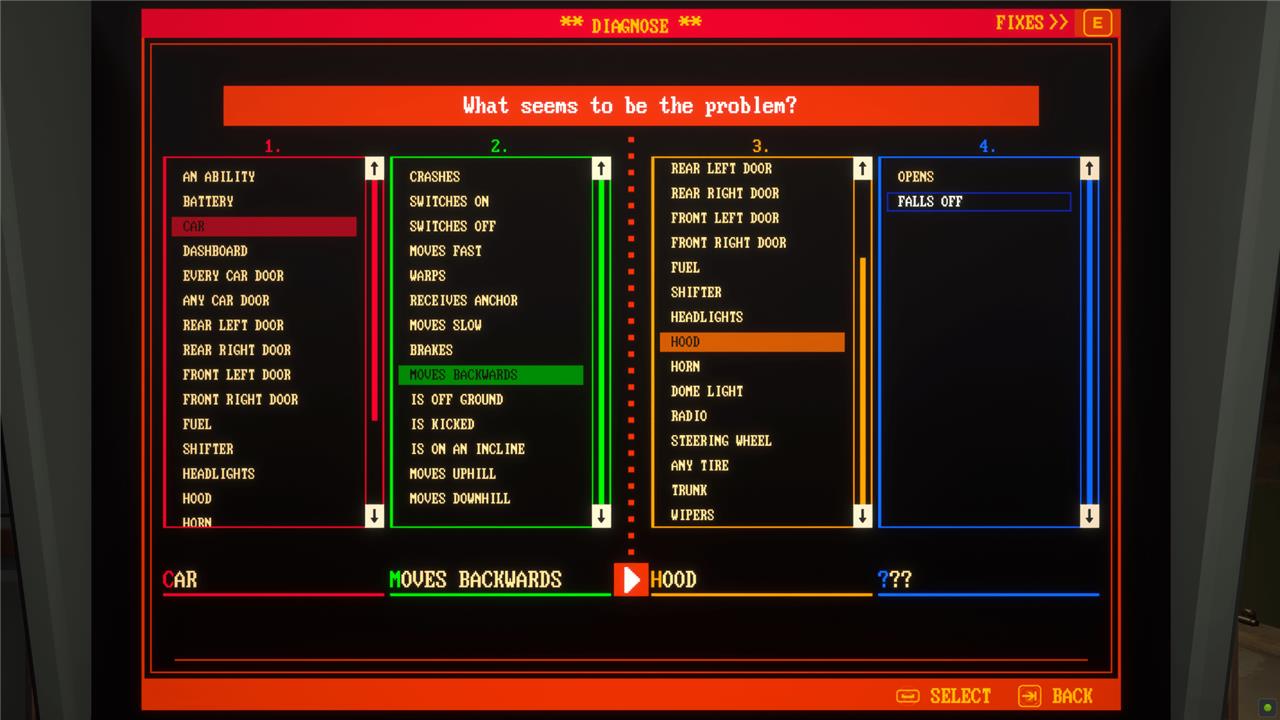
Effectively, you’re filling in the blanks of a sentence that reads, “when the [car part] does [action], then the [different car part] does [quirky action].”
Using that structure, we’ve seen quirks like, “when the shifter does shifts to park, then the front left door does opens” and “when the headlights does turns on, then the radio does toggles.”
Diagnosing quirks takes some experimentation
Diagnosing quirks in Pacific Drive requires some experimentation and patience, as the process involves a bit of trial and error. At the Tinker Station, you input guesses about what triggers a quirk and what effects it causes, then submit these guesses to see if they are correct. Initially, you only get feedback on how many guesses are right, making it challenging to pinpoint the exact problem. To ease this, you can enable Free Quirk Guesses in settings or craft the Investigator Module, which helps identify which guesses are correct. Observing your car’s odd behaviors carefully while driving and taking notes can also aid in narrowing down the quirks. Despite upgrades and tools, diagnosing quirks remains a partly guess-driven process that demands careful observation and experimentation to successfully fix your vehicle’s strange malfunctions.
The problem is, the line between cause and effect isn’t always clear – especially when you’re dodging hazards and fleeing the storm out in the Zone. It can be hard to decide if a quirk’s cause is the headlights, the car’s speed, going up or down a hill, or running low on gas when all of those things are (constantly) happening at the same time.
When you get a quiet moment in a stable part of the Zone, do some experimenting. Better yet, if it’s a simple cause and effect, you can test it out in the auto shop between trips.
When you’re confused, use the options listed in the columns on the tinker station to guide you. It’s a lengthy list, but the first two columns contain all of the potential causes.
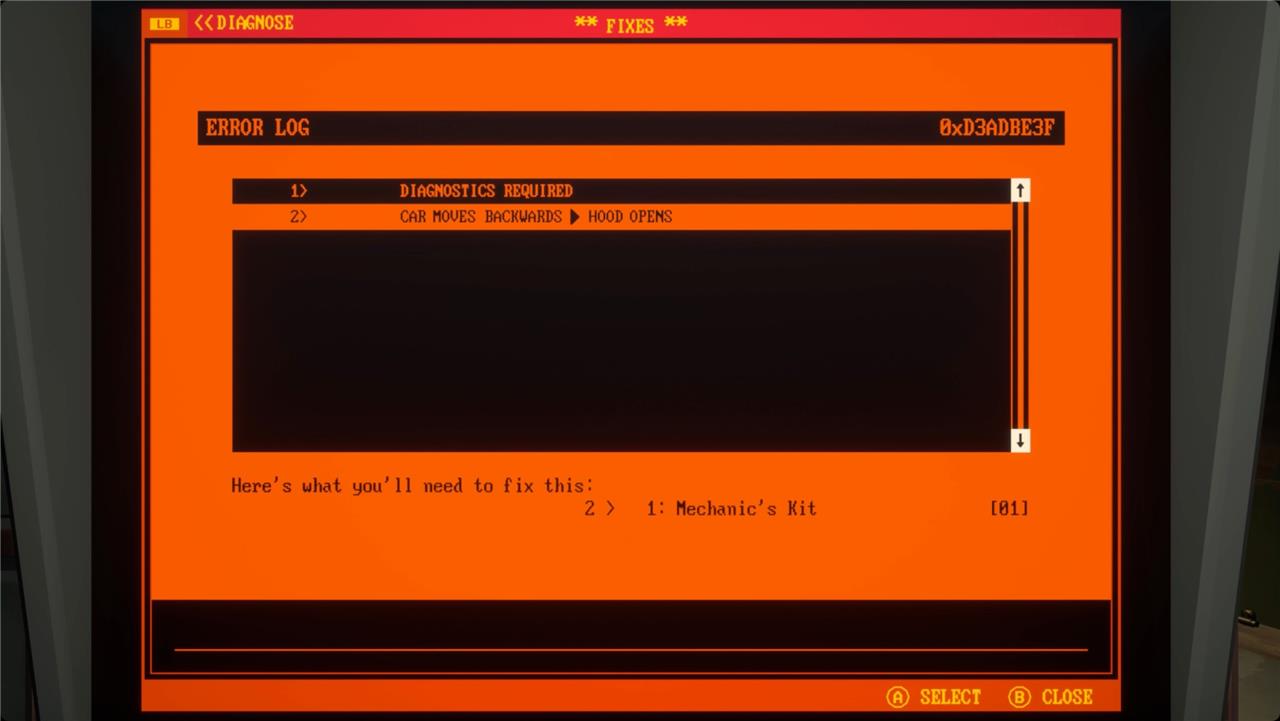
When you work out the cause and effect of a quirk correctly, you’ll be able to fix and remove it – usually, this involves a mechanic’s or electrician’s kit.
If you get something wrong, you’ll lose a guess. Speaking of guesses.
How guesses work at the tinker station
At the Tinker Station in Pacific Drive, diagnosing a quirk involves a guessing game where you have eight attempts to correctly identify the malfunction’s cause and effect. The interface presents four columns to fill: the first and third relate to car parts involved, while the second and fourth describe the actions or effects. You must specify the quirk in a format such as “When [car part] does [action], [another car part] does [response].” Each incorrect guess costs one attempt, and if you run out, you must complete another run before trying again. To ease this process, you can enable free guesses in settings or craft the Investigator Module, which highlights correct guesses to help narrow down the problem. Driving your car around the Auto Shop to observe the quirk’s behavior also aids in making accurate guesses.
Each time you visit the auto shop between journeys into the Zone, you have eight guesses to diagnose a quirk. If you get any of the columns wrong, you’ll lose a guess. If you guess the cause and effect of a quirk correctly, you’ll get refunded that guess.
If you run out of guesses, you’re not stuck with that quirk forever, though, just your next run. You can’t make any more guesses this time, but your count will reset the next time you open a Gateway and return to the auto shop.
Some quirks are subtle
Some quirks in Pacific Drive are subtle and not immediately obvious, making them tricky to diagnose. These minor malfunctions might cause small, unexpected behaviors like the windshield wipers moving the speedometer or the headlights flickering off occasionally, which can easily be mistaken for glitches or misclicks. Because these quirks don’t always interfere drastically with driving, players need to pay close attention to their car’s odd behaviors while exploring the Zone. Using the Tinker Station to diagnose such subtle quirks requires careful observation and sometimes multiple guesses, but upgrades like the Investigator Module can help by marking correct guesses and narrowing down the problem faster. Keeping notes of these small anomalies while driving can make the diagnostic process more manageable and less frustrating.
Not every quirk your car develops is easily noticeable. The more dramatic ones will jump out at you – like when the hood pops open or when the headlights turn off. But others affect components you don’t really look at often. For example, I currently have six quirks going on with my car, and I genuinely can’t tell you what any of them are. I think one has something to do with the dome light?
There’s no real penalty to having a quirk, so the subtle ones are fine to leave for a while. You’ll get the occasional sarcastic comment from Oppy over the radio, but, if it’s not impacting your survival, it’s fine to leave it be.
For those hard-to-diagnose quirks, you might have to upgrade the tinker station.
Build the investigator module to help diagnose quirks
To build the Investigator Module to help diagnose quirks in Pacific Drive, you need to craft it at the Fabrication Station using specific materials: 1 Circuit Board, 4 Copper Wire, 10 Scrap Metal, and 2 Glass Shards. Once crafted and installed on the Tinker Station, the Investigator Module provides valuable feedback during the quirk diagnosis process by indicating which guesses are correct. This feature significantly simplifies the guessing game involved in diagnosing quirks, allowing you to identify problem areas more efficiently and fix your car with fewer attempts, typically within eight guesses. This upgrade is essential for managing the complex and often frustrating quirks your car may develop in the Zone.
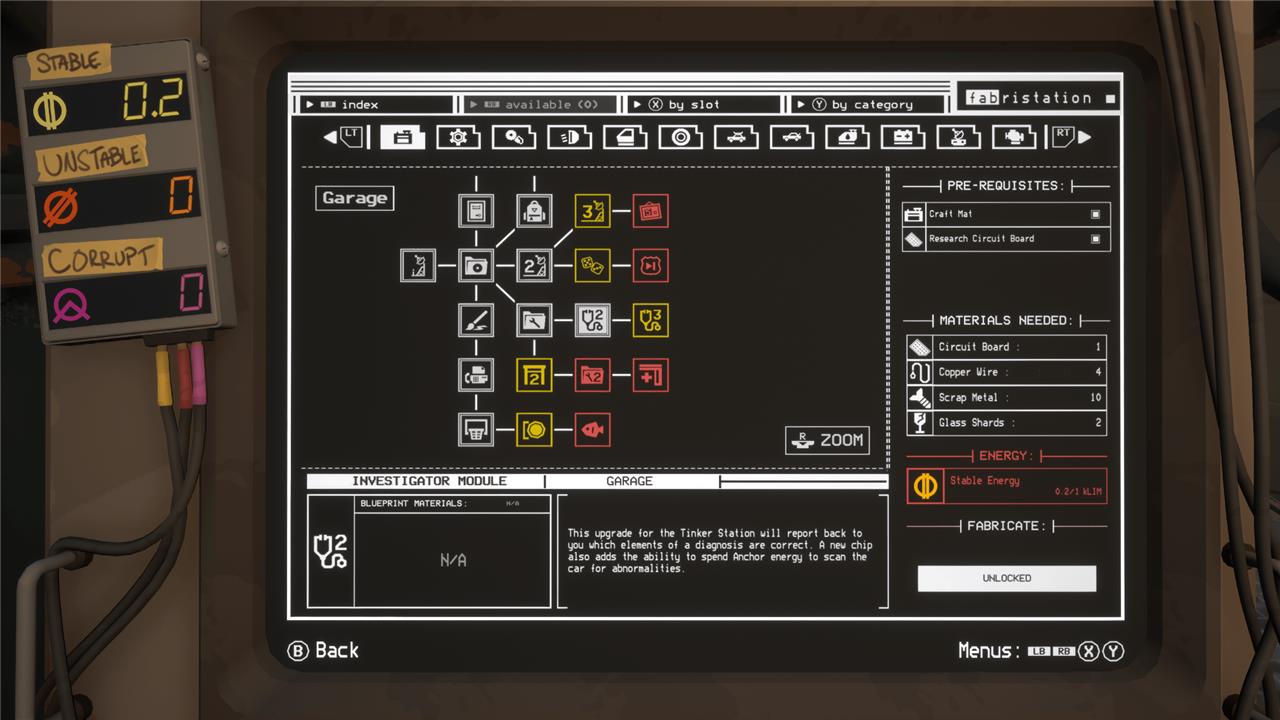
At the fabrication station, look for the investigator module on the first tab – it’s in the fourth column from the left, and one row down. This adds a couple functions to the tinker station.
First, it will tell you which columns of your guess are correct. When you submit a diagnosis, you’ll see a little smiley face emoticon under the columns you have correct.
If you’re still struggling, you can spend some stable energy (that you earn by collecting those glowing yellow stable anchors) to investigate your car’s quirks. Doing that gives you an exclamation point next to the car parts that (might) have quirks. You can even investigate multiple times to help you narrow down the quirk.
What are the most effective strategies to diagnose quirks quickly in Pacific Drive
Most Effective Strategies to Diagnose Quirks Quickly in Pacific Drive
-
Drive Around the Auto Shop to Observe Quirks
The best way to identify what triggers your car’s quirk is to take it for a test drive around the small roads surrounding the Auto Shop. This controlled environment lets you safely observe what car parts activate the malfunction without the pressure of the Zone’s dangers. -
Use the Tinker Station with the Correct Format
When diagnosing, you must input your quirk guess in a specific format:
When [car part] does [action], another [car part] does [effect].
For example, “When the Steering Wheel goes left, any Car Door opens.” This structured approach helps pinpoint cause and effect clearly. -
Enable Free Quirk Guesses for Practice
Turning on Free Quirk Guesses in the settings allows unlimited attempts to familiarize yourself with the diagnosis process. This removes the frustration of limited guesses while learning, though it’s recommended to switch back to normal mode later for the full challenge. -
Craft and Use the Investigator Module
The Investigator Module, crafted at the Fabrication Station, reveals which guesses are correct, helping you narrow down the problem more efficiently. This module requires circuit boards, copper wire, scrap metal, and glass shards. -
Upgrade the Tinker Station with Investigation and Analysis Modules
These upgrades increase your number of guesses (up to 10) and provide partial diagnostics by highlighting problem parts. They reduce guesswork and speed up the process significantly. -
Take Detailed Notes While Driving
Since quirks can be complex and sometimes involve multiple car parts, carefully noting what triggers what during your drive helps recall the exact symptoms when diagnosing at the Tinker Station. -
Test Logical Guesses Based on Observations
Focus first on the parts and effects you observe directly. The last two columns (effect and affected part) are usually easier to identify, so concentrate your guesswork on the cause and trigger to save time.
By combining careful observation, structured input at the Tinker Station, and using helpful upgrades like the Investigator and Analysis Modules, you can diagnose quirks more quickly and efficiently in Pacific Drive.
How can I identify the triggers that cause specific quirks in my car
To identify the triggers that cause specific quirks in your car in Pacific Drive, the most effective method is to take your car for a controlled test drive around the roads surrounding the Auto Shop. This allows you to safely observe when and how the quirk manifests without the pressure of the Zone’s dangers. Pay close attention to what car part or action seems to initiate the malfunction-for example, turning the steering wheel, closing the trunk, or shifting gears.
Once you notice the quirk’s behavior, use the Tinker Station’s diagnostic interface to input your observations in a structured format:
When [car part] does [action], another [car part] does [effect].
For example, “When the Steering Wheel goes left, any Car Door opens”. The last two columns (the malfunctioning part and the resulting action) are usually easier to identify since they describe the quirk’s visible effect, so focus your guesswork on pinpointing the trigger part and its specific action.
Taking detailed notes during your test drive helps recall exact triggers and effects when diagnosing. Additionally, crafting and using the Investigator Module at the Tinker Station can assist by indicating which parts of your guess are correct, speeding up the identification process. This combination of careful observation, structured input, and diagnostic tools is key to accurately identifying the triggers behind your car’s quirks.
