
Tired of awkward confrontations but still want peace on Discord? The new Ignore feature lets you quietly tune out specific users without blocking them or alerting anyone. Hide their messages, notifications, and even avoid surprise voice or video calls-all while keeping the option to peek at their messages if you choose. Discover how this subtle tool can help you regain control and protect your peace in the bustling world of Discord chats.
The rest of this post will explain how the Discord ignore button works and how to use it.
How Discord’s ignore button works
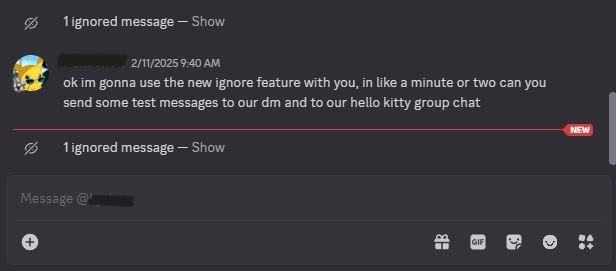
The Discord Ignore button allows users to discreetly mute another person’s messages, notifications, and activities without notifying them. When you ignore someone, their direct messages appear grayed out with an icon, and their messages in group chats or servers are hidden behind a “show” button, giving you control over what you see. Additionally, if you join a voice or video call that includes an ignored user, Discord will warn you beforehand. Unlike blocking, ignoring does not remove the person from your friends list or prevent them from seeing your profile, making it a subtle way to take space from someone without confrontation or alerting them.
The ignore feature on Discord is a way to soft-block someone. Unlike the block feature, ignoring another user won’t remove them from your friends list. When you ignore someone on Discord, the person won’t be notified and they can still see your profile and your account activity. However, ignoring someone will hide any messages and notifications from the user. (This applies to messages in servers, personal DMs, and group chats.)
Instead of showing you messages from that person, Discord will gray-out their profile and tell you the number of messages hidden from the ignored person. If you’d like, you can view these messages at a later time by clicking the unread messages hidden by the feature. Overall, think of the ignore button as another tool to help you control whose messages you see.
How to ignore someone on Discord
To ignore someone on Discord, simply right-click on the user’s avatar or name either in your friend list, direct messages, or server chat, and select the “Ignore” option from the menu. This action will dim their direct messages and hide their messages in group chats and servers, though you can still view these messages by clicking a “Show” button if you choose. Ignoring a user does not notify them, nor does it remove them from your friends list; it quietly hides their messages and notifications to give you more control over your interactions without confrontation. You can also manage ignored users from your User Settings under the “Content & Social” section, where you can unignore someone anytime.
To ignore someone on Discord, right-click a user, and select “Ignore” on the small pop-up menu. Discord will pull up a window explaining what the feature does and from there, you can click “Ignore” again. If you ever want to unignore someone, you can do so by following the same steps. Just right-click and select, “Unignore.” It takes a few seconds and is completely reversible either way.
Want to learn how to discreetly hide messages from someone on Discord
To discreetly hide messages from someone on Discord without blocking them, you can use the Ignore feature. When you ignore a user, their messages in DMs, group chats, and servers appear darkened and hidden, with an option to reveal them by clicking a “Show” button. This lets you avoid seeing their messages and notifications without alerting them or fully blocking them.
Additionally, you can close a DM to hide the chat from your list, which can be reopened later if needed. For hiding specific message content, Discord also supports spoiler tags: by wrapping text with double vertical bars (||hidden message||), the message is concealed until clicked to reveal.
While Discord does not currently offer a way to hide individual messages from a user without blocking, these methods provide practical ways to manage unwanted messages discreetly and maintain control over your chat experience.
How effective is ignoring someone compared to blocking on Discord
Ignoring someone on Discord is a subtler, less aggressive alternative to blocking that lets you hide their messages, notifications, and activity without them knowing. When you ignore a user, their messages in DMs, group chats, and servers appear darkened and hidden by default, and you receive no notifications from them, but they can still send messages and see your profile. In contrast, blocking completely cuts off direct messaging from that user, removes them from your friends list, and limits what they see of your profile, while they also cannot message you anymore.
The ignored user remains unaware they have been ignored, allowing you to avoid confrontation or hurt feelings, whereas blocking is more obvious and can escalate tensions. However, ignoring does not prevent the other person from interacting with you or seeing your activity, while blocking restricts these interactions more thoroughly. Thus, ignoring is effective for quietly managing unwanted interactions while maintaining some connection, whereas blocking is a firmer, more definitive cutoff.
