
Unleash your cosmic power in Starfield with the ultimate guide to cheats and console commands! Whether you’re on PC or Xbox, discover how to bend the rules of the galaxy-spawn rare items, activate god mode, or teleport across planets with just a few keystrokes. Ready to explore the universe on your terms? Here’s everything you need to know to hack your way through Bethesda’s sprawling space epic.
Of course, your mileage may vary, and some of these commands can legitimately break your game. That said, before you start using any of these console commands, make sure to manually save your game, in case you need to revert any of the damage you did.
How to use console commands in Starfield
To use console commands in Starfield on PC, press the tilde (~) key or the grave (’) key (depending on your keyboard layout) to open the command console. Once open, you can type in any console command and press Enter to activate it. Commands are not case-sensitive, so capitalization does not matter. After entering your commands, press the tilde key again to close the console. It is recommended to save your game before using console commands, as they can cause glitches or crashes and will disable achievements during that session. On Xbox, console commands can be activated through specific methods demonstrated in tutorials, but primarily, console commands are a PC feature accessed via the keyboard.
To open the console in Starfield, press the ’ key (above Tab). You’ll get a notice that using some console commands will disable achievements from this save. From there, you can type in or paste in whatever commands suit your fancy. Just type in whatever you want and hit enter to submit. You can close the console by pressing the ’ key again.
You cannot use console commands on Xbox.
Useful Starfield console command list
The useful Starfield console command list includes a variety of cheats that enhance gameplay on PC by enabling god mode, no-clip movement, infinite stamina, and unlocking all powers. Key commands allow players to add items or credits, toggle NPC detection, manipulate AI behavior, unlock doors, and resurrect NPCs. Other handy commands include toggling the UI, enabling a free camera for screenshots, and setting player stats like health, speed, and level. These commands provide players with powerful tools to customize their experience, explore freely, and overcome challenges more easily in Starfield.
Below we list out some of the more useful console commands. There are definitely far more commands than what we list below, but we’ve only listed the ones that we can confirm work. There’s lots of crossover from the console commands for Skyrim and Fallout, though some of them don’t seem to work, even if the console doesn’t say there’s an error. We’ll update this list as we find more useful commands.
Again, be careful when using these. Some of them may break your game. We’ve marked the particularly dicey ones as dangerous in our list.
Starfield console commands (cheats) list
Starfield console commands offer players a powerful way to enhance their gameplay experience on PC by enabling cheats such as god mode, no clip, infinite credits, and item spawning. To use these commands, open the console by pressing the tilde (~) or grave (’) key during the game, then type the desired cheat code and press enter. These commands allow for a range of effects, including killing all hostile NPCs, adding specific items or credits, adjusting player stats like carry weight and speed, and unlocking all map locations. However, console commands are not available on Xbox, where players must wait for potential mod support to access similar cheats. Using these commands can make exploration and combat easier but may also affect game stability, so saving before use is recommended.
Command |
Effect |
|---|---|
| tgm | Toggles god mode |
| player.setlevel # | Set your player level to #. |
| killall | Kill all nearby targets (even your companion) |
| kah | Kill all hostiles |
| unlock | Unlocks doors and containers. Click the locked object with the console up and then use the command to unlock the selected object. |
| movetoqt | Teleports you to your active quest target |
| player.additem item-ID # | Gives you # of whichever item you provided the ID for |
| player.additem f # | Adds # credits |
| player.additem a # | Adds # digipicks |
| player.additem ABF9 # | Adds # med packs |
| player.additem 3FB19 # | Adds # ship parts |
| player.setav carryweight # | Sets your maximum carry weight to # |
| player.addperk perk-ID | Levels up the skill you provide the ID for once. Use this command multiple times to keep leveling up the skill without having to complete the challenges. (See list of perk IDs below) |
| showmenu sleepwaitmenu | Shows a menu that allows you to adjust time |
| saq | Starts all quests (dangerous) |
| caqs | Completes every quest (also dangerous) |
| psb | Give yourself every power |
| tm | Turns UI on/off |
| tdetect | Toggles being detected by NPCs (for easy stealing) |
| tcl | Toggles no clip, allowing you top pass through walls and other objects |
| help (search term) | Gives your IDs and command information for whatever you searched. (see below) |
Item, weapon, and skill IDs
To use cheats effectively in Starfield, knowing the item, weapon, and skill IDs is essential. These unique codes allow players to spawn specific weapons, items, and unlock skills instantly via console commands. For example, you can spawn legendary weapons like the “Despondent Assassin” rifle or attach powerful weapon modifiers using their respective IDs. Similarly, skill IDs enable you to unlock or level up abilities quickly. By entering commands such as player.placeatme (ID Code) for items or player.additem (Ammo ID) (Amount) for ammunition, you can customize your gameplay experience extensively. Comprehensive lists of these IDs are available on resources like IGN and Prima Games, providing detailed codes for weapons, mods, ammo, and skills to enhance your Starfield adventure on PC.
In order to give yourself items and skills, you’ll need to know their specific IDs, an alphanumeric combination in the game’s files. Lucky for you, we provide a lot of IDs for useful items and weapons, and all the IDs for the different skills in the game. If you need to look for more items, you can use the help command to find more IDs, which we detail how to do if you scroll down past the following tables.
Item and weapon IDs
These are definitely not all the item and weapon IDs in the game (or else this table would be way too long), but we list out some of the more useful IDs below. We’ll add more useful ones as we find them.
Starfield item and weapon IDs
In Starfield, players can use console commands on PC to spawn items and weapons by entering specific item and weapon IDs. These IDs allow you to add a wide range of weapons to your inventory, including unique, legendary, and base variants, by typing commands like player.placeatme (ID Code). Additionally, weapon modifiers and ammo can be spawned using their respective IDs with appropriate commands. This system provides a powerful way to customize your gameplay experience by instantly accessing any weapon or item you desire. Note that these console commands are not available on Xbox versions of the game.
Item type |
Item |
ID |
|---|---|---|
| Spacesuit | Starborn Spacesuit Astra | 12E187 |
| Spacesuit | Starborn Spacesuit Avitus | 1CBA52 |
| Spacesuit | Starborn Spacesuit Gravitas | 21C77E |
| Spacesuit | Starborn Spacesuit Venator | 21C77F |
| Spacesuit | Starborn Spacesuit Locus | 1CBA4A |
| Spacesuit | Starborn Spacesuit Materia | 1CBA49 |
| Spacesuit | Starborn Spacesuit Tenebris | 1CBA4D |
| Spacesuit | Starborn Spacesuit Solis | 2D7365 |
| Spacesuit | Starborn Spacesuit Tempus | 2D7346 |
| Spacesuit | Starborn Spacesuit Bellum | 1CBA4E |
| Throwables | Frag Grenade | 115EF |
| Throwables | Impact Grenade | 26D89F |
| Throwables | Incendiary Grenade | 26F180 |
| Throwables | Particle Grenade | 26D89E |
| Throwables | Shrapnel Grenade | 26D89D |
| Throwables | Fragmentation Mine | 4A41A |
| Throwables | Cryo Mine | 389F34 |
| Throwables | Stun Mine | 3C23E3 |
| Throwables | Inferno Mine | 389F33 |
| Throwables | Tesla Pylon | 389F37 |
| Throwables | Toxic Gas Mine | 3C23E4 |
| Weapon | AA-99 | 2BF65B |
| Weapon | Arc Welder | 26D965 |
| Weapon | Auto-Rivet | 26D964 |
| Weapon | Barrow Knife | 26F181 |
| Weapon | Beowulf | 4716C |
| Weapon | Big Bang | 26D963 |
| Weapon | Breach | 547A3 |
| Weapon | Bridger | 26D96A |
| Weapon | Coachman | 26D96B |
| Weapon | Combat Knife | 35A48 |
| Weapon | Cutter | 16758 |
| Weapon | Discarded Sidestar | 2F413A |
| Weapon | Drum Beat | 18DE2C |
| Weapon | Ecliptic Pistol | 26D96E |
| Weapon | Eon | 476C4 |
| Weapon | Equinox | 1BC4F |
| Weapon | Grendel | 28A02 |
| Weapon | Hard Target | 546CC |
| Weapon | Kodama | 253A16 |
| Weapon | Kraken | 21FEB4 |
| Weapon | Lawgiver | 2D7F4 |
| Weapon | Maelstrom | 2984DF |
| Weapon | MagPulse | 23606 |
| Weapon | Magshear | 2EB3C |
| Weapon | MagShot | 2EB42 |
| Weapon | MagSniper | 2EB45 |
| Weapon | MagStorm | 26035E |
| Weapon | Microgun | 546CD |
| Weapon | Novablast Disruptor | 26D968 |
| Weapon | Novalight | 26D967 |
| Weapon | Old Earth Assault Rifle | 26ED2A |
| Weapon | Old Earth Hunting Rifle | 21BBCD |
| Weapon | Old Earth Shotgun | 278F74 |
| Weapon | Orion | 2773C8 |
| Weapon | Osmium Dagger | 26D966 |
| Weapon | Pacifier | 2953F8 |
| Weapon | Rattler | 40826 |
| Weapon | Razorback | 0FD6 |
| Weapon | Regulator | 2CB5F |
| Weapon | Rescue Axe | 4F760 |
| Weapon | Shotty | 26D960 |
| Weapon | Sidestar | 26D95D |
| Weapon | Solstice | 26D961 |
| Weapon | Tanto | 26D8A3 |
| Weapon | Tombstone | 2EB36 |
| Weapon | UC Naval Cutlass | 26D8A5 |
| Weapon | Urban Eagle | 26D96D |
| Weapon | Va’ruun Inflictor | 26D8A0 |
| Weapon | Va’ruun Painblade | 26D8A2 |
| Weapon | Va’ruun Starshard | 26D8A4 |
| Weapon | Wakizashi | 26D8A1 |
| Aid | Aurora | 2C5884 |
| Aid | Antibiotics | 2F4436 |
| Aid | Bandages | 2F4459 |
| Aid | Immobilizer | 2F445B |
| Aid | Ship Parts | 3FB19 |
| Aid | Med Pack | ABF9 |
| Misc | Digipick | A |
| Misc | Credits (money) | F |
Skill IDs
If you want to level up your skills, you’ll need to use the IDs below with the command “player.addperk perk-ID” replacing “perk-ID” with the alphanumeric ID below. Each time you use the command, you will level up the skill (or be granted the skill at level one if you didn’t have it before). This means to fully max out a new skill, you’ll need to input the same command four times.
Starfield Skill IDs
Starfield Skill IDs are unique codes assigned to each skill in the game, allowing players to unlock and level up skills quickly using console commands on PC. By entering the appropriate skill ID with commands like player.addperk (Perk ID), players can enhance abilities across various categories such as Physical, Social, Combat, Science, and Tech. This method is especially useful for those looking to customize their character’s skill set efficiently without the usual gameplay progression. A comprehensive list of all Skill IDs is available, covering skills like Boxing, Stealth, Commerce, Ballistics, Astrodynamics, and more, enabling precise control over skill development through cheats.
Skill Tree |
Skill |
ID |
|---|---|---|
| Physical | Boxing | 2C59DF |
| Physical | Cellular Regeneration | 28AE14 |
| Physical | Concealment | 2C555E |
| Physical | Decontamination | 2CE2A0 |
| Physical | Energy Weapon Dissipation | 2C59E2 |
| Physical | Environmental Conditioning | 28AE17 |
| Physical | Fitness | 2CE2DD |
| Physical | Gymnastics | 28AE29 |
| Physical | Martial Arts | 2C5554 |
| Physical | Neurostrikes | 2C53B4 |
| Physical | Nutrition | 2CFCAD |
| Physical | Pain Tolerance | 2CFCAE |
| Physical | Rejuvenation | 28AE13 |
| Physical | Stealth | 2CFCB2 |
| Physical | Weight Lifting | 2C59D9 |
| Physical | Wellness | 2CE2E1 |
| Social | Commerce | 2C5A8E |
| Social | Deception | 2CFCAF |
| Social | Diplomacy | 2C59E1 |
| Social | Gastronomy | 2C5A94 |
| Social | Instigation | 2C555D |
| Social | Intimidation | 2C59DE |
| Social | Isolation | 2C53AE |
| Social | Leadership | 2C890D |
| Social | Manipulation | 2C5555 |
| Social | Negotiation | 2C555F |
| Social | Outpost Management | 23826F |
| Social | Persuasion | 22EC82 |
| Social | Scavenging | 28B853 |
| Social | Ship Command | 2C53B3 |
| Social | Theft | 2C555B |
| Social | Xenosociology | 2C53B0 |
| Combat | Armor Penetration | 27DF94 |
| Combat | Ballistics | 2CFCAB |
| Combat | Crippling | 27CBBA |
| Combat | Demolitions | 2C5556 |
| Combat | Dueling | 2CFCB0 |
| Combat | Heavy Weapons Certification | 147E38 |
| Combat | Incapacitation | 27DF96 |
| Combat | Lasers | 2C59DD |
| Combat | Marksmanship | 2C890B |
| Combat | Particle Beams | 27BAFD |
| Combat | Pistol Certification | 2080FF |
| Combat | Rapid Reloading | 2C555A |
| Combat | Rifle Certification | 2CE2E0 |
| Combat | Sharpshooting | 2C53AF |
| Combat | Shotgun Certification | 27DF97 |
| Combat | Sniper Certification | 2C53B1 |
| Combat | Targeting | 2C59DA |
| Science | Aneutronic Fusion | 2C2C5A |
| Science | Astrodynamics | 2C5560 |
| Science | Astrophysics | 27CBBB |
| Science | Botany | 2C5557 |
| Science | Chemistry | 2CE2C0 |
| Science | Geology | 2CE29F |
| Science | Medicine | 2CE2DF |
| Science | Outpost Engineering | 2C59E0 |
| Science | Planetary Habitation | 27CBC2 |
| Science | Research Methods | 2C555C |
| Science | Scanning | 2CFCB1 |
| Science | Spacesuit Design | 27CBC3 |
| Science | Special Projects | 4CE2D |
| Science | Surveying | 27CBC1 |
| Science | Weapon Engineering | 2C890C |
| Science | Zoology | 2C5552 |
| Tech | Automated Weapon Systems | 27B9ED |
| Tech | Ballistic Weapon Systems | 2CE2C2 |
| Tech | Boost Assault Training | 8C3EE |
| Tech | Boost Pack Training | 146C2C |
| Tech | EM Weapon Systems | 2C53B2 |
| Tech | Energy Weapon Systems | 2C59DB |
| Tech | Engine Systems | 2CE2DE |
| Tech | Missile Weapon Systems | 2C5558 |
| Tech | Particle Beam Weapon Systems | 2C2C5B |
| Tech | Payloads | 143B6B |
| Tech | Piloting | 2CFCAC |
| Tech | Robotics | 2C5553 |
| Tech | Security | 2CE2E2 |
| Tech | Shield Systems | 2C2C59 |
| Tech | Starship Design | 2C59DC |
| Tech | Starship Engineering | 2AC953 |
| Tech | Targeting Control Systems | 2C5559 |
How to search for more item codes and commands
To find more item codes and commands for Starfield, you can explore comprehensive online lists and databases dedicated to the game’s console commands, such as those on IGN, PCGamesN, and Reddit. These sources provide detailed compilations of item IDs, cheat codes, and command functions that you can search through to find specific items or effects you want to use. Additionally, using searchable command lists or typing keywords related to the item or action in command databases online can help you quickly locate the exact codes you need. Remember, these commands are primarily available on the PC version via the in-game console, accessed by pressing the Tilde (~) or Grave (’) key.
By using the help command, you can look up item codes and find other commands. This is useful if you’re trying to duplicate or give yourself a ton of a specific, niche item or hunt down new useful commands.
The command to do this is the following:
help “search term”
For example, if you’re looking for the item code for the different plushies in the game, you can enter the command:
help plushie
This will give you a set of results, with the code listed. For example, the item code for the “plushie galacticat” item is 12DFFD (you can omit the zeros at the start of the ID).
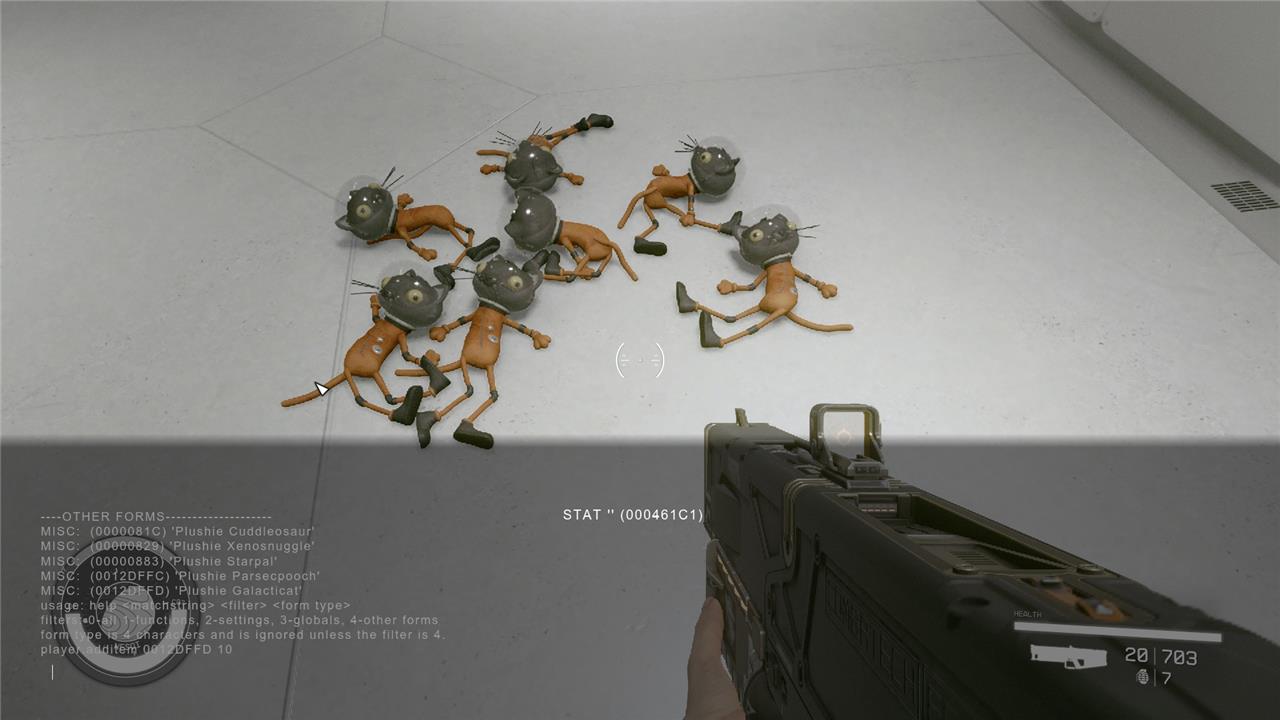
You can also narrow down your search further if your search yields too many results, by using the same command with more modifiers:
help “search term” (filter number) (form type)
The filters are numbers from 0-4, corresponding in the following way:
- 0: All results
- 1: Functions (commands and scripts)
- 2: Settings
- 3: Globals
- 4: Other (item codes and stuff is in here)
Discover the ultimate secrets to dominating Starfield with console commands
Discover the ultimate secrets to dominating Starfield with console commands that unlock god mode, infinite credits, and the power to spawn any item or manipulate the cosmos at your fingertips. Whether you want to breeze through missions, explore every corner without limits, or customize your character beyond the game’s constraints, mastering these commands on PC or Xbox will transform your gameplay into an unstoppable space adventure.
Which console command is best for becoming invincible in Starfield
The best console command for becoming invincible in Starfield is tgm (Toggle God Mode). This command makes your character completely invincible and grants unlimited ammo, effectively making you unstoppable in combat. Another related command is tim (Toggle Immortal Mode), which allows you to take damage but prevents your health from ever reaching zero, offering a slightly different form of invincibility. However, for full invincibility, tgm is the top choice.
