
Docking your ship at a space station in Starfield might seem straightforward, but the game offers little guidance on this essential skill. Whether you’re aiming to explore, trade, or even commandeer enemy vessels, mastering the art of docking is your gateway to the deeper mysteries of the Settled Systems. Here’s how to smoothly bring your ship alongside any station or ship, unlock new opportunities, and boldly step into the next chapter of your cosmic adventure.
The problem is, it doesn’t tell you how to physically get onto the station itself. Landing on a planet is simple enough – you just pick a spot and your ship lands. While you’re in space, though, rendezvousing with another ship or a space station (like docking with the Staryard or The Eye) means you have a new skill to learn.
OurStarfield docking guide will explain how to dock your ship with space stations.
How to dock your ship at a space station in Starfield
To dock your ship at a space station in Starfield, first approach the station and target it by pressing “E” on PC or “A” on Xbox to lock onto the station. Once you are within 500 meters, an on-screen prompt will appear giving you the option to dock or hail the station. You can optionally hail the station by holding “E” or “A” before proceeding. When the dock prompt appears, hold “R” on PC or “X” on Xbox to initiate docking. A short cutscene will play, after which you can board the station, undock, or move around your ship. Remember that while docked, you cannot fast travel or select a new destination until you undock again by pressing “Y” on Xbox or the space bar on PC.
To get onto a station or ship, you have to dock. To begin docking your ship in Starfield, you first have to first target the space station with the A button (on an Xbox controller), or the E key on PC.
This is the input you’ll use to cycle through nearby targets in space, including planets, stations, and ships (both enemy and friendly).
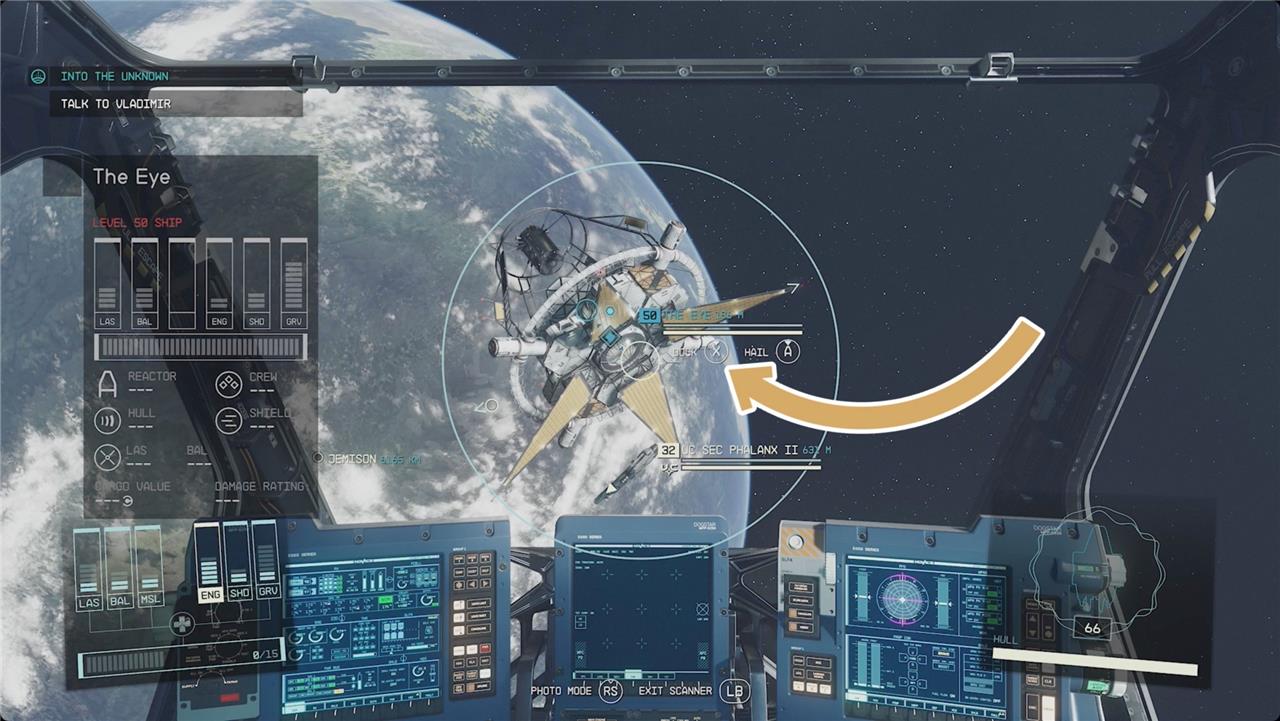
This will get you the option to hail your target by holding down the A button on an Xbox Controller, or holding the E key on PC. (It’s not always necessary to hail a ship or station first, but it’s just common courtesy.)
Finally, to dock your ship, you have to getwithin 500m of your target, then you’ll get the option to dock by holding down the X button on an Xbox controller, or the R key on PC.
From the pilot’s seat of your ship, you’ll have three options: board whatever you just docked with, undock from it, or stand up to wander your ship. If you stand up, you can head to your ship’s airlock to find the door to the other vessel.
Can you fast travel while docked?
Starfield does not allow you to fast travel while your ship is docked at a space station or another ship. To fast travel, you must first undock your ship by leaving through the airlock, getting back into the pilot’s seat, and then undocking. Only after undocking can you select a new destination and fast travel to it. This restriction means you cannot initiate fast travel directly from the docked state, so plan accordingly when managing your travel and docking activities in the game.
If your ship is docked with another vessel, you can’t fast travel or select a new destination from the Starmap. In order for fast travel to be an option again, you’ll have to head back through the airlock and docker onto your ship, get to the pilot’s seat, and choose to undock with the Y button on an Xbox controller, or the space bar on a keyboard.
What are the key steps to successfully dock at a space station in Starfield
Key Steps to Successfully Dock at a Space Station in Starfield
-
Approach the Space Station
Fly your ship into the orbit of the space station you want to dock with and get close-within about 500 meters-to the station’s docking area. -
Target the Space Station
Lock onto the station by pressing E on PC or A on Xbox. This will bring up targeting options. -
Hail the Station (Optional but Recommended)
You can hail the station by holding E on PC or A on Xbox to request docking clearance. This step is sometimes necessary and helps establish communication with the station. -
Wait for the Docking Prompt
Once you are close enough and have targeted the station, an on-screen prompt will appear giving you the option to dock. -
Initiate Docking
Hold down R on PC or X on Xbox to dock your ship. A short docking cutscene will play, confirming successful docking. -
Board or Undock
After docking, you can choose to board the station, explore your ship, or undock whenever you want.
Additional Notes
-
Docking with other ships requires disabling their engines first by targeting and damaging them until they stop, then following the same docking procedure.
-
The process is straightforward once you know the steps, but the game offers minimal in-game guidance, making this knowledge essential for smooth gameplay.
What’s the easiest way to target a space station before docking in Starfield
The easiest way to target a space station before docking in Starfield is to press the E key on PC or the A button on Xbox while your ship is near the station. This input cycles through nearby targets in space, including planets, stations, and ships, allowing you to lock onto the space station you want to dock with. Once targeted, you can optionally hail the station by holding the same button (E on PC, A on Xbox) to request docking clearance, which helps initiate communication and smooth docking. After targeting and approaching within about 500 meters, the docking prompt will appear, enabling you to dock your ship.
