
Tired of Monster Hunter Wilds crafting items you don’t want on the fly? The game’s auto-crafting feature can be a double-edged sword-handy for instant supplies but tricky when you want to conserve rare materials. Luckily, you can easily take back control by turning off auto-crafting for specific items, tailoring your inventory management to your playstyle on PC, PlayStation, or Xbox.
This feature can be super helpful, because it allows you to craft additional items in the field without fiddling with a menu in the middle of a monster fight.
On the flip side, it can make it difficult to save up certain resources, since the game automatically allocates them toward crafting.
If you want to save specific resources for particular items or you just want full control over what you collect, then you might want to stop the game from auto-crafting certain items. In this Monster Hunter Wilds guide, we’ll go over how to turn-off auto-crafting.
How to turn off auto-crafting in Monster Hunter Wilds
To turn off auto-crafting in Monster Hunter Wilds, open the in-game menu and navigate to the “Items and Equipment” submenu. Select the “Crafting List” option at the top. Here, you will see a list of craftable items, each with a toggle indicating whether auto-crafting is enabled (yellow toggle) or disabled (gray toggle). Highlight the item for which you want to disable auto-crafting and press the right thumbstick (R3 on PlayStation, right joystick on Xbox, or Tab on PC) to toggle auto-crafting off. You need to do this individually for each item you want to stop from auto-crafting, giving you full control over your resource usage and inventory management during hunts.
Monster Hunter Wilds allows you to craft items on-the-go. The default settings make it so that the game automatically crafts several items like potions, hot drinks, and flash pods, alongside several types of ammo. Editing the auto-craft settings will allow you to take complete control over how you use your resources.
To turn off auto-crafting in Monster Hunter Wilds, open your menu, then navigate to the “Items and Equipment” submenu. The top option highlighted under this sub-section should say “Crafting List.” Select it.
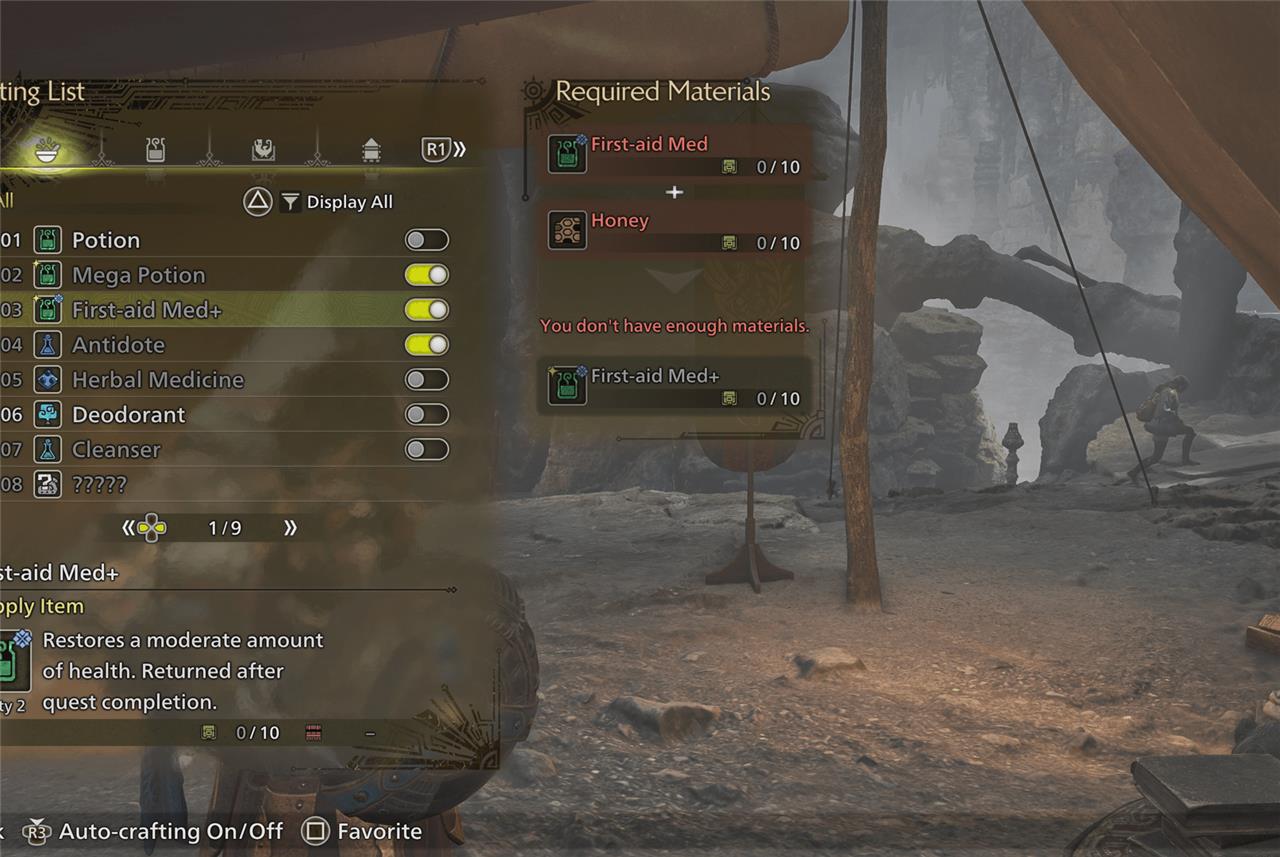
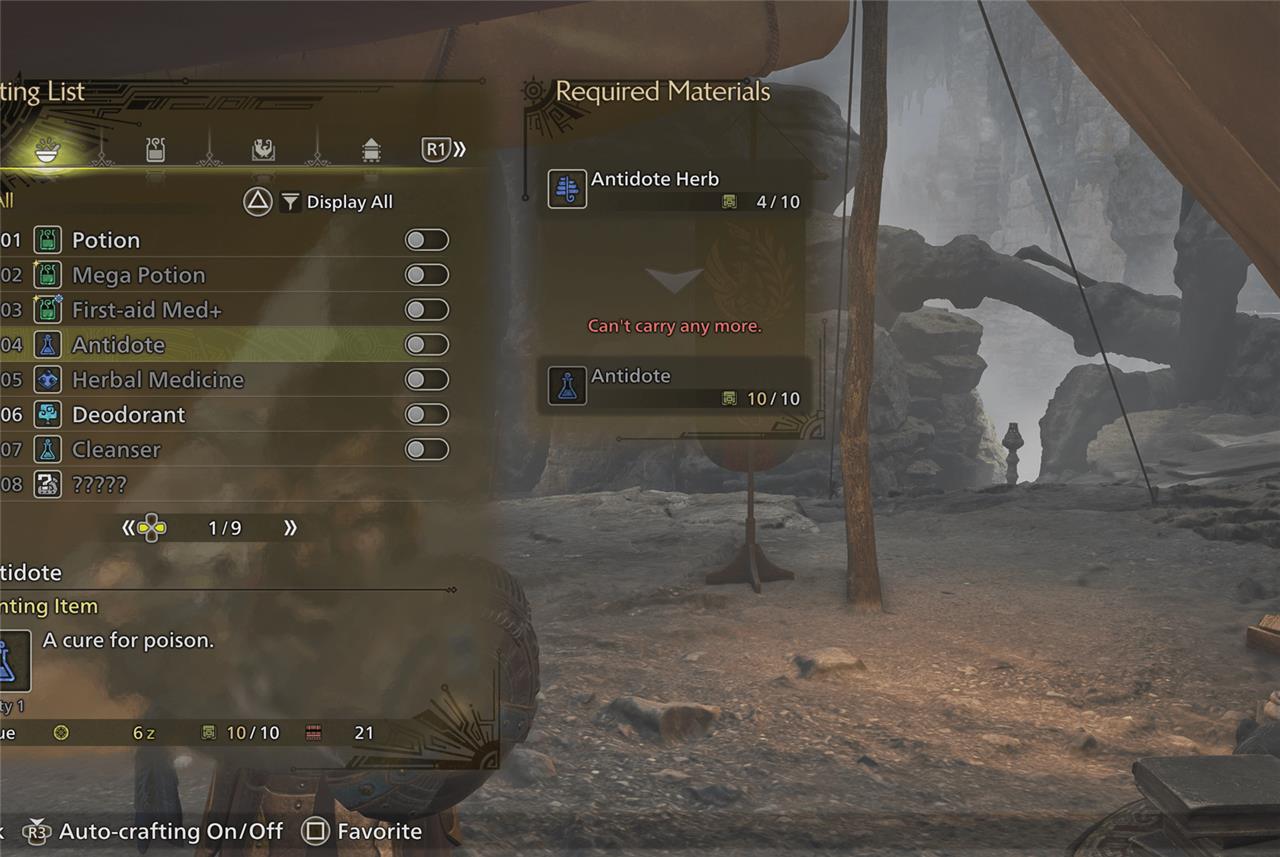
This will pull up a list of craftable items. (Use left and right on the D-pad to flip between different pages of items.) Examine the item list to see which are set to auto-craft. If auto-crafting is available, an item will have a small toggle in line with it position to the right of it, as shown in the image slider above:
- If the toggle is yellow and flicked to the right, then auto-crafting for that item is on.
- If the toggle is gray and flicked to the left, then auto-craft is turned off.
To turn the toggle off or on, select the item you want to turn auto-crafting off (or back on!) for, then click in the right thumbstick. From there, flip through the list of items and decide what you do and don’t want to auto-craft. And if you ever change your mind, the menu will be there for you to edit at a later time.
Want to know how auto-crafting affects resource management in Monster Hunter Wilds
Auto-crafting in Monster Hunter Wilds streamlines resource management by automatically converting gathered materials into useful consumables, such as potions and antidotes, as soon as you pick up the required ingredients. This feature helps maintain a steady supply of essential items without interrupting gameplay, allowing hunters to focus on combat and exploration. However, it can also accelerate the depletion of raw materials if not carefully managed, since the system crafts items immediately rather than letting you save components for specific uses later. Players can toggle auto-crafting on or off for individual items to balance convenience with resource conservation, tailoring their inventory strategy to their hunting style and the demands of each encounter.
How does auto-crafting help prevent resource depletion during hunts
Auto-crafting in Monster Hunter Wilds helps prevent resource depletion during hunts by automatically crafting items only when you pick up the last required ingredient and you have fewer than the maximum number of that item in your inventory. This means the system won’t craft items unnecessarily if you already have enough, conserving your raw materials for when they are truly needed. Additionally, it only crafts items if there is space in your inventory for the resulting item, preventing wasteful crafting when you’re at capacity. This selective, on-demand crafting ensures that your resources are used efficiently, maintaining a steady supply of essential consumables without overusing materials during intense hunts.
