
From smarter interfaces to total fortress overhauls, these seven Steam Workshop mods transform Dwarf Fortress into a smoother, richer, and far more engrossing experience-without losing a drop of its chaotic charm.
How to install Dwarf Fortress mods
Installing Dwarf Fortress mods through Steam is straightforward. Open the game’s Steam Workshop page, find a mod you like, and click “Subscribe.” Steam will download the files automatically. Once installed, launch Dwarf Fortress and open the mod menu before generating a new world or loading an existing save. There you can enable or disable specific mods, change their load order, and make adjustments to fit your playstyle.
Dwarf Fortress mods are installed through the Steam Workshop for the game. Browse through the options there and subscribe to the ones you want.
Mods can only be used in newly generated worlds – you can only activate them during world creation – so you’ll need to start a new fortress to use them. In the Create A New World screen, click on Mods in the bottom right.
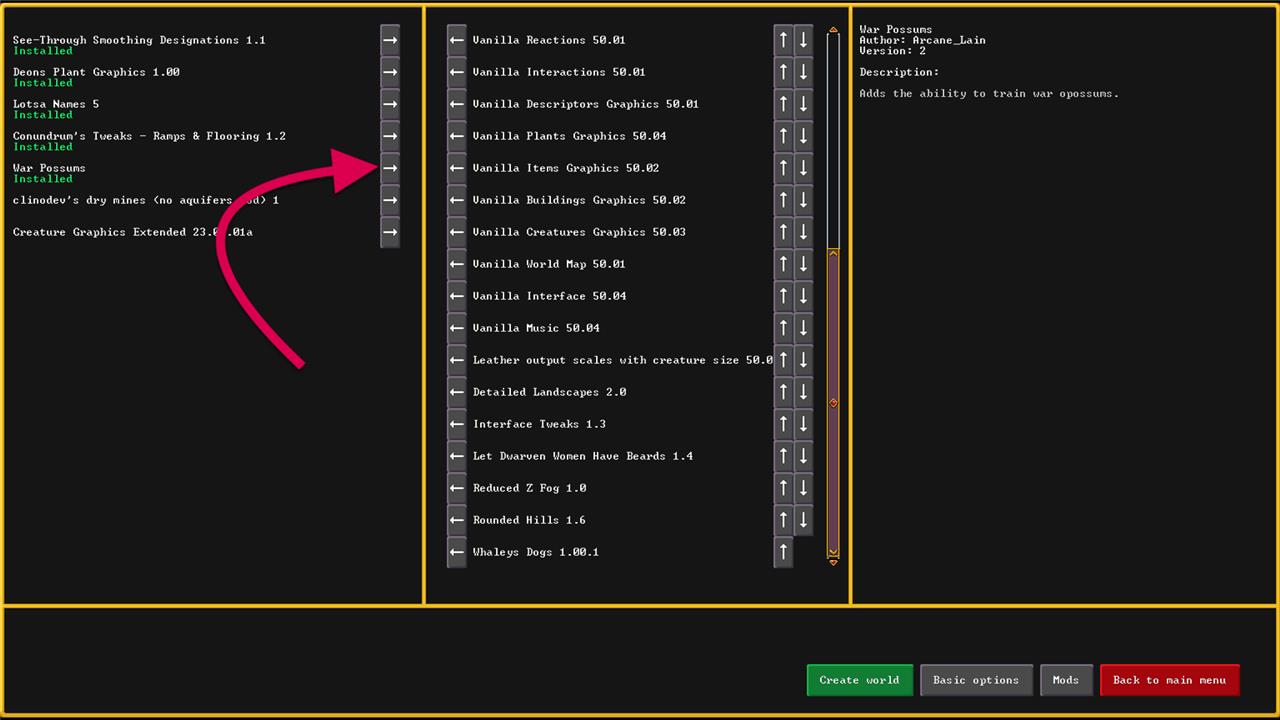
You’ll see three columns here – available mods on the left, the default Vanilla mods in the middle, and details about whatever you’re hover over on the right (including conflicts with other mods). Click the arrow next to the mods you want to activate, and they’ll move into the center column.
Click on Basic Options to return to the main creation options (the mods you chose will remain).
Interface Tweaks
Interface tweaks make Dwarf Fortress far more approachable, especially for new players. Mods like DFHack, TwbT, and Dwarf Therapist improve visibility, simplify menu navigation, and let you manage dwarves with precision. These additions streamline everyday tasks such as stockpile management and labor assignments, cutting down the time spent sorting through endless lists. The result is a smoother, more readable experience that keeps your focus on fortress growth instead of endless micromanagement.
The first mod we recommend is one called Interface Tweaks by Trainzack. The main thing you’ll notice with this mod is that the keyboard hotkeys are listed on almost every icon. Yes, the Steam version of Dwarf Fortress still requires a mouse, but this mod will make the keyboard a lot more useful (and will help veteran players remember the new hotkeys).
It also adds some color to the play and pause buttons. The color scheme is red and green, so not exactly the most accessible palette, but it should help make them a little clearer to most users.
Detailed Landscapes
Detailed Landscapes enhances the visual richness of Dwarf Fortress by replacing the basic terrain with hand-crafted textures and improved tile sets. Forests gain depth through varied tree types, soil layers appear more natural, and mountain slopes show greater geological detail. The mod carefully balances realism with the game’s unique ASCII-inspired style, giving players a more immersive view of their fort’s surroundings without sacrificing performance or readability.
While the tiles of ground in Dwarf Fortress all look like generic grass or cavern spots, there’s actually a huge variety of plants and mushrooms. Detailed Landscapes by Poss adds graphics for 39 species.
The way Dwarf Fortress tiles and blends the graphics for ground is a bit convoluted for a mod to handle, so this one isn’t always perfect – it looks a little checker boarded – but seeing how wild the wilderness really is adds a nice touch.
Rounded Hills and Reduced Z-Level Fog
Rounded Hills and Reduced Z-Level Fog gives the game’s terrain a smoother and more natural shape while improving visibility across vertical layers. Hills appear less jagged, creating a more believable sense of elevation, and the fog effect that covers lower levels is toned down, making underground exploration and surface building easier on the eyes. The result is a cleaner visual experience that keeps the charm of Dwarf Fortress while making navigation more comfortable.
A pair of visual mods, Rounded Hills by Poss and Reduced Z-Level Fog by Munashe are just nice to have if only to soften the visuals of Dwarf Fortress. The Rounded Hills mod smooths out the sharp corners on the terrain ramps and makes it look a little more natural. The Reduced Z-Level Fog extends your ability to see a few Z-levels deeper and actually see what’s going on in your world.
Whaleys Dogs
Whaleys Dogs adds loyal canine companions to your fortress, each with unique personalities and tasks suited to different roles. They can guard entrances, accompany hunters, or simply keep dwarves company, bringing life and charm to daily routines. The mod also introduces new breeds and behaviors, making each dog feel like a true member of the community rather than just another asset.
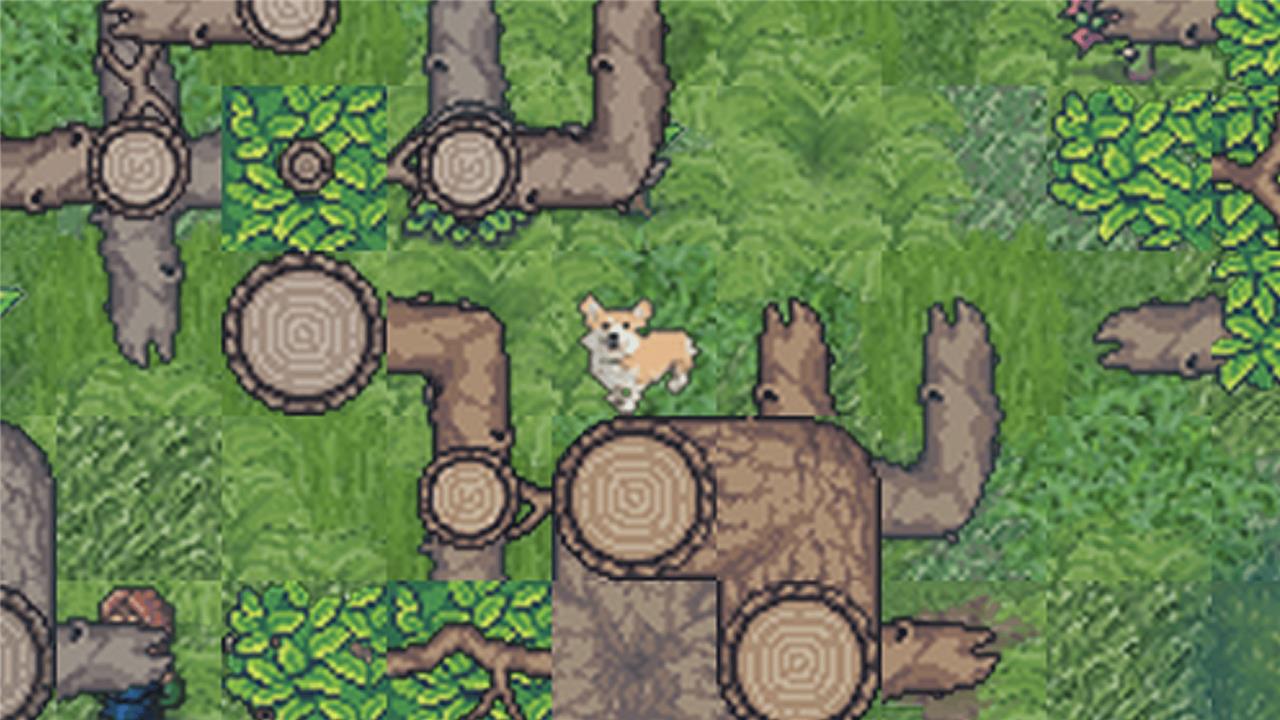
They’re all good dogs, so why not add some sprites to expand the visuals? The Whaleys Dogs mod by user Roseanne on DVD 2K19 adds graphics for eight new breeds of dog. None of the stats change, but, I mean, look at that corgi.
Let Dwarven Women Have Beards
This mod restores a classic bit of Dwarven charm by giving female dwarves the beards they deserve. Long-time players often missed this quirk from older versions, and the mod fixes that with great attention to detail and respect for the game’s humor. It’s a small change, but it helps keep the fortress feeling true to traditional fantasy roots-where every dwarf, no matter their gender, can proudly braid and groom their beard.
This mod by Lielac does exactly what it says. Some dwarven women have beards.
[Author’s note: Look, I did a quick Google to double-check something before I made a comment about Tolkien’s dwarves and . it’s A Whole Thing™ – as with most things Tolkien. So, instead, let’s just say that this mod isn’t so much an “accuracy” thing as it is about simply letting dwarven women have beards.]
War Possums
A bizarre mix of chaos and cunning, War Possums turns your fortress’s rodent population into organized miniature soldiers. This mod trains possums to patrol, raid goblin camps, and protect your dwarves with surprising tenacity. Watching a swarm of furry warriors defend the gates adds both absurd humor and unexpected tactical depth to late-game defenses.
Look, there’s no way to not recommend War Possums by Elsie (with an honorable mention to War Geese by Mackeroni). War Possums adds (o)possums as a domesticated species – which means you can choose them at embark and, more importantly, train them for war.
How to install DFHack with Steam Workshop mods
DFHack integrates seamlessly with Steam Workshop mods for Dwarf Fortress, as it’s a separate Steam app that installs into your DF folder and supports standard mod loading.
Install DFHack via Steam
Subscribe to DFHack in Steam-search for “DFHack – Dwarf Fortress Modding Engine” (app ID 2346660) and install it. Launch DF through the DFHack app (not the base DF app) to enable it automatically; Steam handles updates and compatibility with your DF version. Workshop mods remain unchanged: subscribe on the DF Workshop page, then activate them during new world creation via the “Mods” button.
Verify Compatibility
DFHack versions match specific DF releases (e.g., 53.10-r1 for DF 53.10), so ensure Steam auto-updates both apps to align. No manual file copying needed for Steam installs-DFHack adds its hack folder next to DF’s data and save folders. Test by starting DFHack; look for the DFHack icon (top-left or configurable) and check dfhack.init for loaded features.
Usage with Mods
Workshop mods load per-world as usual, while DFHack provides global tools like automations and overlays. Conflicts are rare, but disable mods one-by-one if issues arise during world gen. For betas, opt into DFHack betas via Steam properties if using DF betas.
How to check DFHack version compatibility with current Dwarf Fortress
To check DFHack version compatibility with your current Dwarf Fortress (DF) version, match the version numbers directly, as each DFHack release targets a specific DF release.
Find DF Version
Launch Dwarf Fortress via Steam and check the title screen or gamelog.txt in the DF root folder (next to data and save) for the exact version, like “53.10” or “51.05”. Steam also shows it under the game’s properties or news feed.
Find DFHack Version
In Steam, view DFHack app properties (app ID 2346660) for the release notes or version tag. Once running DF via DFHack, press Ctrl + Shift + F12 or check the console/log for startup info like “DFHack 51.05-r1”. Compatible pairs match exactly (e.g., DFHack 53.10-r1 for DF 53.10); Steam auto-updates both, but verify via GitHub releases if mismatched.
Quick Compatibility Check
-
DFHack names indicate DF support (e.g., 50.13-r2 supports DF 50.13).
-
Look for the DFHack logo/icon on launch (upper-left screen); absence signals mismatch.
-
If incompatible, Steam’s default branch aligns them-opt into betas only if both match. Test a new world; errors appear in errorlog.txt or console.
