
Stuck waiting for a vendor to restock or a quest to trigger in Starfield? Don’t just pace the deck-discover the simple trick to fast-forwarding time in Bethesda’s vast universe, whether you’re on PC or Xbox. From secret XP boosts to clever uses for every chair and bed, here’s how to bend the clock to your will and make every minute in the Settled Systems count.
How to pass time in Starfield
Passing time in Starfield is straightforward but requires using specific in-game furniture. To wait or pass time, simply find a chair, sofa, bench, or bed and interact with it-on PC, press E, and on Xbox, press A. Once seated or lying down, you’ll receive a prompt to wait; pressing B (PC) or Y (Xbox) brings up a menu where you can set how many hours you want to advance, up to 24 hours at a time. Sleeping in a bed not only passes time but also grants a 10% XP boost from the well-rested buff, or 15% if you’re sleeping next to a romanced companion. This mechanic is especially useful for waiting out vendor restocks, aligning with mission times, or simply skipping ahead in the game’s day-night cycle.
All you need to do is sit on a chair or sleep in a bed. When you sit in a chair, you’ll be prompted to wait at the bottom of the screen. Press the corresponding key or button to bring up a screen asking how long you’d like to wait for. When you choose to sleep in a bed, you’ll get the prompt right away:
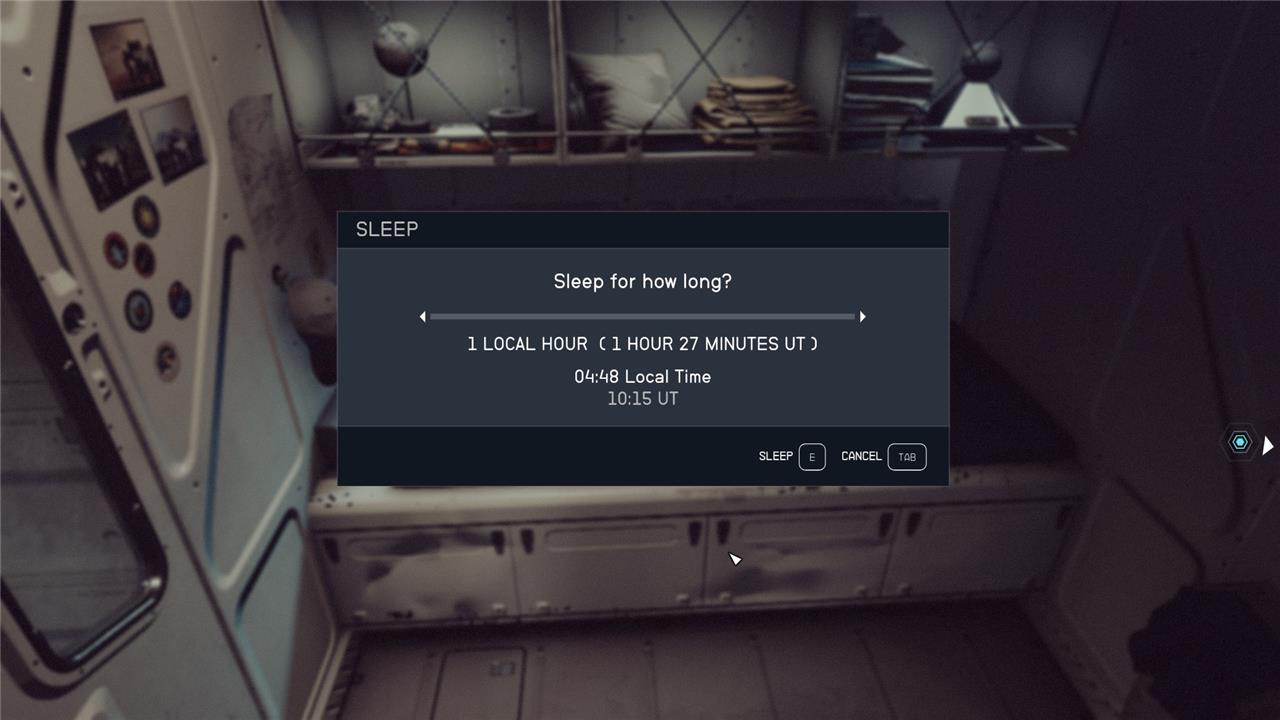
You can wait or sleep for up to 24 hours of local time. For some quests, like the “Red Tape Blues” quest line on Mars, passing time until it’s night causes NPCs to clear out of areas you need to sneak into. (Hey, NPCs need sleep too!)
If you sleep, you’ll get a “well-rested” buff, as it does in other Bethesda games. This gives you a 10% XP boost, so you should sleep before missions. If you sleep alongside a romanceable companion you’ve married, that bonus increases to 15%.
Want to discover the easiest way to pass hours in Starfield without losing progress
If you want to pass hours in Starfield without losing progress, the simplest method is to find a chair, bench, or bed in the game world. Sit down on the furniture, and you’ll be prompted to open the wait menu-on PC, press B while seated. You can then choose exactly how many hours you want to skip, advancing time instantly without affecting your current progress or quests.
Beds offer an added bonus: sleeping in one not only advances time but also gives you a 10% XP boost for a limited period after you wake up. This method is perfect for waiting out vendor restocks, syncing up with quest times, or just skipping ahead to the next in-game event-all without risking your save or missing out on any action.
What is the fastest way to pass hours in Starfield without risking progress
The fastest and safest way to pass hours in Starfield without risking your progress is to sit on any chair, bench, or bed you find in the game world. Once seated (or lying down), you’ll get a prompt to open the wait menu-on PC, press B; on Xbox, press Y. From there, you can select how many hours (up to 24 at a time) you want to skip, and the time will advance in just a few seconds, with no impact on your ongoing quests or save file.
Sleeping in a bed is even better, as it grants you a temporary 10% XP boost from the Well Rested buff, or 15% if you sleep next to a romanced companion. This method is quick, repeatable, and ensures you don’t lose any progress while waiting for vendors to restock or quest times to change.
