
Tired of juggling a mountain of loot in Starfield? Your starship isn’t just for travel-it’s a mobile vault ready to lighten your load. Whether you’re on PC or Xbox, accessing and managing your ship’s storage can transform your gameplay, freeing you from inventory headaches and letting you focus on exploration and combat. Here’s everything you need to know to unlock your ship’s full cargo potential and keep your gear organized across the galaxy.
How to access your ship storage in Starfield
To access your ship storage in Starfield, you can either open the pause menu and select the “Ship” tab, then press the X button to open the Cargo Hold menu and view your ship’s inventory, or interact directly with the Cargo Hold console located next to the pilot’s seat inside your ship’s cockpit. Alternatively, while on board, you can open your inventory and toggle to the ship’s cargo by pressing Q on PC. You can store or retrieve items from this storage, which acts like a large inventory space to help manage your resources and gear. Additionally, you don’t always need to be near your ship to access the cargo hold via the menu, but to transfer items physically, you need to be on or close to the ship.
The easiest way to access your ship storage in Starfield is toopen your inventory while on the ship, and then justtoggle over to your ship cargo. You can do this by pressing “Q” on PC or LB on console.
Depending on your ship’s design, you can alsoaccess your ship’s inventory from a panel, like the one on the left of the Frontier below:
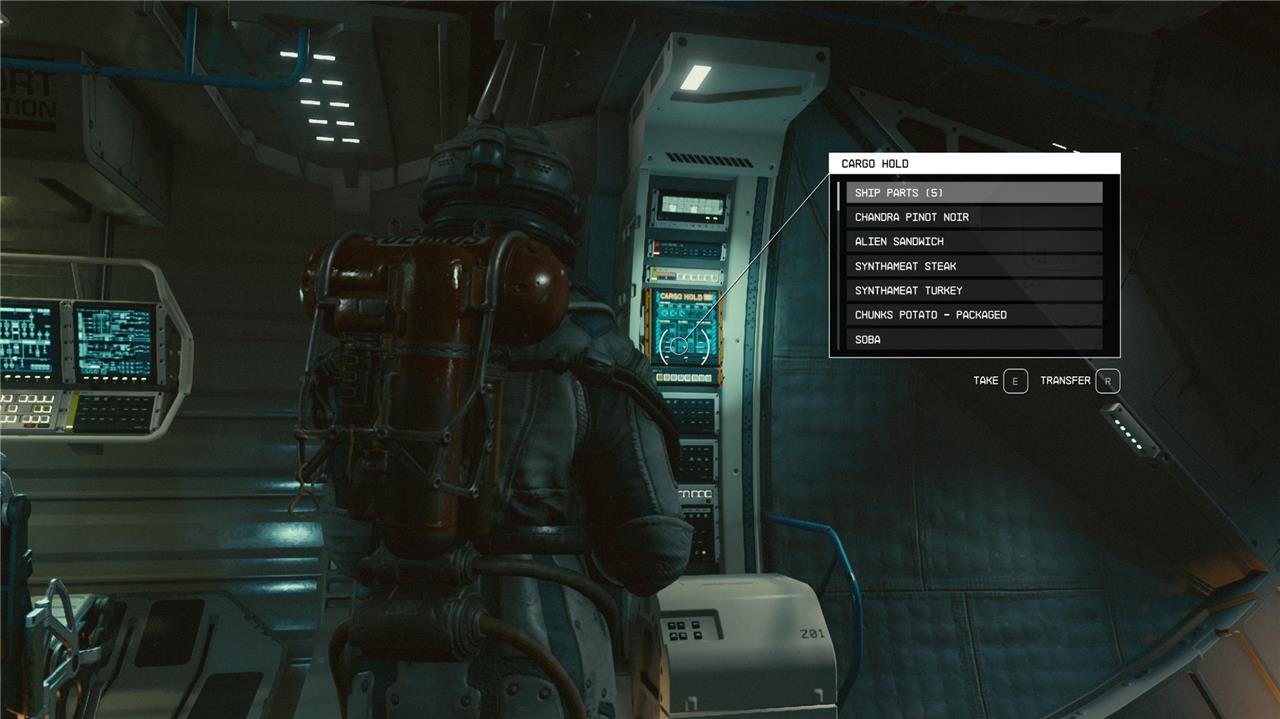
You can also check your cargo hold inventory (but not necessarily withdraw or deposit into it, unless you’re nearby) by selecting the “cargo hold” option from your ship menu.
If you’re trading with a seller near your ship, you can also opt to sell straight from your cargo hold, by again pressing “Q” or LB after you start trading with them. These buttons will toggle the ability to buy, sell, and sell from your ship inventory, which is nice for getting rid of loads of loot.
The Frontier (the default ship you have at start) can hold up to 450 kg, so you can use it to store extra armor you might want to give companions, weapons you might want to save for later, or just masses of mugs and snacks you’ve collected on your journey. Your ship can be upgraded later to hold way more, so don’t stress if the Frontier is feeling cramped.
How can I quickly access my ship storage while exploring in Starfield
To quickly access your ship storage while exploring in Starfield, you can open the Character Menu, select “Ship,” and then click the “Cargo Hold” button located at the bottom-right corner of the ship screen-this works from anywhere, so you don’t need to be near your ship.
If you are inside or piloting your ship, you can open your inventory and press Q on PC or LB on Xbox to switch directly to your ship’s cargo hold for fast item management.
Additionally, when near your ship, you can interact with the cargo hold console inside the ship’s cockpit to access the storage as a loot container, allowing quick transfers between your inventory and ship storage.
Note that while you can view and manage your ship’s cargo remotely within about 500 meters, transferring items into or out of storage typically requires proximity to the ship.
How do I access my ship storage from anywhere in Starfield
You can access your ship storage from anywhere in Starfield by opening the Character Menu, selecting “Ship,” and then clicking the “Cargo Hold” button located at the bottom-right corner of the ship screen. This method works regardless of your proximity to the ship, allowing you to view your ship’s stored items remotely. However, to transfer items between your personal inventory and ship storage, you generally need to be inside or near your ship.
Additionally, if you are on your ship, you can open your inventory and press Q on PC or LB on Xbox to quickly toggle to your ship’s cargo hold for easy management.
Note that while you can view and manage your ship’s cargo remotely, accessing outpost storage from your ship requires being at the outpost itself and having the proper transfer stations built.
