
Your Adventurer Plate in FFXIV is more than a name tag-it’s your character’s first impression. Whether you want a fierce battlefield portrait or a graceful pose that fits your style, learning how to set and customize these plates lets your personality shine through every encounter.
After playing around with the new system out of beta, we have a rundown on how to make it work. However, note that these solutions may not be the fix-all for you, though they did help us.
How do Adventurer Plates and portraits work?
Adventurer Plates serve as customizable profile cards that showcase your character’s appearance, title, and personal greeting. Portraits, on the other hand, display your character in specific poses, outfits, and lighting setups, often used in duties, PvP, or social interactions. Once created, these elements update automatically when linked to gear sets, letting players present a consistent look that reflects their preferred style and personality.
Adventurer Plates are the little Warrior of Light business cards you can make that display whatever information you want. You can access and set them them up through the “character” button and then by selecting “Adventurer Plate” on the dropdown.
On the plate, you can set one snapshot of your character to appear by selecting “edit portrait.” This snapshot will appear as your Adventurer Plate photo even if you are not currently that job or wearing that set of armor.
For example, if my Adventurer Plate is a Red Mage wearing a raincoat, it will show up as that – even if I’m playing as Warrior, or if my Red Mage has a different outfit equipped.
This is not to be confused with portraits, which is available from the next dropdown option under “Adventurer Plate.” You can use these as “instant portraits” which is what your party members will see when you do multiplayer content.
However, in order for your instant portrait to work, you have to be wearing the same gear in the portrait as you are in the content you’re running, even if you have glamoured over the equipment. If you changed any equips, whether its glamour or not, make sure to resave your portrait before running content, or you’ll get the default mugshot portrait.
If you are playing as the job represented in your Adventurer Plate, the plate’s portrait, your instant portrait, and your current equips also must be wearing the same gear or you will get the default mugshot. Whew.
If your gear does not match up, you should get a little error triangle next to the portrait like so:
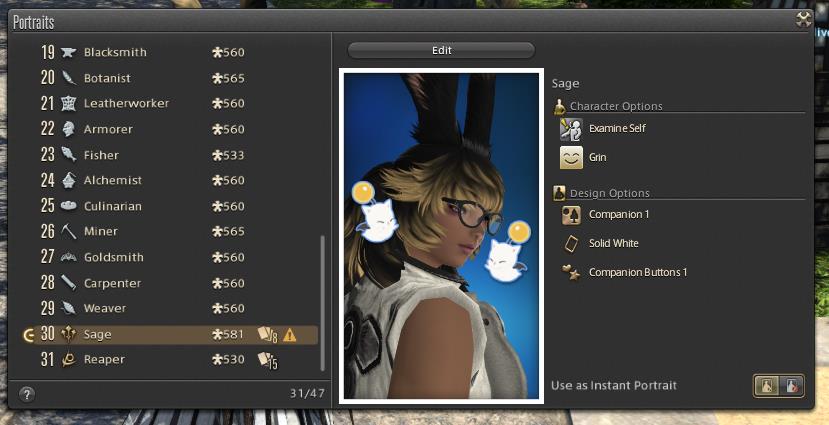
Why isn’t my instant portrait working?
Instant portraits can stop working if the settings connected to your Adventurer Plate and gear set are out of sync. Each gear set needs its own saved portrait, and any change in equipment, glamours, or character appearance can disable the portrait until it’s updated. Reopen the Portrait menu, edit the matching set, and re-save it to refresh the data. If that doesn’t help, try switching gear sets or re-equipping items to trigger a reload.
The answer is that you probably have mismatched gear you might not be noticing. The other answer is that portraits seem kind of buggy, so you might just need to fiddle with them a bit to make them work.
Try doing any of the following to fix your issue:
- Retake your Adventurer Plate portrait and save it. Then resave the matching job instant portrait for it.
- Make sure your gear set is updated. (The rotating arrows on your character menu should be grayed out if it is.) If it wasn’t, update it and resave your portraits.
- If the last time you saved your portraits was before the patch 6.3 update, resave them.
- This may sound silly, but very meticulously check your gear between your Adventurer Plate portrait and instant portrait. We had an un-glamoured ring causing us problems for ours, which we didn’t even realize was glamoured in the portrait, since it’s not part of our glamour plate. Yeesh.
You can test if your portrait works by heading into any duty while unsynced. Entering unsynced will allow you to skip the queue, jump in quickly, and then leave (once you check your portrait) without penalty.
How to unlock more Adventurer Plate designs and frames
Unlocking more Adventurer Plate designs and frames in FFXIV involves acquiring Framer’s Kits and completing specific content like duties, quests, achievements, and PvP rewards.
Framer’s Kits
These items provide new backgrounds, frames, borders, and accents for plates and portraits. Purchase role-specific kits (e.g., tank, healer) using Trophy Crystals from the Crystal Quartermaster at Wolves’ Den Pier (X:4.5, Y:6.1). Crystals come from PvP like Crystalline Conflict, Frontline, or season rewards.
Other sources include vendor purchases after achievements (e.g., Island Days Framer’s Kit from island sanctuary vendors post-patch 7.3) or duty clears.
Content Rewards
-
PvP: Role kits via Trophy Crystals; tribal quests and Ultimate raids also reward crystals.
-
Duties/Quests: Clear specific trials, raids, or quests for unique designs (e.g., preview locked items in-game via edit lists, sorted by unlocked/unobtained).
-
Achievements: Long-term goals unlock premium kits.
-
Events/Other: Seasonal rewards, Mog Station (paid companion app imports), or expansions like Dawntrail add more.
Preview and Apply
In the Adventurer Plate editor, click arrows next to options to preview all items (even locked) with unlock hints. Apply kits directly in Edit Plate Design or Edit Portrait tabs.
Over 100 kits exist as of recent patches, with free trial limits around 42-100; track progress on sites like ffxivcollect.com.
List of all achievements that unlock Adventurer Plate frames
Achievements unlock many Adventurer Plate frames via Framer’s Kits rewarded at various ranks (Bronze through Final) across PvP series, alongside select direct unlocks from quests and duties. While Framer’s Kits are often tied to series progression (not single achievements), specific achievements grant unique kits.
PvP Series Achievements
These reward tiered Framer’s Kits (e.g., Bronze/Silver/Gold) per series and map, earned via Series Malmstones in Crystalline Conflict or Frontline. Examples include:
-
Series 1-13 (patches 6.1-7.2): Kits for each metal tier per patch/series.
-
Seal Rock Framer’s Kit: Series 7 Level 10.
-
Red Sands Framer’s Kit: Series 7 Level 20.
-
Clockwork Castletown: Series 6 Level 10 (7.0).
-
Volcanic Heart: Series 6 Level 20 (7.0).
Full lists span patches 6.1+ with 10+ tiers per series (e.g., Rising, Endless, Final).
Specific Achievement-Unlocked Kits
-
Adventurous Angling Framer’s Kit: “On A Boat V” (3,000,000 fishing points).
-
Others via vendor exchange post-achievement, like Yo-kai Watch Kit from “You Must Needs Befriend Them All II” (20,000 MGP during event).
Direct Quest/Ultimate Unlocks (No Kit Needed)
These auto-unlock frames upon completion:
-
Futures Rewritten: Futures Rewritten (Ultimate) (7.2).
-
Omega Protocol: The Omega Protocol (Ultimate) (6.4).
-
Unending Coil of Bahamut: The Unending Coil of Bahamut (Ultimate) (6.2).
-
Dragonsong’s Reprise: Dragonsong’s Reprise (Ultimate) (6.2).
-
Job quests (e.g., Viper Simple: Enter the Viper (7.0); Paladin Simple: Paladin’s Pledge (6.1)).
Check in-game plate editor previews for lock hints, or sites like ffxivcollect.com/ffxiv.consolegameswiki.com for trackers (100+ total as of 7.x).
