
Ready to leap across the stars in Starfield? Mastering your ship’s Grav Drive power allocation is the key to unlocking faster, farther grav jumps-letting you explore new planets and star systems with ease. Learn how to efficiently charge your Grav Drive, optimize power distribution, and upgrade your ship to conquer the vast galaxy like a true space explorer.
Our Starfield grav drive guide explains how to power up your grav drive for a grav jump, plus an explanation of what that pesky “grav drive pending” warning means, and a rundown of the grav drive’s limitations.
How to grav jump
To grav jump in Starfield, first take off and fly your ship into open space. Then, open the starmap from the pause menu and select the star system and planet you want to travel to, provided they appear as accessible white dots on the map. Next, set your course and allocate power to your ship’s Grav Drive via the power management menu-this is crucial, as the Grav Drive needs energy to charge before jumping. The more power you allocate, the faster the Grav Drive charges. Once charged, select “Jump” to initiate the grav jump and travel to your chosen destination. After arriving, you can choose a landing spot on the planet map. Keep in mind that if the destination is beyond your current jump range or fuel capacity, you may need to upgrade your Grav Drive or fuel tanks or make intermediate jumps through explored systems.
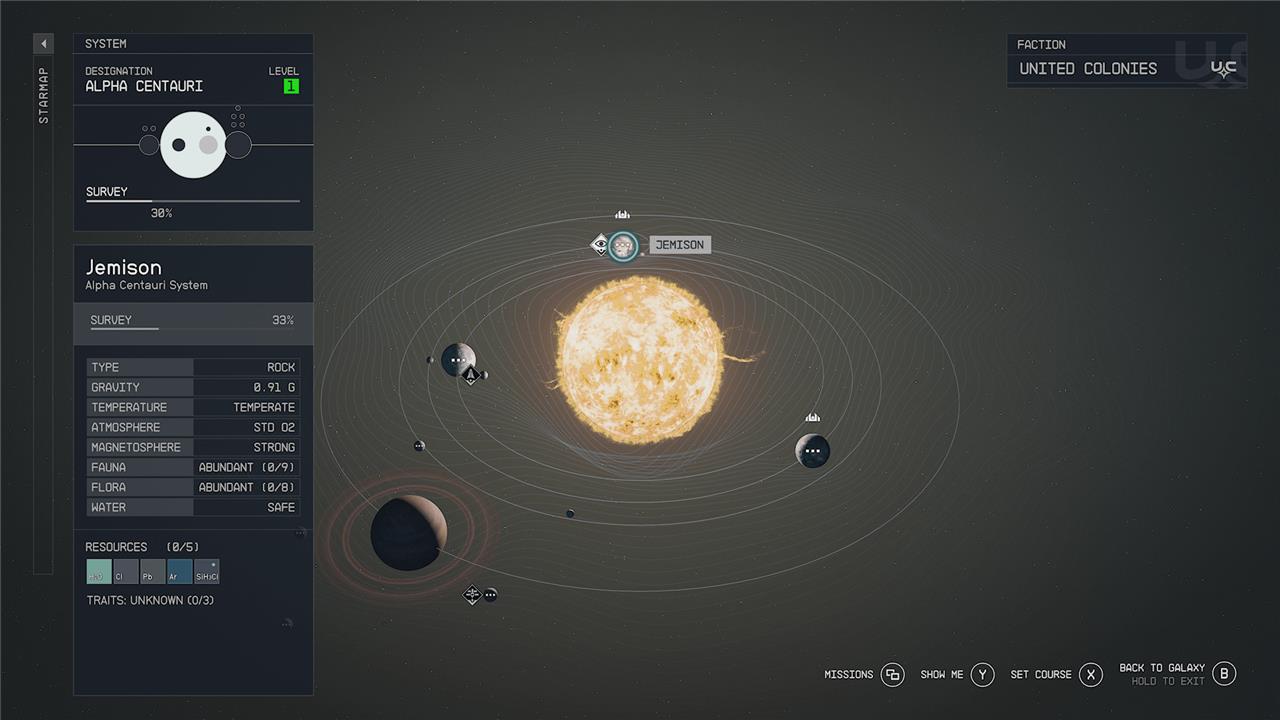
Your first visit to a new star system means picking the star from the menu, jumping to the star system, picking a planet (or moon) to visit, and then landing on that planet at a landing target. Once you’ve done all that, you can fast travel to that landing target again with a lot less work.
How to power up your grav drive
To power up your grav drive in Starfield, you need to allocate power from your ship’s reactor to the grav drive through the power management menu, accessible via the ship’s controls using the arrow keys on PC or the D-pad on consoles. The grav drive requires at least one bar of power to initiate a grav jump, and allocating more power will reduce the charging time before the jump can occur. You can upgrade your grav drive and increase its jump range by visiting Ship Services Technicians found near starports in major cities, who also offer ship parts and upgrades. Once powered and charged, you can select your destination on the starmap and execute the grav jump to travel between star systems efficiently. Remember to redistribute power away from the grav drive after completing your jump to optimize your ship’s systems.
Performing a grav jump, though, requires you to have power available for your grav drive. While piloting your ship, you’ll see your power distribution in the lower left of your HUD. This is how you’ll balance out power to your weapons, shields, and engines during combat (by using the D-pad). It’s also where you’ll assign power to the grav drive.
What ’grav jump pending’ means
The phrase “grav jump pending” in Starfield means that you have selected a destination for your ship to jump to, but the Gravity Drive does not currently have enough power to initiate the jump. This warning appears when the grav drive is active but not powered, so the jump cannot proceed until you allocate power to the GRV system in your ship’s power distribution HUD. To fix this, you need to reduce power from other ship systems like weapons or engines and transfer it to the grav drive. Once the grav drive has sufficient power, you can charge it and perform the grav jump to your chosen star system.
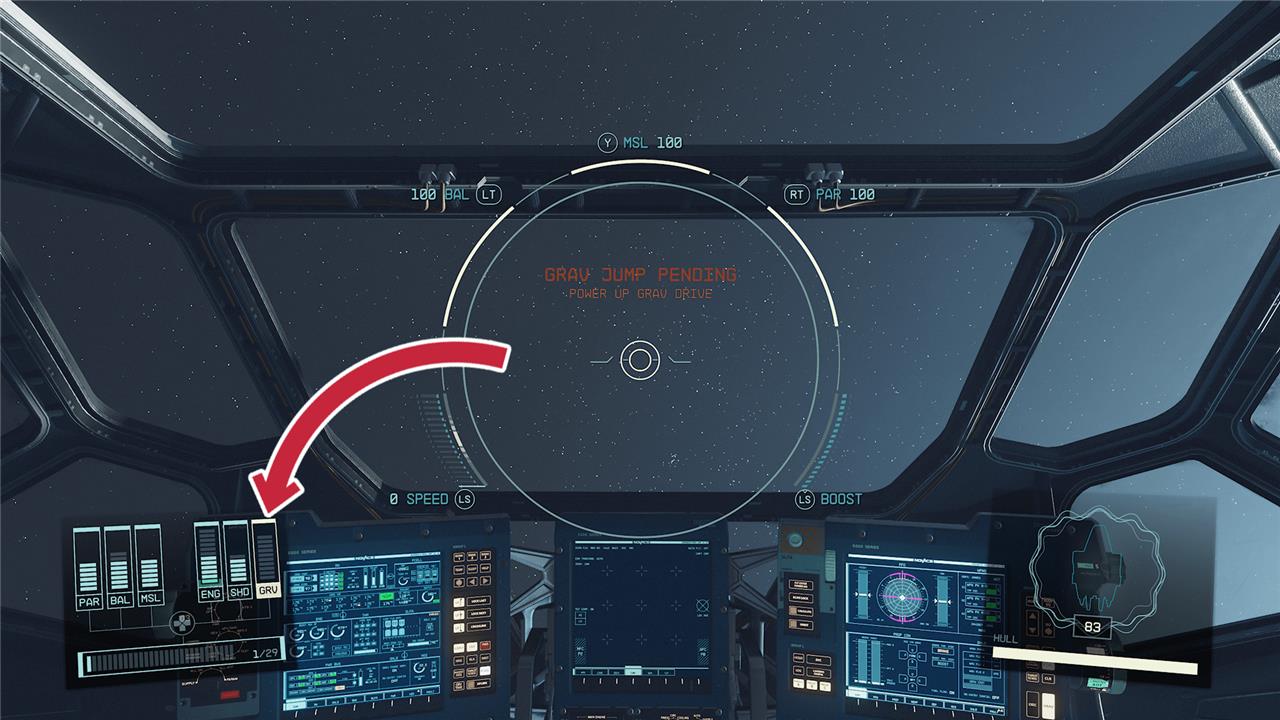
If your grav drive is completely powered down and there’s no extra power from the reactor available, you’ll get a warning on your screen that says “grav jump pending.” This just means that you’ve picked out a destination in the Starmap menu, but the grav drive doesn’t have power. As soon as you free up power and assign at least one slot of juice to the grav drive, the countdown will start and you’ll jump away.
The speed of that countdown is not measured in seconds, mind you. It’s actually a measure of how much power you have assigned. If you only have one notch allocated to the grav drive, it’ll tick down slowly. If you max it out, it’ll count down quickly – helpful information if you’re trying to grav jump out of a firefight.
How far can you grav jump?
The maximum distance you can grav jump in Starfield is 30 light years per single jump. This limit is determined primarily by your ship’s Grav Drive thrust and the ship’s mass, with lighter ships and more powerful drives allowing for longer jumps. You can increase your jump range by upgrading your Grav Drive, reducing your ship’s mass, and improving your Astrodynamics skill, which also helps reduce fuel consumption. Fuel tanks determine how far you can travel on a route overall, but ships never run out of fuel automatically as they refuel upon entering star systems. Planning your jumps within the 30 light-year range is essential to avoid “Out of range” warnings on the star map.
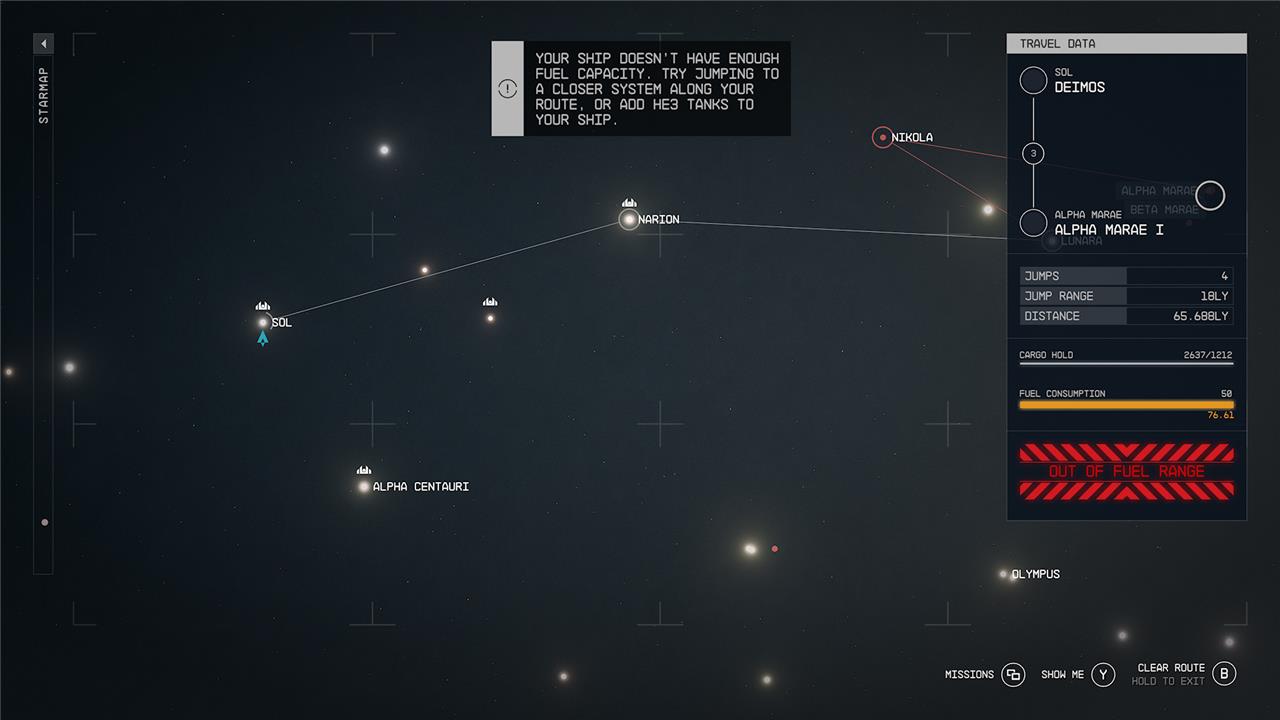
There are a few limitations on how far your ship can grav jump. Mostly, you’ll see this as warning on the Starmap saying you can’t take the trip your plotting.
It’s never really clear, though, how to resolve the issue(s). The limitations are all interconnected, and involve three things: the route, the grav drive jump range, and your fuel.
Route
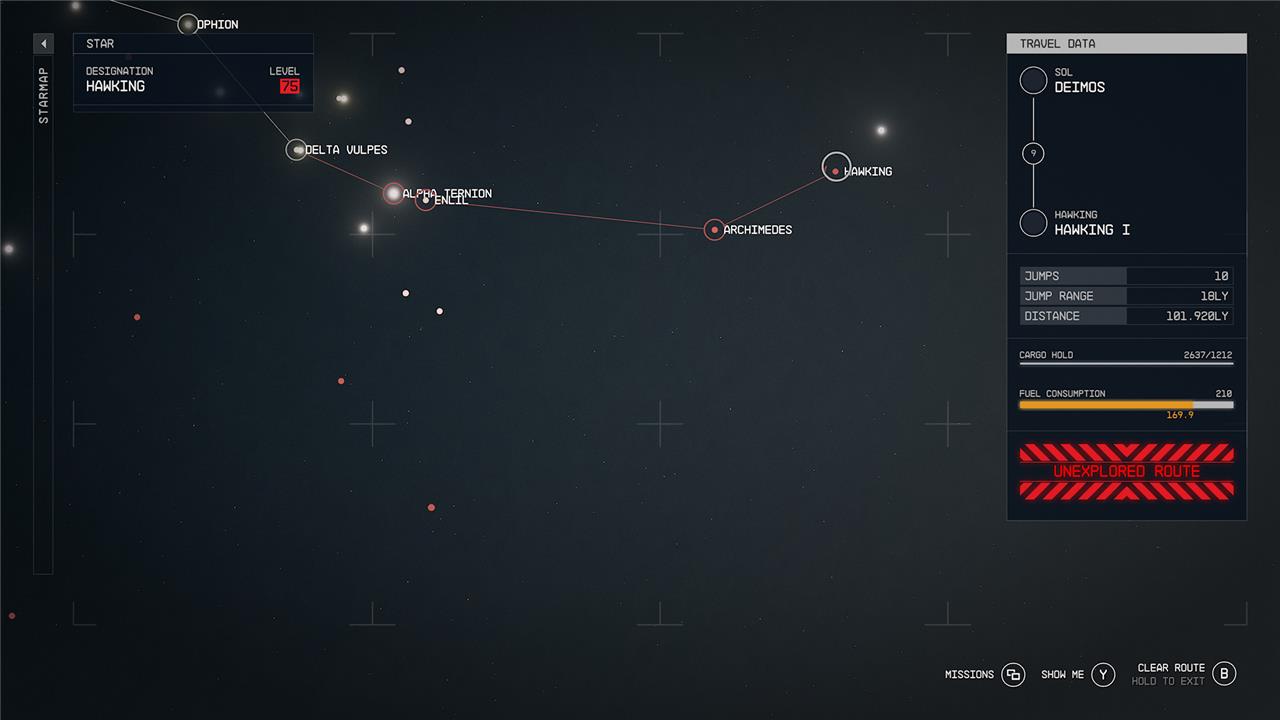
If you hover over a distant star in the Starmap, you’ll notice that the route it plots for you isn’t a straight line – it bounces between stars in shorter (grav) jumps that eventually end up at your target. But you can’t make any trip that jumps through a star system you haven’t visited before and, if you try, you’ll see an “Unexplored route” warning.
This is represented visually by certain legs of your trip turning red (parts you’re able to jump are in white). Trace that red part of the line back to where it stops being white, and that’s the first system you haven’t visited yet.
Grav drive jump range
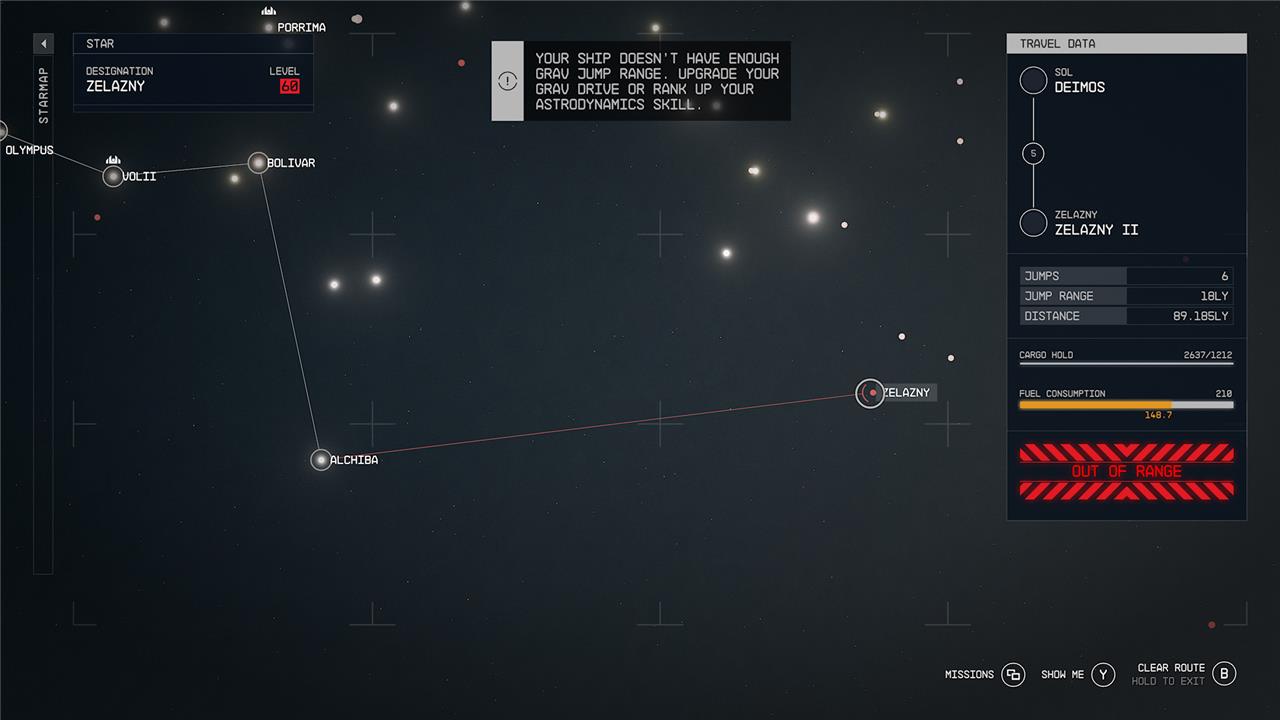
The next, slightly more intuitive limitation comes from your ship’s grav drive. How far your ship can jump – its jump range – is the maximum distance between two stars (legs on that long route) your ship can handle. If you try to make a jump that exceeds your jump range, you’ll see a “Out of range” warning on the Starmap.
Your ship’s grav drive you have determines the maximum that its range can be, but the mass of your ship will reduce it. In order to increase your jump range, you’ll have to upgrade to a better grav drive with the Ship Builder.
Fuel
The last limitation is fuel – and it’s much less clear how this works. The route you take to get between systems is made up of smaller jumps through systems you’ve visited before (see above). The maximum distance covered by each of those legs is determined by your grav drive’s jump range (above). The number of legs that make up any given trip is limited by your fuel.
How can I maximize my grav drive power for faster jumps in Starfield
To maximize your Grav Drive power for faster and longer jumps in Starfield, follow these key steps:
-
Allocate more power to the Grav Drive via your ship’s power distribution menu. Increasing power speeds up the Grav Jump charge time, allowing quicker jumps.
-
Upgrade your Grav Drive module to a higher-tier model through the Ship Builder or by visiting Ship Technicians. Better Grav Drives increase your maximum jump range significantly.
-
Reduce your ship’s mass by minimizing cargo or equipment weight, as heavier ships reduce jump range despite Grav Drive power.
-
Invest in the Astrodynamics skill, which boosts jump range by up to 30% at higher ranks, enhancing your Grav Drive’s effectiveness without hardware changes.
-
Manage power distribution dynamically, shifting power to Grav Drive when preparing to jump, then reallocating to weapons or engines during combat or travel.
By combining these strategies-upgrading your Grav Drive, optimizing power allocation, managing ship mass, and improving skills-you can achieve faster charging and longer-distance Grav Jumps in Starfield.
What ship upgrades increase grav drive power for faster jumps in Starfield
To increase your Grav Drive power for faster and longer jumps in Starfield, upgrading your ship’s Grav Drive module is essential. Here are some notable Grav Drive upgrades that enhance jump thrust and efficiency:
-
Apollo GV300 Grav Drive: Offers a high Grav Jump Thrust of 50 with relatively low mass, making it arguably the best Grav Drive for long-distance jumps. It requires Rank 4 Starship Design and a Class C Reactor and becomes available around level 52.
-
J-52 Gamma Grav Drive: Also provides a Grav Jump Thrust of 50 but with slightly higher mass than the Apollo GV300. It shares similar requirements and availability as the Apollo GV300.
-
NG340 Grav Drive: A Class C Grav Drive with 45 Grav Jump Thrust and lower mass compared to similar drives, unlockable at level 48. It requires Rank 3 Starship Design and a Class C Reactor.
-
SGD 3300 Grav Drive: Another Class C option with 45 Grav Jump Thrust but higher mass, available at level 52 and requiring Rank 4 Starship Design and Class C Reactor.
-
Helios 400 Grav Drive: A Class A Grav Drive with 27 Grav Jump Thrust and low mass, accessible earlier in the game (level 22), suitable for early to mid-game upgrades.
-
R-4000 Alpha Grav Drive: Similar to Helios 400 in thrust but with slightly higher mass and requirements, also available around level 22.
Upgrading to higher-class Grav Drives (Class C) and better models increases your ship’s jump thrust, allowing for longer and faster Grav Jumps. Keep in mind that ship mass affects jump range, so balancing upgrades with ship weight is important. You can upgrade your Grav Drive by visiting Ship Technicians at settlements and using the Ship Builder interface to swap to better models.
