
Ready to leave your mark on the cosmos? In Starfield, renaming your ship and changing your Home Ship is a hidden but rewarding way to personalize your spacefaring adventure. Whether you want a fresh identity for your trusty vessel or to switch to a new flagship, this guide will walk you through the surprisingly well-concealed steps to make your ship truly yours-without spending a single credit.
Our Starfield guide will teach you how to change your Home Ship and how to rename ships in your fleet.
How to change your Home Ship in Starfield
To change your Home Ship in Starfield, you have two main options. The first and most straightforward method is to visit a Ship Services Technician at any major settlement or spaceport. Speak to the technician, choose the option to view and modify your ships, then navigate through your ship inventory to select the one you want to designate as your Home Ship. On PC, press the H key; on Xbox, press the Menu button to set it as your Home Ship. Alternatively, simply fast travel, grav jump, or land on a planet with the ship you want to make your Home Ship, and the game will automatically assign it as your new Home Ship. Both methods allow you to switch your Home Ship quickly and easily.
In Starfield, your Home Ship is just the ship that’s currently active that you fly around in. You can own (or steal) multiple ships, but you can only have one active at a time.
There are plenty of reasons you’d want to change your Home Ship over the course of a game. For example, you might use the Ship Builder to equip different ships for different purposes – like hauling cargo, fighting, or smuggling contraband. Or maybe you’ve just stolen an enemy ship and it became your Home Ship by default.
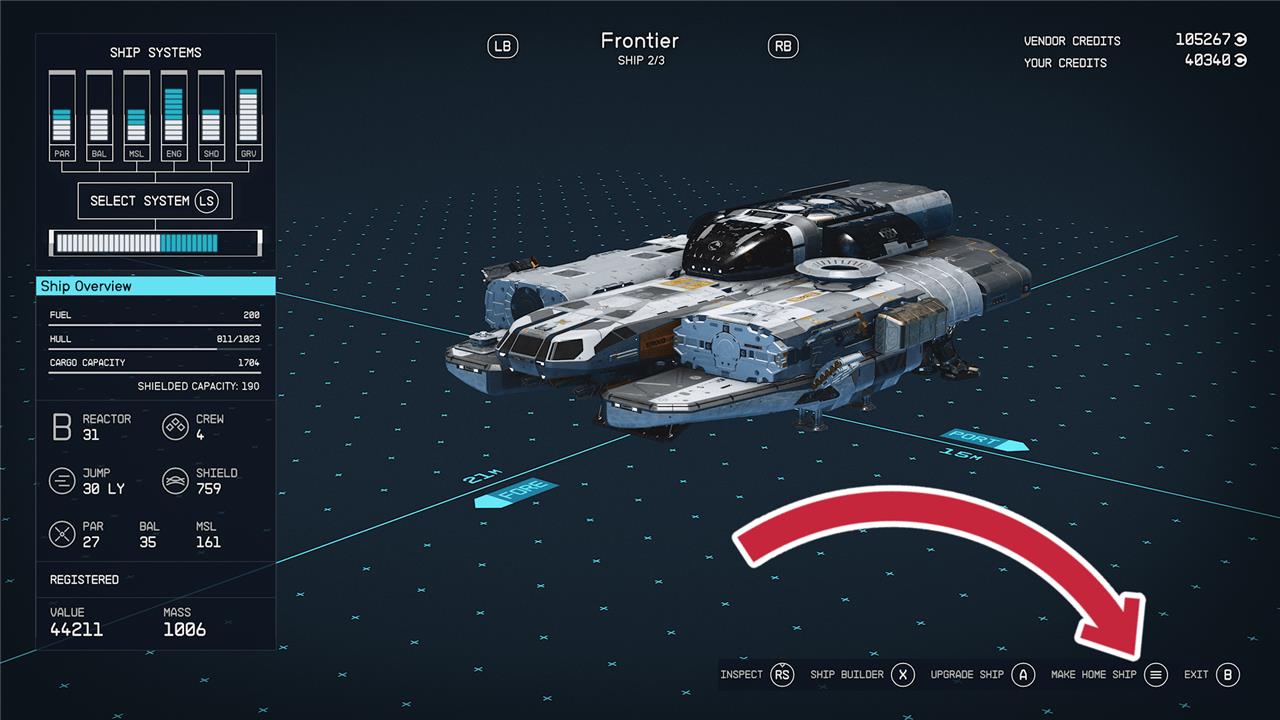
To switch back, you’ll need to head to a spaceport and talk to a Ship Services Technician. There, you can choose either “I’d like to view and modify my ships” or “let me see what ships you have for sale.” In that menu, scroll through your ships to find the one you’d like to set as your Home Ship and hit the menu button.
When you swap out your Home Ships, as much of your cargo and crew will transfer as can fit on the new ship.
How to rename a ship in Starfield
To rename a ship in Starfield, first locate and speak to a Ship Technician at any major spaceport or settlement, such as the one near the landing pad in New Atlantis. Choose the option to “view and modify my ships,” then select the ship you want to rename. Enter the Ship Builder menu, then click on “Flight Check,” which will reveal the “Rename Ship” option. Select this, type in your new ship name (up to 14 characters), and confirm the change twice to save it. Renaming your ship is free and can be done as many times as you like, allowing you to personalize your vessel easily.
Maybe the name Frontier just isn’t doing it for you anymore or maybe you’ve stolen a ship and would like to name it something better than the previous owner had chosen. No matter the reason, there is a way to rename your ship. To do it, you’ll have to head in to the Ship Builder.
Note: If it’s a stolen ship, you’ll have to register it first.
At a Ship Services Technician, choose the “I’d like to view and modify my ships” option and then hit X to open the Ship Builder.
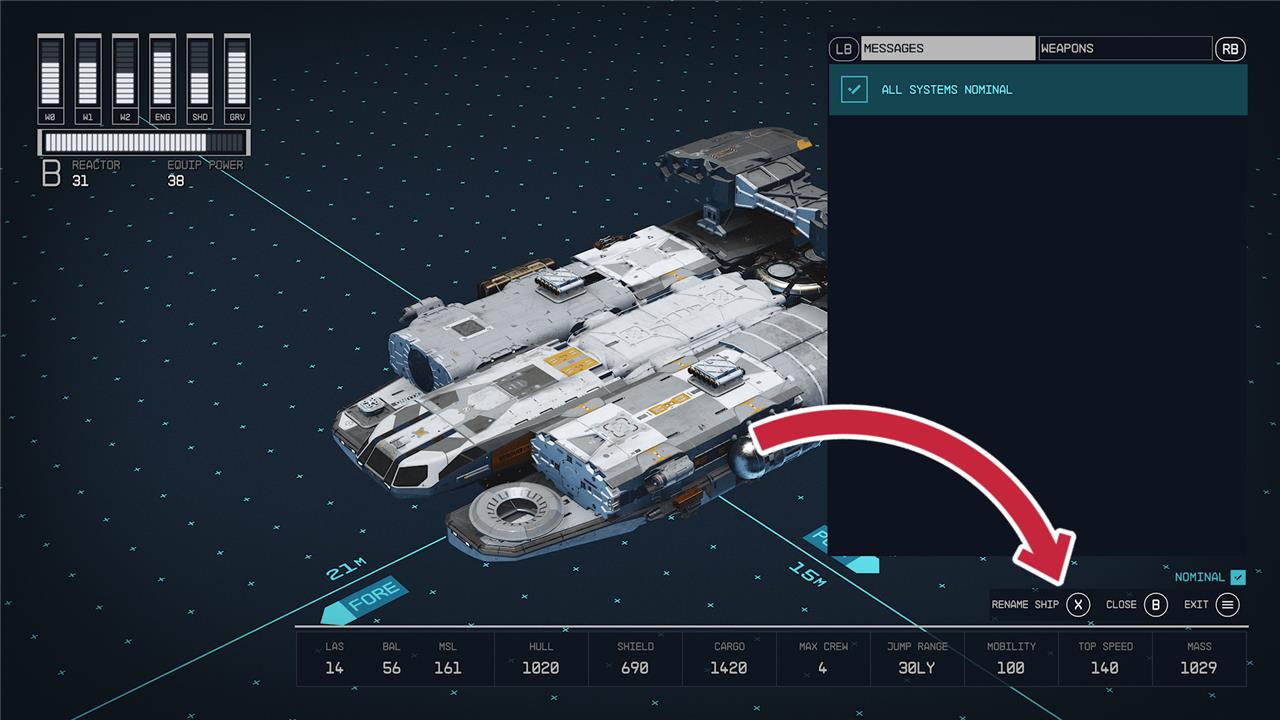
You don’t have to change anything about your ship. Just hit the menu button to open the Flight Check. With that open, you can hit the X button to rename your ship (for free).
Want to know the hidden trick to rename your ship easily in Starfield
To rename your ship in Starfield, head to a Ship Services Technician, typically found at spaceports. Ask to view and modify your ships, then enter the Ship Builder mode. Open the Flight Check menu, where you’ll find the option to rename your ship at no cost.
Here’s the hidden trick simplified:
-
Find a Ship Services Technician at any spaceport.
-
Ask to view and modify your ships.
-
Enter Ship Builder mode.
-
Open the Flight Check menu.
-
Rename your ship.
What’s the secret method to rename your ship without bugs in Starfield
The secret method to rename your ship in Starfield without encountering bugs involves a precise sequence after entering the renaming menu: first, click rename and type your desired ship name; then exit the renaming menu; next, close the Diagnostics menu entirely before saving your ship. This extra step of closing the Diagnostics menu before saving ensures the game registers the new name properly and avoids the common bug where the ship reverts to its old name. Additionally, the standard process requires visiting a Ship Services Technician at a spaceport, selecting “view and modify ships,” entering Ship Builder mode, opening the Flight Check menu, and then choosing the rename option (usually pressing G on PC). If this method still fails due to bugs, some players have found workarounds such as duplicating a ship, renaming the duplicate, and selling the original to bypass the issue. Keeping your game updated and restarting it a few times can also help mitigate rename bugs.
