
In Hello Kitty Island Adventure, time travel might seem like a tempting shortcut to boost your friendship levels and unlock rewards faster, but beware-manipulating your device’s clock can lead to serious consequences, including game errors, loss of multiplayer access, and even permanent bans from time-based events. This guide reveals how time travel works in the game, the risks involved, and why the developers strongly advise against it despite its allure.
Much of the game progression in Hello Kitty Island Adventure is tied to the Frienship Level you reach with characters. The better friends you become with all the Sanrio cuties, the more quests and items you can unlock. You can level up your friendship with characters by giving them gifts, but the game limits the number of items you can give away every 24 hours in real time.
Time traveling is a way to circumvent this limitation, but the developers of Hello Kitty Island Adventure highly discourage time traveling, warning that it could restrict certain features of the game. (Update, Feb. 7: We’ve included more detailed comments from the developer about specific restrictions.)
The game doesn’t explain much along these lines, so this guide will teach you how time works in Hello Kitty Island Adventure and show you how to time travel, along with a broader explanation about the risks if you choose to do so.
How time works in Hello Kitty Island Aventure
Hello Kitty Island Adventure features a unique time system that combines a short in-game day-night cycle with a 24-hour clock based on the actual time set on your device. The in-game day lasts about one hour of real time and affects environmental elements like sunlight and creature appearances. Meanwhile, the real-time 24-hour clock governs key gameplay mechanics such as the daily limit on gifts you can give to characters to increase friendship levels and access to daily rewards. This real-time clock resets at 2:00 a.m. EST, meaning certain game progressions depend on waiting for the actual day to change. Players can manipulate the system clock on their device to “time travel” and bypass these waiting periods, but doing so carries significant risks including potential game errors, loss of multiplayer access, and corrupted save data. The developers strongly advise against time travel as it disrupts the intended gameplay experience and can cause irreversible issues.
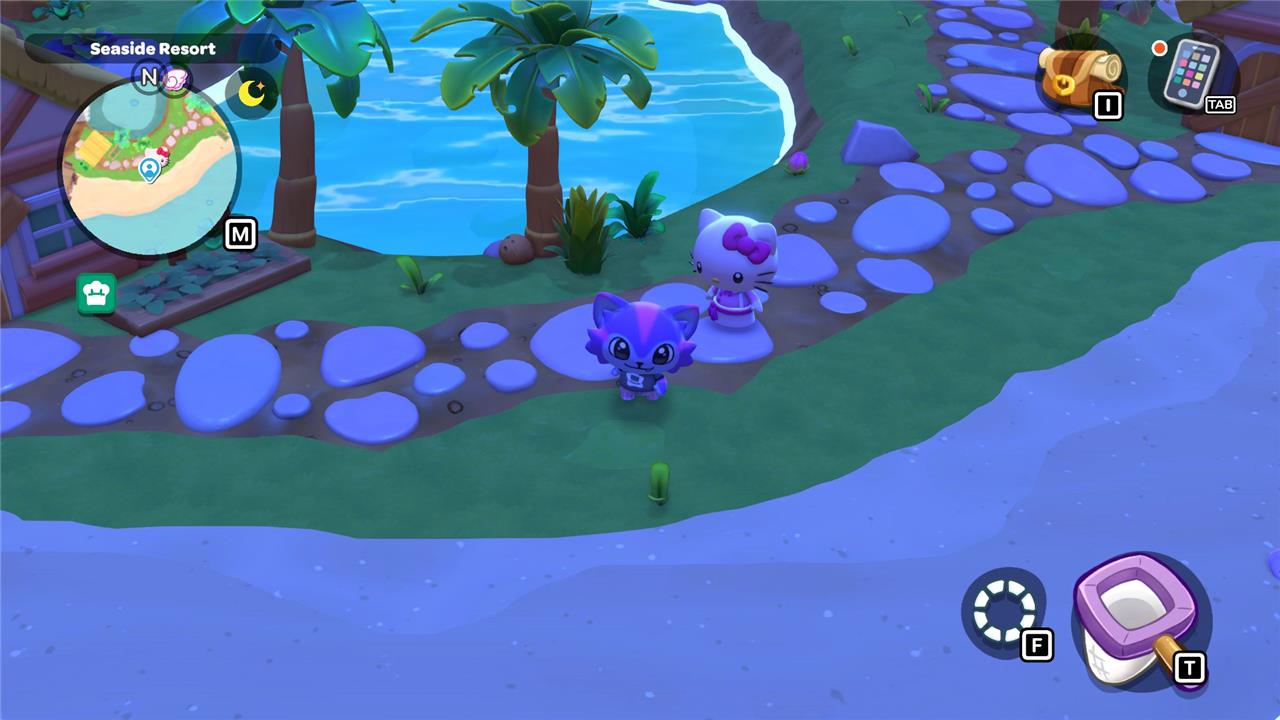
Hello Kitty Island Adventure uses a time system that combines a short in-game day cycle with a 24-hour daily clock based on the actual time. Each clock regulates different features in the game.
As you play, the time of day on the island changes, as indicated by the amount of sunshine and the little sun and moon icons just above the minimap. The time of day in the game determines factors like what kinds of critters and fish spawn in a certain area. According to AELGAMES’s testing, one in-game day lasts one hour in real time. If you have a quest that’s dependent on the in-game time and you don’t want to wait, you can go to a cabin with a bed and select a specific time to wake up.
The game also uses a 24-hour timer based on the real-world date and time set in your gaming system. This timer is much more important because it restricts the number of gifts you can award to a specific character without using special items. You can also unlock daily rewards based on real-world time. For the real-world timer, a new day starts at 2:00 a.m. EST.
Can I time travel in Hello Kitty Island Adventure?
In Hello Kitty Island Adventure, time travel is technically possible by changing the date and time settings on your Nintendo Switch or PC, which affects the in-game clock and allows you to skip ahead to unlock rewards and quests faster. However, this practice is strongly discouraged by the developers because it can cause serious issues such as game errors, permanent bans from multiplayer, and loss of access to time-based events. Time traveling may also corrupt your save file, forcing you to restart the game from scratch. Therefore, while you can time travel, doing so carries significant risks that can break your game experience and is not recommended.
If you want to get around the restrictions placed by the real-world 24-hour clock, you will need to “time travel.” This is the term used to describe the process of editing the system clock in your PC or Nintendo Switch to “trick” the game into thinking a day has passed in the real world. Hello Kitty Island Adventure is extremely sensitive to time travel. According to a representative of its creator, Sunblink, time traveling can introduce “irreversible” and “game-breaking” bugs that take away your ability to participate in season content.
In a statement to AELGAMES, a representative from Sunblink provided a short list of examples of what could happen to your save file if you do time travel. To quote:
- Multiplayer
- Players will not be able to play with friends or complete multiplayer quests, even if the other players have also time-skipped
- Players will be unable to trade with other players
- No access to friend cabins
- Timed Event Exclusion
- Exclusion from future seasonal events and/or limited-time content, even if you engage with them in the future (such as birthdays or holidays), because their content is not yet released/implemented
- Resetting of event calendars when moving between years
If you’ve time-traveled already and are now worried about your game you at least have one option: start a new save file.
“Note that these effects are per save file and kick in when the save file is accessed. Normal travel through time zones and across the dateline should not trigger any of these.” The representative said, “Adjusting the clock when the game is closed, as long as it is reset to real time, should not trigger any of these.”
How to time travel in Hello Kitty Island Adventure
In Hello Kitty Island Adventure, time travel involves manually changing the date and time settings on your gaming device-whether a Nintendo Switch or PC-to trick the game into thinking a day has passed. This allows players to bypass the 24-hour real-time limit on gifting characters, which is essential for increasing friendship levels and unlocking new quests. To time travel on the Switch, you must close the game, disable internet time synchronization, adjust the system clock, and then reopen the game; on PC, you similarly disable automatic time settings and manually set the date and time before restarting the game. However, the developers strongly warn against time traveling, as it can cause serious issues such as corrupted save files, loss of multiplayer access, and permanent bans from time-based events. Fixing these problems often requires deleting your save and starting over, making time travel a risky strategy despite its potential benefits for faster progression.
If you still want to do it – despite the risks – here are some tips to keep in mind:
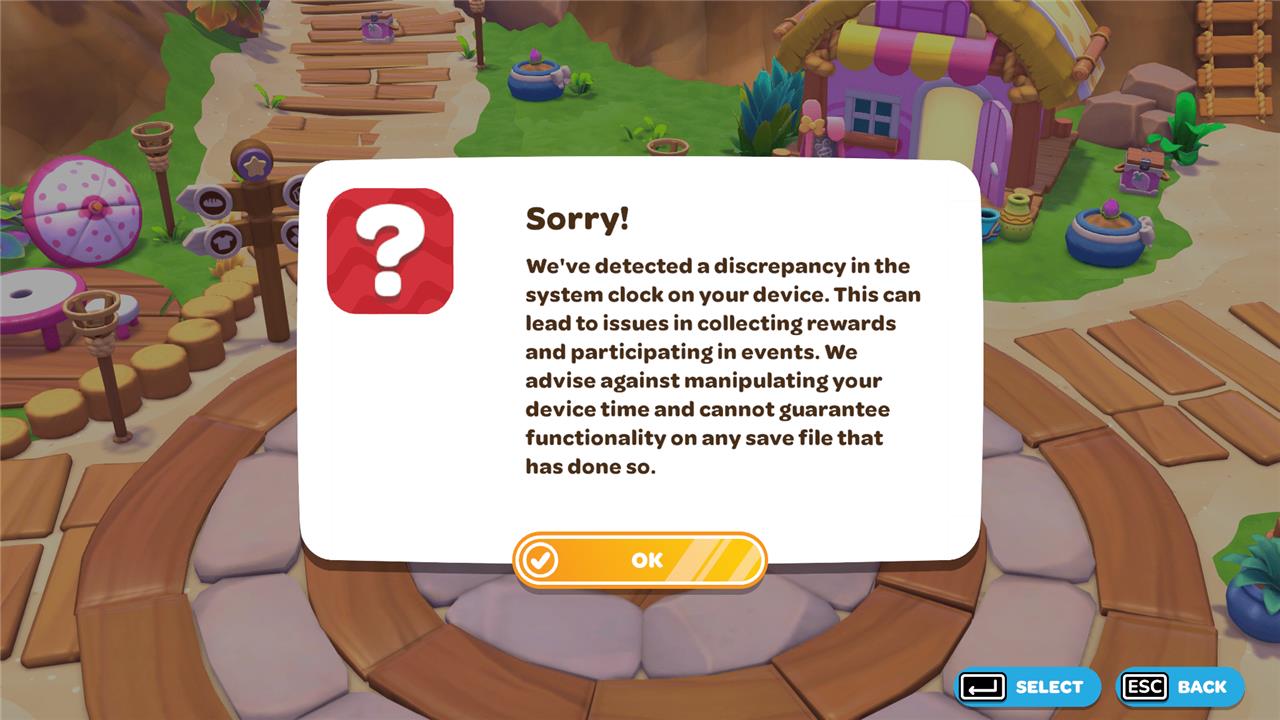
- Each time AELGAMES time traveled, we only set the date for a future date. When we did this, we were able to progress the game without issues. When we did time travel “backward” and set the date for an earlier time, the game displayed an error message appeared on when we logged in.
- Once you time travel, it’s difficult to correct the now-incorrect system date and time since it would require you to go backwards in time. There is a potential way to do this, but due to the real-life time and waiting it takes, AELGAMES has not been able to test a solution. We will update this article as soon as we can with our results. You might just have to put up with an incorrect time and date in your system – which is very annoying!
Here is how to time travel in Hello Kitty Island Adventure on the Nintendo Switch:
- Close Hello Kitty Island Aventure. Do this by going to the Switch’s Home screen by pressing Home button. Highlight the game’s icon, press the X button, and click “Close” in the dialogue box that appears.
- Go to your Nintendo Switch System Settings by selecting the gear icon on the home screen. Once there, scroll all the way down, and select “System.”
- Select “Date and Time,” and turn off the setting that says “Synchronize Clock via Internet.”
- Change the date or the time to your desired date.
- Reopen Hello Kitty Island Aventure and the date and time in the game will match whatever you set it to in the Switch’s system preferences.
Here is how to time travel in Hello Kitty Island Adventure on Windows PC:
- Close Hello Kitty Island Adventure on your PC.
- Go to “System Settings” on your PC and click the section, “Time & Language.”
- On the left-hand column, select “Date & Time.”
- Under that section, make sure the top two settings: “Set time automatically” and “Set time zone automatically” are toggled to “Off”
- Just below the toggles, there is text that says “Set the date and time manually.” Click the “Change” button below it.
- It will pull up a small menu. Alter the date on the menu to your desired date and time and select “Change.”
- Relaunch Hello Kitty Island Adventure.
Why does time travel in Hello Kitty Island Adventure carry such risks
Time travel in Hello Kitty Island Adventure carries significant risks because the game is highly sensitive to changes in the system clock, which it uses to regulate daily gift limits, event progress, and multiplayer access. Manipulating the device’s date and time to speed up gameplay can cause irreversible, game-breaking bugs that prevent participation in seasonal events, disable multiplayer features including trading and friend cabins, and corrupt the save file permanently. Unlike some other cozy games, the developers warn that once these issues occur, there is no way to restore the save file except by starting over. Additionally, time travel can disrupt in-game schedules and event calendars, further compromising the intended experience.
How do game-breaking bugs caused by time travel impact my progress in HKIA
Game-breaking bugs caused by time travel in Hello Kitty Island Adventure can severely impact your progress by causing irreversible errors that may result in the loss of previously collected items, quests, and friendship progress. Traveling back in time is especially risky, as it can trigger error messages and corrupt your save file, making recovery impossible. These bugs can also lock you out of online multiplayer features, including trading and visiting friends’ cabins, until you reset your system clock to the correct time. Additionally, time travel can disrupt time-limited events and visitor schedules, causing some characters to stop traveling or events to fail to trigger as intended, which may prevent you from completing certain quests or accessing exclusive content. Overall, these issues can force you to start the game over, losing all your hard-earned progress and rewards.
