
Tired of your gun running its mouth every two seconds? Here’s how to silence that chatty weapon in High On Life using the game’s hidden audio options-so you can finally enjoy the chaos without commentary.
Enemy and Gun Chatter setting
The Enemy and Gun Chatter setting controls how much your weapons and enemies talk during gameplay. You can lower or completely mute this chatter in the audio section of the settings menu. Adjusting it doesn’t affect combat mechanics or story progression; it just reduces the amount of dialogue interrupting your fights. It’s a quick fix if you want to enjoy the action without nonstop commentary from your talking guns.
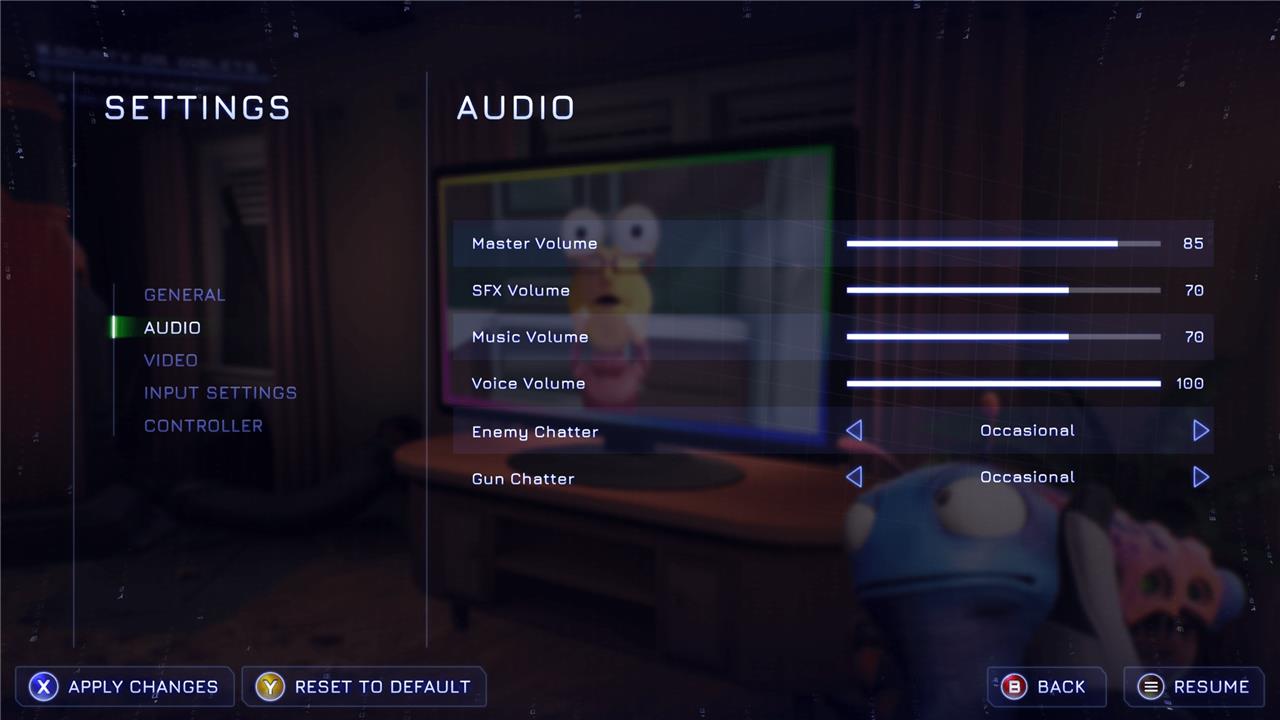
In the pause menu, select the second option, Audio. The last two options are Enemy Chatter and Gun Chatter. Each of these have three options: None, Occasional, and Frequent.
Both settings are on Frequent by default. Turning them both down to Occasional will give you a bit of a break from the constant dialogue. They’ll still pipe up pretty regularly, but it won’t be nearly as often.
Does muting Gun Chatter affect gameplay or story
Muting Gun Chatter does not change how the game plays or how the main story progresses; it only affects how often your guns talk during gameplay. It’s a comfort/immersion setting, not a difficulty or content toggle.
What actually changes
-
The guns’ jokes, comments, and banter are reduced or silenced during normal gameplay depending on the setting (None, Occasional, Frequent). You still keep all weapon functions, damage, abilities, and upgrades.
-
Core story beats and important dialogue are still delivered through cutscenes and key scripted moments, so you won’t soft-lock the game or break progression by muting chatter.
What you might miss
-
Some optional flavor lines, world-building jokes, and little reactive comments to what you’re doing can be skipped if Gun Chatter is set to None or Occasional. These are there for humor and personality rather than for giving you vital objectives.
If you’re worried, you can set Gun Chatter to Occasional instead of None so you keep rare comments without the constant talking.
How do you permanently mute Gatlians like Kenny
You can’t truly, 100% “hard-disable” Kenny or the other Gatlians, but you can get as close as the game allows so they’re effectively muted for normal play.
In-game “permanent” mute
Do this once and it will stick in your save unless you change it again:
-
Pause the game.
-
Go to Settings → Audio.
-
Set Gun Chatter to None.
That setting is saved to your profile, so every time you load that save the Gatlians (Kenny, Sweezy, Creature, Gus, etc.) will stay silent during exploration and combat until you manually change it.
What you can’t mute
Even with Gun Chatter on None:
-
Gatlians can still speak in key cutscenes and certain scripted story moments; these lines are treated as core dialogue, not “chatter.”
-
There’s no separate per-weapon or Kenny-only mute option in the menus, so you can’t silence Kenny while leaving the others talking through official settings.
So the practical answer: set Gun Chatter = None once, and from then on they’re effectively permanently muted during gameplay, with only unavoidable story dialogue left.
