
Unlock extra savings on your next Nintendo Switch purchase by mastering the art of using My Nintendo Gold Points – the digital currency earned from your game and DLC buys that can slash costs on future eShop transactions. Whether you shop digitally or register physical games, these points translate directly into discounts, making every purchase a step towards your next adventure. Ready to learn how to cash in on this rewarding system and maximize your gaming budget? Here’s your quick guide to spending My Nintendo Gold Points like a pro.
Nintendo announced in February that the Nintendo eShop will no longer award My Nintendo Gold Points for purchases starting on March 24.
This guide will explain what My Nintendo Gold Points are, show you how to use them, and explain their expiration date.
What are My Nintendo Gold Points?
My Nintendo Gold Points are a digital rewards currency that Nintendo Switch users can earn by purchasing eligible digital games, downloadable content (DLC), and select physical software through the Nintendo eShop or the My Nintendo Store. Each Gold Point is equivalent to one cent (USD) and can be redeemed for discounts on future digital purchases, including games, DLC, and Nintendo Switch Online memberships. While Gold Points were traditionally earned from purchases, Nintendo ended the ability to accumulate new Gold Points from digital or physical games released after March 24, 2025, though any existing points remain valid for 12 months from the date they were earned.
My Nintendo Gold Points is a kind of currency that you earn when you purchase certain Nintendo products, games, and DLC.
The most common way to earn Gold Points is by buying games via the Nintendo Switch eShop. However, you can also earn them by registering eligible physical software or by purchasing products at Nintendo New York. Once you accrue Gold Points by making purchases, you can use the points to make purchases on the eShop.
For each purchase made on the Nintendo eShop, you earn five percent of the amount you paid in Gold Points and one Gold Point is worth the equivalent of one cent in USD. So if you buy a $59.99 game on the eShop, you would get 300 Gold Points. This in turn could be redeemed for $3 towards a future purchase on the Nintendo eShop.
How to spend My Nintendo Gold Points
My Nintendo Gold Points can be spent as a digital currency to get discounts on eligible digital purchases in the Nintendo Switch eShop or on the official Nintendo website. When you are ready to buy a game or downloadable content (DLC), simply proceed to checkout and select the option to redeem your Gold Points. You can choose how many points to apply, which will reduce the total price of your purchase, with each Gold Point equating to one cent. If your points do not cover the full amount, you can pay the remainder with other payment methods. Gold Points can also be used towards Nintendo Switch Online memberships but not for auto-renewals or in-game items. This makes it easy to save money on your favorite digital games and DLC by using the points you’ve earned from previous purchases.
You can only spend your My Nintendo Gold Points via the Nintendo Switch eShop or the official Nintendo website in territories where it’s available. Here is how to spend to spend your My Nintendo Gold Points:
- Open the Nintendo eShop on your Nintendo Switch via the console homepage.
- Choose a game that you would like to purchase on the shop and click “Proceed to Purchase.”
- From the purchase page, select the option that says “Redeem points” that’s just above the other payment options.
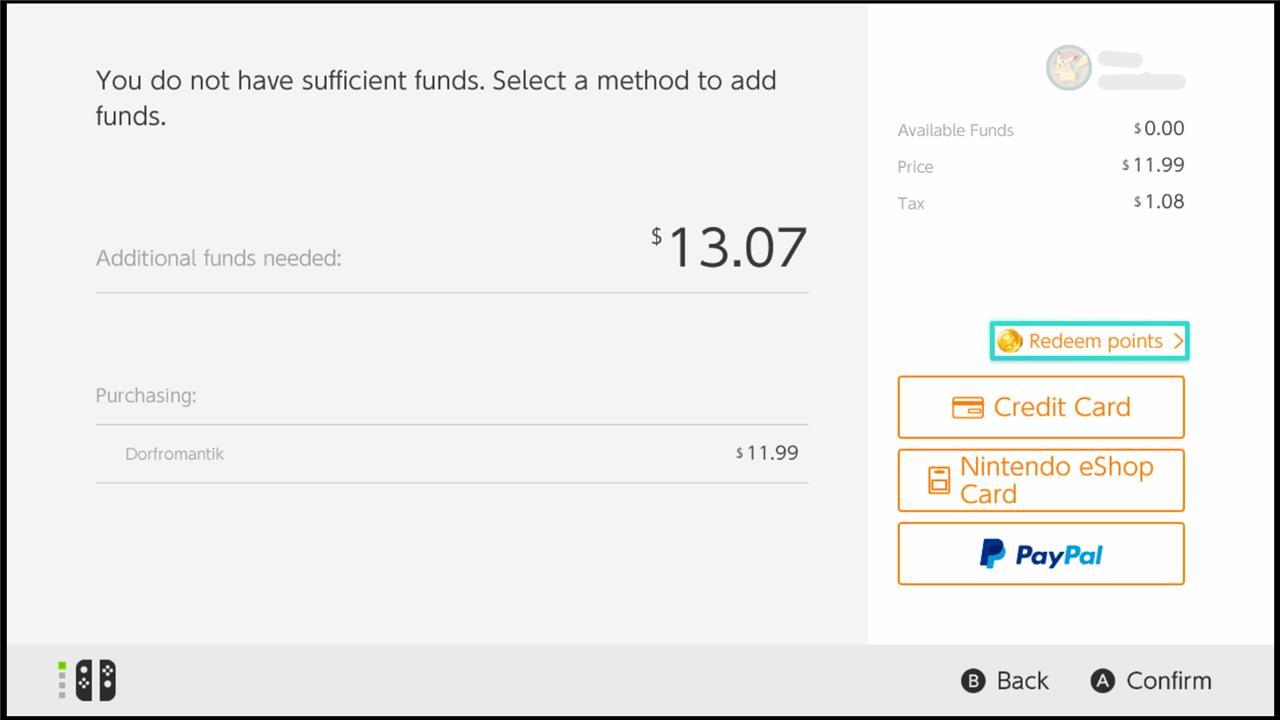
- Click next and the eShop will now apply your Gold Points towards that purchase.
- Select your payment option if you don’t have enough Gold Points to cover the full amount of the purchase. Then choose the amount of funds you want to add.
- Click the final confirmation to make the purchase. We usually use a credit card to pay for games so the screen says “Use This Credit Card” and lists the last four digits of the card tied to the account.
- The eShop will show you one final window that lists the cost of the software you want to buy, the amount that will be paid with Gold Points, and your final total cost. Scroll to the bottom and select “Add Funds and Purchase.” You have now bought a game using your My Nintendo Gold Points.
My Nintendo Gold Points expiration date
My Nintendo Gold Points expire 12 months after they are earned, specifically on the last day of the month one year later. For example, points earned on April 15, 2024, would expire on April 30, 2025. After expiration, points can no longer be redeemed and will be marked as “Expired” in your My Nintendo account history. Although Nintendo discontinued awarding new Gold Points as of March 25, 2025, any existing points remain usable until their individual expiration dates following the 12-month validity period.
Purchases on the Nintendo eShop and other places will no longer earn you My Nintendo Gold Points as of March 24. However, you will still be able to use your Gold Points in your account after March 24; you just won’t earn any for purchases after that date.
Want to discover hidden tips for maximizing your Gold Points on Switch
To maximize your My Nintendo Gold Points on the Switch, start by registering physical game cards through the HOME menu to earn 1% back in points, in addition to the 5% earned from digital purchases. Redeem your Gold Points strategically during checkout on the Nintendo eShop to get discounts on popular digital games and DLC, or even apply them toward a Nintendo Switch Online membership (excluding renewals). For the best value, accumulate points from both digital and physical purchases and use them on high-value titles or pre-orders to stretch your gaming budget further. Remember, Gold Points must be claimed within a year of the game’s release for physical versions, so timely registration is key.
What are the lesser-known ways to earn extra Gold Points on Switch
Here are some lesser-known ways to earn extra My Nintendo Gold Points on the Switch:
-
Buy discounted games priced very low (under $2) on the eShop: Even the cheapest games earn Gold Points proportional to their price, so purchasing these can add up over time.
-
Register physical game cards within the eligibility period: Physical games released on or before March 24, 2025, can earn Gold Points at 1% of the digital version’s eShop price when registered on your Nintendo Account within one year of release (two years in Europe and South Africa).
-
Participate in occasional Nintendo competitions or events: Some games like Tetris 99 have offered Gold Points as prizes, though these opportunities are rare and not always available.
-
Purchase Nintendo Switch Game Vouchers: Buying these vouchers can earn Gold Points, though redeeming the vouchers themselves does not generate additional points.
-
Use point codes distributed by Nintendo: Occasionally, Nintendo releases My Nintendo point codes that can be redeemed for Gold Points.
-
Buy physical games from official Nintendo stores like Nintendo New York: Purchases here can earn Gold Points based on 1% of the price paid.
Avoiding the use of points when purchasing games (i.e., paying with actual money rather than redeeming points) ensures you still earn Gold Points on that transaction.
Note that Gold Points cannot be earned on certain items such as Nintendo Switch Online memberships, in-game items, or virtual currency. Also, a game card can only be registered once for points, so buying used games repeatedly to farm points is not a reliable method.
