
Dive into the brick-built chaos of LEGO Fortnite Odyssey, where survival meets creativity in a vibrant world you can explore solo or with up to seven friends. Whether you’re teaming up to build villages, conquer bosses, or simply roam the vast map, this cross-platform adventure lets you share the fun across Nintendo, PlayStation, Xbox, and PC. Ready to craft, fight, and explore together? Here’s how to unlock the full multiplayer experience and keep the LEGO magic alive with your crew.
Below, we explain the intricacies of Lego Fortnite’s multiplayer system, covering how to invite friends, how to play when the World Owner is offline, and more.
How to invite friends in Lego Fortnite Odyssey multiplayer
To invite friends in LEGO Fortnite Odyssey multiplayer, start by launching Fortnite and selecting the LEGO Fortnite Odyssey playlist. Ensure you have an Epic Games account linked to your platform account (Nintendo, PlayStation, Xbox, or PC) for crossplay compatibility. From the lobby or in-game, open the social menu or press the options button to access your friends list. Select a friend and choose “Invite to Party” to bring them into your game. Once your friends join, open the map and navigate to the Players tab, where you can share a key with them. Sharing a key allows friends to access and play in your world even when you are offline, enabling continuous cooperative play and world-building. You can invite up to seven friends this way, making multiplayer a collaborative and creative experience across all supported platforms.
To join a friend in Lego Fortnite, you have two options:
- From within the world, the host (the World Owner) can open the menu, select the Players tab, then select “Invite Players.”
- From the Fortnite lobby, have all players together in a party, where the host can then either create a new world or load a pre-existing one.
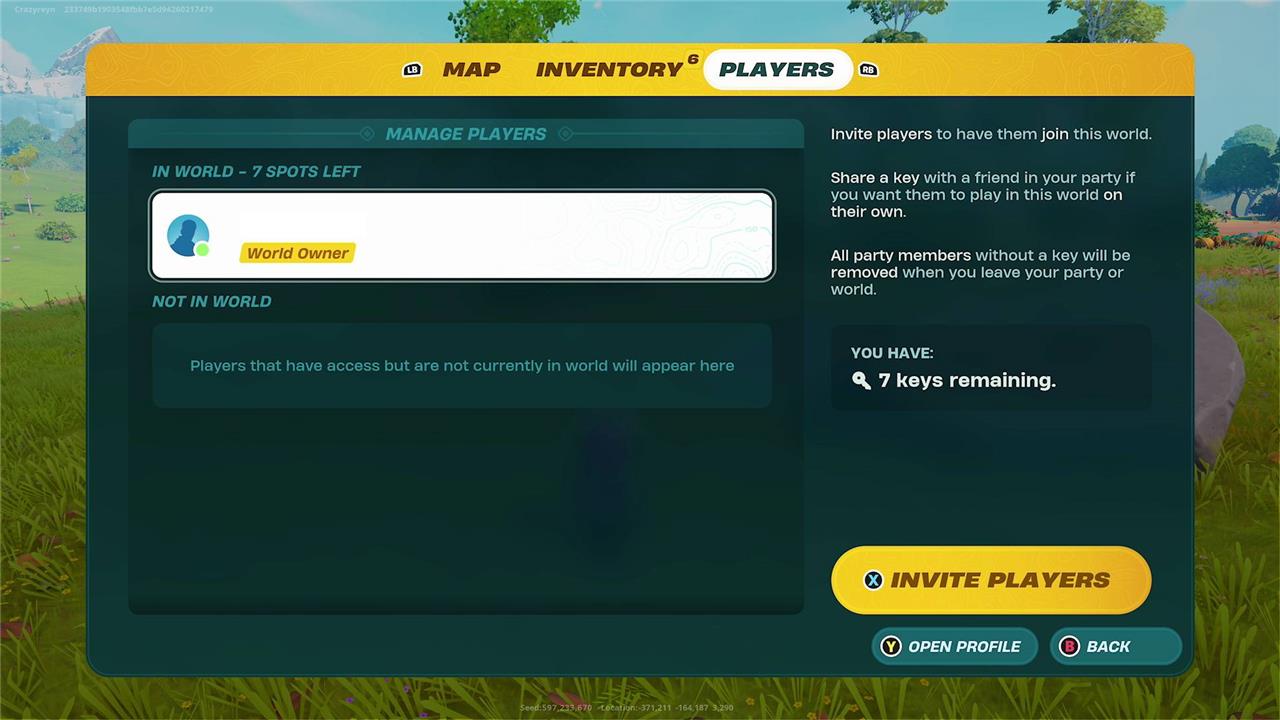
Note that if you are starting a world from scratch, though all players in the party will automatically join, they won’t have access to that world when offline automatically. To do that, you need to make them a Key Holder.
How to become a Key Holder to play a shared world with a friend
To become a Key Holder in LEGO Fortnite Odyssey and play a shared world with a friend, first invite your friend to join your custom-created world. Once they are in, open the Map or Inventory menu and navigate to the “Players” tab. From the list of players currently in your world, select your friend’s name and choose the “Share Key” option. This grants them Keyholder status, allowing them to access and modify your world anytime, even when you are offline. Keyholders can build, explore, and make permanent changes, so only share keys with trusted friends. You can share keys with up to seven players per world, enabling cooperative play without the host needing to be online.
To join a shared world when your friend is offline, you need to make all participants a Key Holder.
Only the person who started the world – known as the World Owner – can do this, and requires both parties to be online and in the world to share access.
An easy way to begin is to open the menu during the game, select the Players tab, then select “Invite Players.” This opens the Epic Games friends list, where you can invite them to your party (and thus, your world).
Once they are in the world, the World Holder must revisit the Friends menu, then select the player from the list. Simply press the button prompt (on Xbox controllers, this is the A button) to share the key their way.
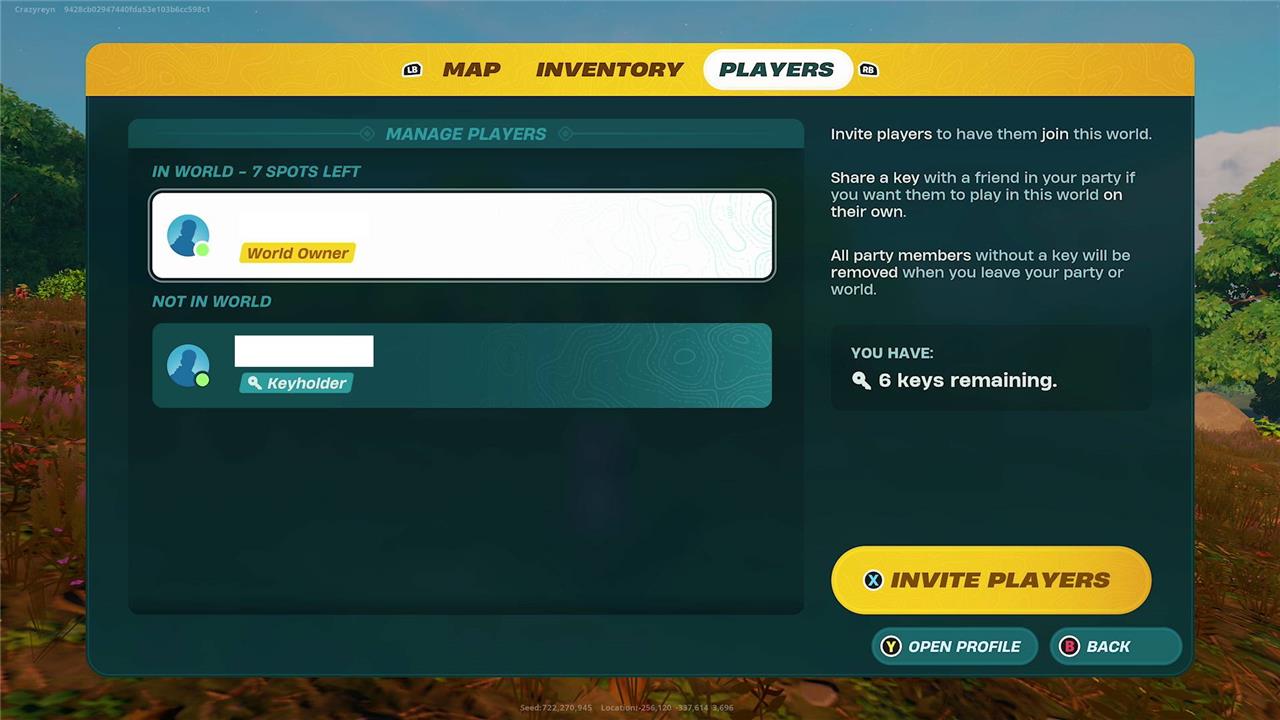
From there, that player is able to then visit this world when you are not playing. A caveat is all players in the party must be a key holder to join the world when the World Owner is offline.
How to join a friend’s Lego Fortnite Odyssey world
To join a friend’s LEGO Fortnite Odyssey world, first ensure you both have linked Epic Games accounts and are friends on the platform. Launch LEGO Fortnite Odyssey through the Fortnite launcher and open the social menu to find your friend’s lobby. You can join their game by selecting their name and choosing to join their party or lobby. Once in the lobby, the host can share a key with you via the Players tab in the menu, granting you access to their world even when they are offline. This key allows you to enter and build in their world independently. Up to seven keys can be shared per world, enabling friends to collaborate and explore together seamlessly across all platforms thanks to crossplay support.
Joining a friend is as easy as joining their lobby or party. Join the friend’s lobby as you would a regular Fortnite match. You can do this by selecting them from the social menu or by clicking a prompt (which may or may not come up) on the party screen. After doing this, you can click the “Ready!” button and be sent straight into their world. You do not need to be a Key Holder to join the world, as long as the World Owner is online and in their world.
If you have other people in your party who are not friends with the World Owner, you will not be able to join the world, even if you are a Key Holder.
How many people can play multiplayer in Lego Fortnite Odyssey?
LEGO Fortnite Odyssey supports multiplayer gameplay with up to eight players simultaneously in one world, allowing friends to cooperate in building, exploring, and overcoming challenges together. Players can invite friends to join their private worlds, and with the crossplay feature, players on different platforms such as PlayStation, PC, Xbox, and Nintendo Switch can all play together seamlessly. Additionally, world owners can designate friends as key holders, enabling them to access and edit the world even when the owner is offline, enhancing the collaborative experience.
According to Epic Games, you can have up to eight players total (including yourself) in one Lego Fortnite world simultaneously.
We’re unsure if this means your world can have 10 people coming in and out, capping out at eight online at once, or if this means only eight people can even be added to your world. We’ll update this guide when we figure that out. (Getting more than seven people to play Lego Fortnite with you at once is a feat in itself!)
Want to discover how to invite friends and start teaming up in LEGO Fortnite Odyssey
To invite friends and start teaming up in LEGO Fortnite Odyssey, first ensure you have an Epic Games account linked to your console or platform account. Then launch Fortnite and select the LEGO Fortnite Odyssey playlist. Click on the circular avatar icon in the upper right corner, choose the plus (+) button to open the Add Friends menu, and enter your friend’s Epic account name or email to send an invite. Once your friends join your world, you can share a key with them via the map’s player menu, allowing them to access and build in your world even when you’re offline. Up to eight players can play together, enjoying cooperative building, exploration, and battles across all platforms thanks to crossplay support.
How do I send a friend request in LEGO Fortnite Odyssey
To send a friend request in LEGO Fortnite Odyssey, follow these steps:
-
Launch Fortnite and sign in to your account.
-
Click on the circular avatar icon in the upper right corner of the screen.
-
Select the icon with the plus (+) button to open the Add Friends menu.
-
Enter your friend’s Epic Games account name or their email address in the provided box.
-
Send the friend request from there.
This process works across all platforms thanks to LEGO Fortnite Odyssey’s crossplay feature, allowing you to connect with friends on PlayStation, Nintendo Switch, Xbox, PC, and more.
