
Ready to face the undead alone? Modern Warfare 3 Zombies lets you dive solo into a relentless PvE nightmare where survival depends on smart loadouts, savvy contract choices, and mastering tactical gear. Whether you’re hunting for the perfect weapon combo or strategizing your escape, this guide reveals how to dominate the zombie hordes on PC, PlayStation, and Xbox-no squad required. Step into the chaos, turn off squad fill, and prove you can outlast the apocalypse solo.
That’s right, not everyone wants to be a social butterfly and stick together in the apocalypse. If you want to disable squads and drop in solo to kill some classic Call of Duty zombies, we’ve got you covered. In this Modern Warfare 3 guide, we’ll show you how to turn off squads and how play Modern Warfare 3 Zombies solo or duo.
How to play MW3 Zombies solo or as a duo
To play Modern Warfare 3 Zombies solo or as a duo, you need to disable the “Squad Fill” option in the Zombies lobby, which is located at the bottom left of the screen. Turning this off prevents automatic matchmaking with other players, allowing you to enter the game alone or with a friend if you are in a party together. On PC, toggle this option off by pressing the 1 key; on Xbox, use the Left Trigger; and on PlayStation, press L2. Once disabled, starting the match will place you solo or as a duo in the map, though other players may still be present in the same lobby since it is an online mode. Playing solo or duo increases the challenge, requiring careful tactics and loadout choices to survive the zombie hordes effectively.
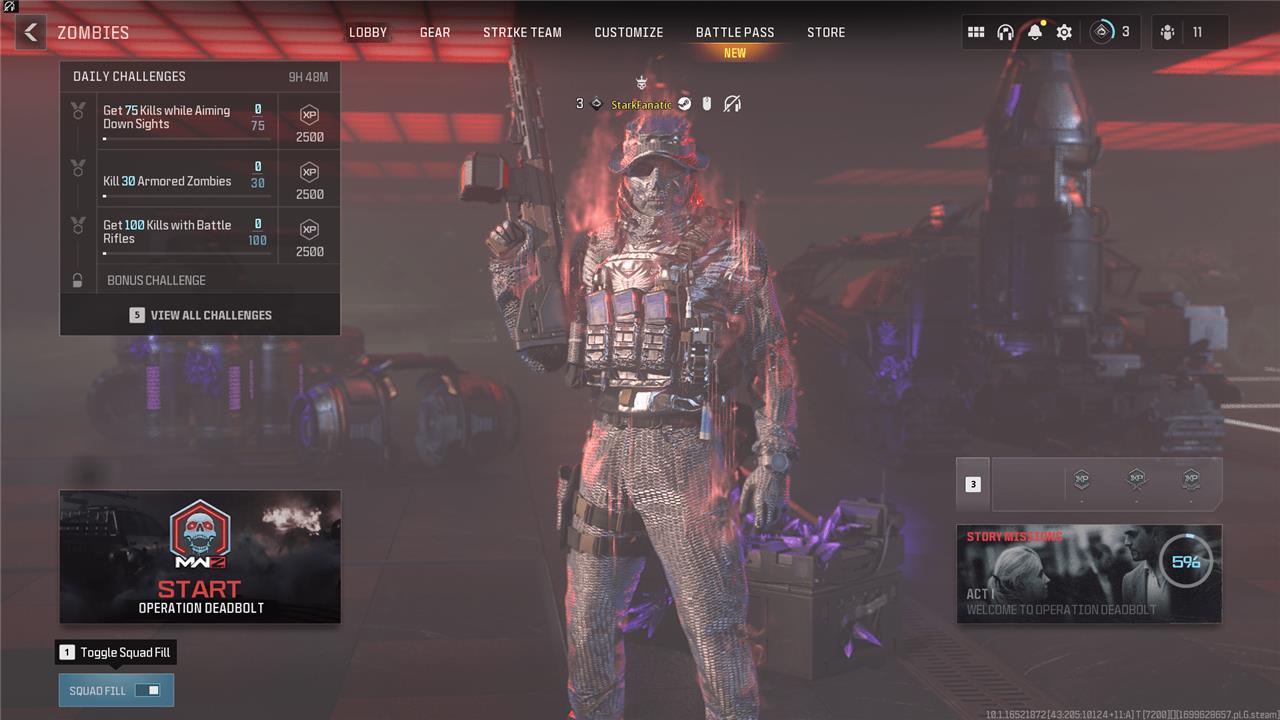
If you just try and load up a new game of Zombies in Modern Warfare 3, the game will automatically place you (or you and your duo partner if you’re playing with a friend) into a squad of three. There’s nothing really stopping you from splitting off and abandoning your squad. However, it is a bit rude, as the mode is much harder solo and is designed for players to stick together.
Freeing yourself from that social pressure is, thankfully, very easy. In the main Zombies lobby, before you hit Start, look in the bottom left of the screen for a button that says “Squad Fill.” Toggle it off. You can do this by clicking on it or pressing 1 on Windows PC, Left Trigger on Xbox consoles, or L2 on PlayStation 4 or PlayStation 5.
With Squad Fill toggled off, you’ll only drop into the game with your current party – which means you’ll drop in by solo if you’re alone. Just make sure you toggle on third-person so you can watch your own back next time.
Can you play MW3 Zombies on a private server?
You can play Modern Warfare 3 Zombies solo by turning off the “Squad Fill” option before starting a match, allowing you to face the undead alone or with just one other player if preferred. However, the game does not offer a fully private server experience for Zombies mode; even when playing solo, other players will still be present in the same lobby, each pursuing their own game. This setup means you cannot have a completely private match isolated from others, but you can enjoy the mode without a coordinated squad.
Even if you drop into a game of Zombies alone or with a buddy, you’ll still bump into other people doing missions, fighting zombies, and attempting to escape the world via exfil. You unfortunately can’t toggle this off in Modern Warfare 3 Zombies. The game mode is designed to be an online, multiplayer adventure – a major departure from most other Call of Duty Zombies experiences – and isn’t likely to change for that reason.
For more Modern Warfare 3 guides, see how to switch to Tactical Stance, and check our guides on the best SVA 545 loadout, best Striker loadout, best MCW loadout, and best AMR9 loadout.
What are the most effective strategies for surviving solo in MW3 Zombies
Most Effective Strategies for Surviving Solo in Modern Warfare 3 Zombies
Prioritize Essential Perks
Focus on perks that boost survivability and self-sufficiency. Juggernog is vital for increased health, while Quick Revive allows you to self-revive when downed. Speed Cola and Stamin-Up enhance reload speed and stamina, which are crucial for evading zombies and maintaining mobility.
Master Kiting and Positioning
Lead zombies in controlled paths to avoid getting cornered. Use open areas or choke points where you can maneuver zombies safely. Practice tight turns and quick direction changes to keep zombies grouped and manageable.
Resource and Ammo Management
Conserve ammunition by aiming for headshots and using melee attacks early on. Utilize traps and environmental hazards to thin zombie numbers without wasting ammo. Save points for critical purchases like weapons, perks, and emergency gear.
Upgrade Weapons Strategically
Use the Pack-a-Punch machine to enhance your weapons, prioritizing those with high damage or crowd control capabilities. Keep at least one weapon for building points and another for tougher enemies or bosses.
Use Tactical Equipment and Field Upgrades
Equip decoy grenades to distract zombies, effectively acting like monkey bombs, and thermites for dealing with powerful enemies like Mega Abominations. Field upgrades such as Frenzy Guard can repair armor instantly, providing crucial survivability in tight spots.
Choose Defensible Locations
Find spots with good visibility, limited zombie entry points, and access to ammo and escape routes. Defend these areas to hold off waves and recover between rounds. Deploy sentry guns or claymores to cover your flanks on higher rounds.
Utilize GobbleGums, Elixirs, and Essence
Use temporary boosts like instant ammo refills, invincibility, or faster movement to survive difficult moments. Collect Essence by killing zombies, especially elites, to buy weapons, upgrades, and crafting schematics essential for long-term survival.
Stay Aware and Use Tactical Stance
Maintain situational awareness by using tactical stance (crouching or proning) to reduce your visibility and avoid zombie detection. Positioning and movement are key since you have no teammates to revive you.
By combining these strategies-smart perk selection, careful resource management, tactical positioning, and effective use of equipment-you can significantly increase your chances of surviving solo in Modern Warfare 3 Zombies.
How can I master kiting to avoid getting trapped solo in MW3 Zombies
To master kiting and avoid getting trapped while playing solo in Modern Warfare 3 Zombies, focus on these key techniques:
-
Find Open Areas and Safe Paths: Identify spacious parts of the map or specific routes where you can lead zombies without risking corners or dead ends. These areas allow you to maintain control over the horde’s movement.
-
Practice Tight Turns and Quick Direction Changes: Use sharp turns and sudden shifts in direction to keep zombies grouped together behind you. This prevents them from spreading out and flanking you, reducing the chance of being surrounded.
-
Keep Moving Constantly: Never stop running. Movement is crucial to avoid getting overwhelmed. Use jumps, climbs, or small obstacles to slow zombies down and create distance.
-
Use Tactical Equipment to Distract Zombies: Deploy decoy grenades to momentarily divert zombie attention, giving you space to reposition or escape tight spots.
-
Choose Defensible Spots with Escape Routes: When you need to pause or reload, pick locations with good visibility and at least one quick exit to break line of sight and reset the chase.
-
Combine Mobility with Weapon Management: Switch between weapons and melee or fists efficiently to conserve ammo and maintain speed, knowing when to shoot and when to run.
Mastering these kiting strategies will help you control zombie hordes effectively, minimizing the risk of getting trapped and increasing your solo survival chances in MW3 Zombies.
