
Tired of the relentless pace in Monster Hunter Wilds? Discover the secret to hitting the pause button with the game’s unique “Online Single Player” mode-freeze the action mid-hunt, catch your breath, and even snap epic photos without risking a monster attack. Here’s how to unlock this lifesaver on PC, PlayStation, and Xbox.
There are many moments where you need to be away from the game at short notice – like when you need to use the restroom, take care of your child, or if your mother asks you to simply pause the game. This is all possible in the new “Online Single Player” mode in Monster Hunter Wilds that comes with its own features.
Here’s how to pause the game in Monster Hunter Wilds, and some of the features from the “Online Single Player” mode.
How to activate Online Single Player and pause in Monster Hunter Wilds
To activate Online Single Player mode in Monster Hunter Wilds, you can either select it from the lobby selection screen at the title menu or talk to Alma, the receptionist at Base Camp, and choose “Online Single Player” from the Change Lobby menu. This mode allows you to play alone online without joining any multiplayer lobbies, enabling you to pause the game from the Start Menu-a feature unavailable in regular multiplayer sessions. Once in Online Single Player mode, pause the game by opening the Start Menu, navigating to the System settings, and selecting “Pause Game.” This will halt gameplay completely, allowing you to take breaks or access Photo Mode while still being connected online.
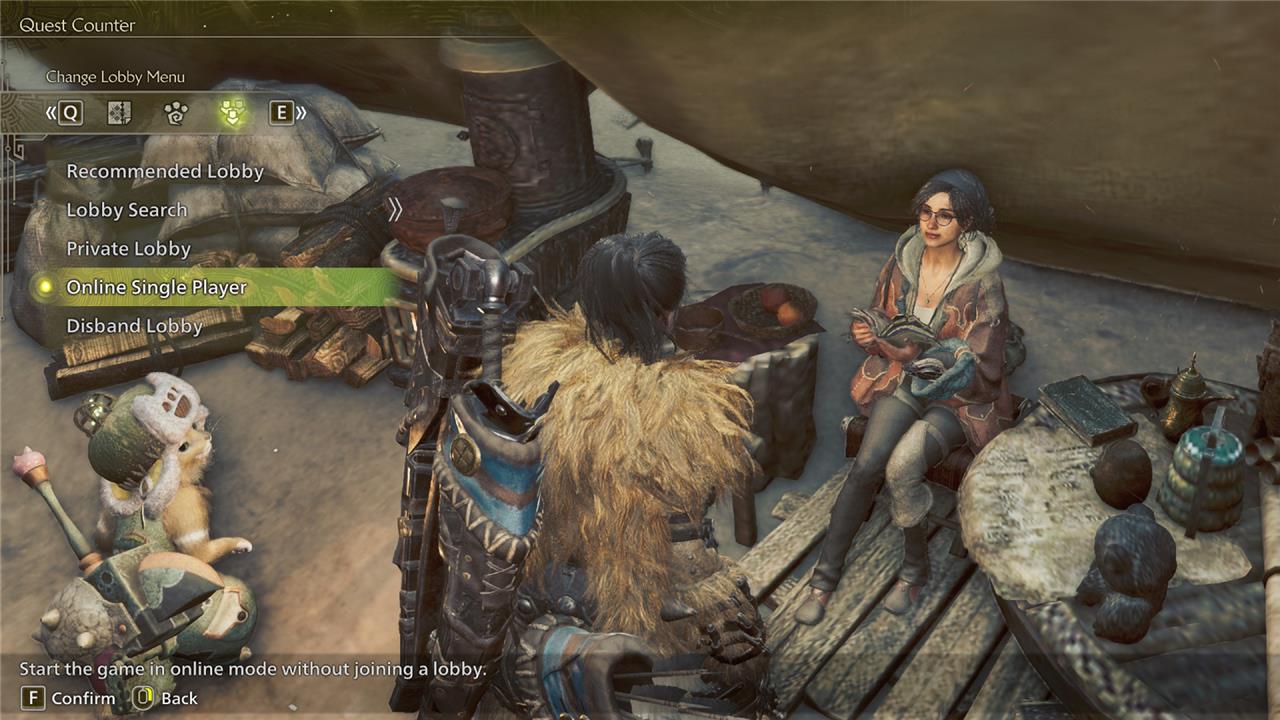
To pause in Monster Hunter Wilds, you must be in “Online Single Player” mode. There are two ways to turn on “Online Single Player” mode in Monster Hunter Wilds:
- Title screen – After you select your save data, you can choose the “Online Single Player” mode in the lobby select screen.
- Interact with Alma – If you started in any of the other modes, find and talk to Alma. Switch to the “Change Lobby” menu, and choose the “Online Single Player” mode option.
Now that you’re in a world with just yourself and the other NPCs, you can pause the game. To pause, open the start menu, switch to the “System” settings, and select “Pause Game.”
How does ’Online Single Player’ mode in Monster Hunter Wilds work?
Online Single Player mode in Monster Hunter Wilds allows players to hunt alone in an online environment without joining multiplayer lobbies. In this mode, you won’t see other players in the base camp, and monsters have reduced health to balance solo play. A key feature of this mode is the ability to pause the game from the Start Menu, which is not possible in multiplayer sessions. You can access this mode either from the lobby selection screen at the title screen or by speaking to Alma at the base camp to change your lobby. While playing solo, you can also send SOS Flares to temporarily invite other players for assistance, switching the game to multiplayer temporarily. Additionally, pausing the game in this mode allows access to Photo Mode, enabling players to capture screenshots without the game progressing or enemies attacking.
The “Online Single Player” mode functions a little differently to other multiplayer sessions. You won’t see other players in base camp, and similar to previous Monster Hunter titles, and as a solo player, monsters will be have less HP to account for fewer people being around to deal damage.
However, you still have the flexibility to use SOS flares to ask other players for help, and this will temporarily switch your mode to multiplayer in the process.
How does the ’Online Single Player’ mode let me pause Monster Hunter Wilds unexpectedly
The ’Online Single Player’ mode in Monster Hunter Wilds lets you pause the game by creating a solo online session where no other players are present, allowing you to freeze all gameplay-including monster actions and combat-at any moment. To activate this, you can select ’Online Single Player’ from the lobby screen after choosing your save or speak with Alma at a base camp to switch lobbies. Once in this mode, you access the pause by opening the start menu, navigating to the System settings, and selecting ’Pause Game.’ This unique mode combines the benefits of online play with the ability to pause, which is not possible in multiplayer sessions, making it ideal for stepping away unexpectedly or managing real-life interruptions without losing progress.
Why is pausing only available in ’Online Single Player’ mode in Monster Hunter Wilds
Pausing is only available in the ’Online Single Player’ mode in Monster Hunter Wilds because this mode places you in an online session all by yourself, eliminating the need to keep the game running for other players. In regular multiplayer or online sessions, the game cannot be paused since it must stay active for all participants, maintaining real-time monster and player actions. The ’Online Single Player’ mode uniquely allows pausing by combining the benefits of an online connection with a solo environment, enabling the game to freeze safely without affecting others. This design ensures that pausing does not disrupt the shared online experience, which is why it is restricted to this mode alone.
