
Ready to dominate the cosmos with a ship that’s truly your own? Dive into Starfield’s Ship Builder and transform your basic starship into a sleek, powerful flying fortress tailored for exploration, combat, or smuggling. From customizing reactors to slapping on the perfect weapons and modules, this guide will show you how to craft a kickass ship that suits your playstyle and stands out in any space encounter.
Our Starfield guide will show you how to use the Ship Builder by introducing you to all of the pieces and concepts involved in starship design. You’ll be able to build the ship of your dreams (depending on your budget).
If you’re after more ship essentials, we run through how to dock your ship at a space station.
Where to access Starfield’s Ship Builder
To access Starfield’s Ship Builder, players need to visit a Ship Services Technician, who can be found at major spaceports and landing pads throughout the game universe. The first Ship Services Technician appears early in the main story at New Atlantis, making it easy to find. Once there, speak to the technician and select the option “I’d like to view and modify my ships” to open the Ship Builder interface. This allows you to upgrade or fully customize your ship by adding, removing, or rearranging modules. For the best access to all ship parts, building a Landing Pad with a Ship Builder on your outpost is recommended, as it consolidates parts from all manufacturers in one location.
Most places with a spaceport will have a Ship Services Technician to speak to near where you land. If you can’t find them, look for a Ship Services counter or shop nearby. Every one will repair your ship, have a selection ships for sale, and give you access to the Ship Builder, which you can access by selecting the “I’d like to view and modify my ships” dialogue option, then pressing the X button (on Xbox) to enter the mode.
You can also build a Landing Pad with Shipbuilder at an outpost.
Which modules are available depends on where you go. The Ship Builder selection depends on the spaceport.
What’s the difference between Ship Builder and ’upgrade ship’?
The difference between Ship Builder and “Upgrade Ship” in Starfield lies in the level of customization and flexibility they offer. The “Upgrade Ship” option is a simpler, more straightforward method that allows you to replace existing ship modules with improved versions of the same type and brand, focusing mainly on enhancing weapons, shields, engines, and other core components without changing their placement. It is limited to upgrades that provide clear statistical improvements and sticks to the same module line, making it quick and easy but somewhat restrictive. In contrast, the Ship Builder offers much greater freedom, enabling you to move parts around, add new modules like cockpits, landing gears, and rooms, and fully customize the ship’s layout. This mode allows for bespoke designs and mixing different brands, but requires more effort and attention to power and connection constraints. Essentially, “Upgrade Ship” is for quick, incremental improvements, while Ship Builder is for detailed, creative ship construction and modification.
In the first menu of the view and modify ships option, you’ll have the choice to enter the Ship Builder or Upgrade Ship. These work similarly, but with different purposes.
The upgrade ship option takes parts already on your ship – weapons, engines, your reactor, and grav drive – and lets you look at what other versions are available. As you scroll through the options, you can replace your current version with a new one. The upgrade options depend on what’s available at the spaceport.
If you want to add or reposition anything to your ship, you’ll need the Ship Builder.
What you can and can’t do in Starfield’s Ship Builder
Starfield’s Ship Builder allows players to customize and upgrade their ships from major spaceports, providing a variety of modules and parts to modify existing ships rather than building entirely from scratch. You can swap out components like weapons, engines, reactors, and habitats to tailor your ship’s performance and appearance, with parts becoming more diverse as you progress and discover new manufacturers. However, the system has notable limitations: you cannot save partial designs, transfer parts between ships, or create capital ships, and the building interface lacks options for curved or angled connections, restricting complex or highly detailed designs. Interior customization is also limited to prefabricated habitats without the ability to freely place doors or rearrange interiors, and any placed decorations are lost when modifying the ship. Despite these constraints, the Ship Builder remains a flexible tool for creating functional and visually distinct ships suited to various play styles in Starfield.
Let’s get the obvious one out of the way first: You can’t build a ship from scratch. You have to start with a ship you own (or, at least, have registered). You can, however, take a ship you own and delete all of it – you’ll even get money back for each component you delete – and start fresh that way.
You also can’t rotate ship components. A hab is always going to be oriented longways and engines will always have a set orientation. Similarly, you can’t switch between mounting something horizontally (on top of or below) and vertically (on the side). The only exception to this is weapons, but they have their own kind of attachment points – more on attachment points below.
That said, some parts can be flipped – mirrored either side-to-side or front-to-back. This is mainly for structural components, but things like cargo holds and some landing bays can be flipped around. This is also how you’ll get things like gear flipped if you’re into symmetry. Speaking of which.
Starfield doesn’t care about symmetry or balance. You can put all of your landing gear on one side of the ship. So long as there are enough, the game won’t care. On the same note, you only need one attachment point to connect pieces, no matter how big and heavy the components are – you don’t have to worry about stresses on joints.
And, to end on a positive note, you can paint any part of your ship any color you’d like.
All ship module categories in Starfield
Starfield’s ship modules encompass a wide range of categories essential for customizing and optimizing your spacecraft. These include propulsion systems like engines and grav drives, weaponry such as lasers and missile launchers, defensive modules like shield generators, and vital components including reactors and fuel tanks. Additionally, there are modules for living accommodations (habitats), cargo holds, cockpits, landing bays, and structural parts. Each module type serves a specific function, allowing players to tailor their ships for combat, exploration, cargo transport, or crew comfort, making the Ship Builder a versatile tool for creating a personalized and effective starship.
In the Ship Builder, you can add parts (called ship modules) to your ship, move modules around, delete things, and just generally design ships to suit your needs and taste.
Choosing to add a component opens a new menu with all of the ship modules available at this location, broken into categories. Those categories are:
- Bay, as in landing bay. This where you walk down the ramp and onto a planet’s surface. The landing bay has to be on the bottom of your ship.
- Cargo has parts that determine the size of your cargo hold.
- Cockpits are where you pilot your ship from. Some cockpits have crew stations and additional cargo capacity.
- Docker is the airlock you use to dock with other ships and space stations. The docker has to be on one of the outer edges of your ship, meaning the holographic ring that represents the airlock has to extend past any other parts sticking out.
- Engines are for moving your ship around in space. These are different from the grav drive. Your engines determine your ship’s mobility and have to overcome its mass. (More on these later.)
- Fuel tanks supply fuel to your grav drive. Tanks with more storage increase your jump range.
- Landing Gear. Landing gear are for, well, landing. The foot part needs to be on the same plane as your landing bay. Gear also have a lander thrust stat which just means you’ll need more gear the heavier your ship gets.
- Grav drives are what allows interstellar travel. You’ll need grav drives with more grav drive thrust as you increase your ship’s mass.
- Habs are the walkable parts of your ship. There are a lot of options for habs so they’ll get their own section below.
- The reactor supplies power to your ship. The reactor determines your ship’s class – A, B, or C – and how much power you have available to allot to your weapons, engines, and grav drive.
- Shields are exactly that – it’s the part that generates the shield.
- Structural components are a little weirder. For the most part, it’s just cosmetic parts and an “everything else” category. You’ll find things like find and nosecones and portholes here. More importantly, a lot of structural elements come with weapon attachment points.
- The weapons category is for all the shooty bits – specifically cannons, lasers, electromagnetic (EM) weapons, and missle launchers.
What does the ’Flight Check’ do?
The “Flight Check” in Starfield’s Ship Builder is a crucial step that ensures your custom-built ship is functional and ready for flight. It verifies that all necessary modules-such as thrusters, weapons, fuel tanks, reactors, and landing gear-are properly installed and connected. If the ship fails this check, it will display errors indicating missing or improperly attached components, preventing you from finalizing or purchasing the ship until these issues are resolved. This process guarantees that your ship can actually fly and operate as intended in the game.
Before we get any deeper into the Ship Builder, let’s talk about the Flight Check. Mostly, the Flight Check alerts you to any errors or problems with your current layout. You’ll pull up the Flight Check with the menu button.
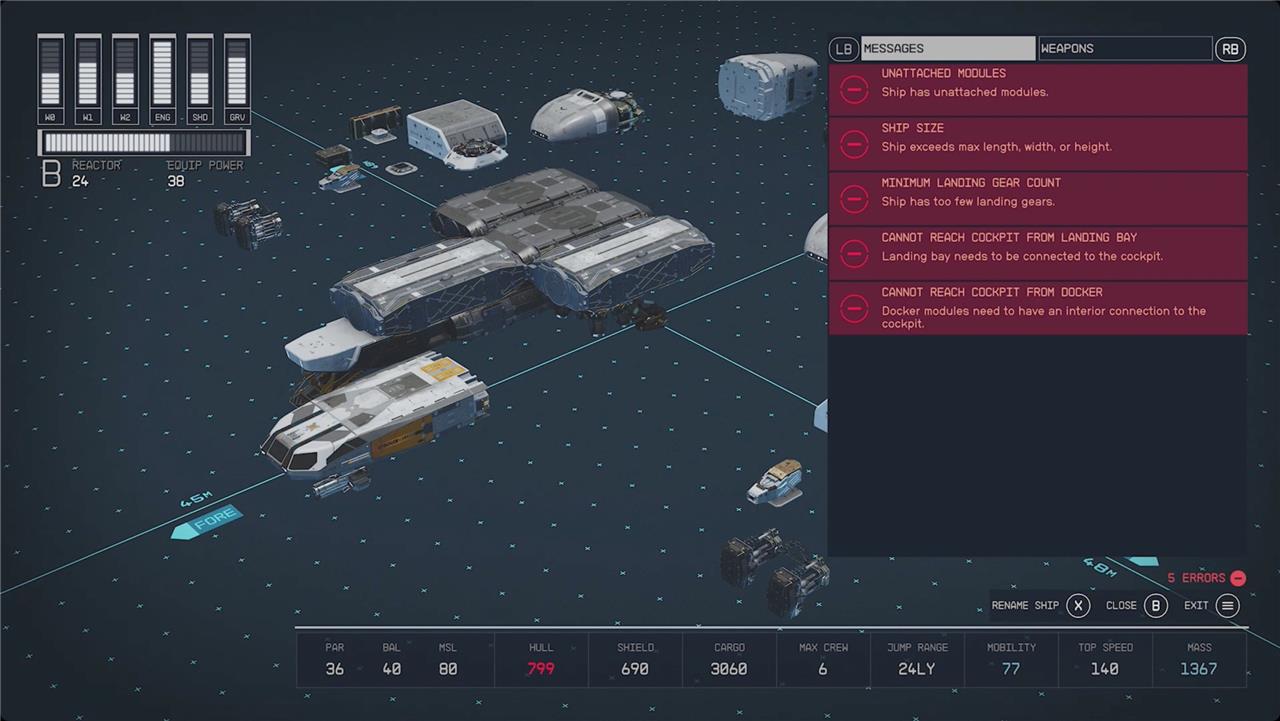
The first tab, Messages, is where you’ll see messages about things like unattached modules (more on attachment points below), missing components that every ship needs (below), and warnings about other problems your ship might have.
The other tab of the Flight Check is where you’ll assign weapons to buttons. Each ship can only have three types of weapon at a time.
What you need to build a ship in Starfield
To build a ship in Starfield, you need several essential components: a reactor, a gravity drive, at least one fuel tank, a shield, one or more engines, a minimum of three landing gears, a landing bay, a cockpit, a docking ring, and a hab module to connect everything internally. You start by visiting a Ship Services Technician at a spaceport, where you can access the Ship Builder system to customize or build your ship from scratch. Having the right certifications, such as Piloting and Starship Design skills, helps unlock advanced parts for better ship stats. The process involves selecting and arranging these modules to balance your ship’s hull, shield, cargo capacity, crew space, jump range, mobility, and power, depending on your playstyle and needs.
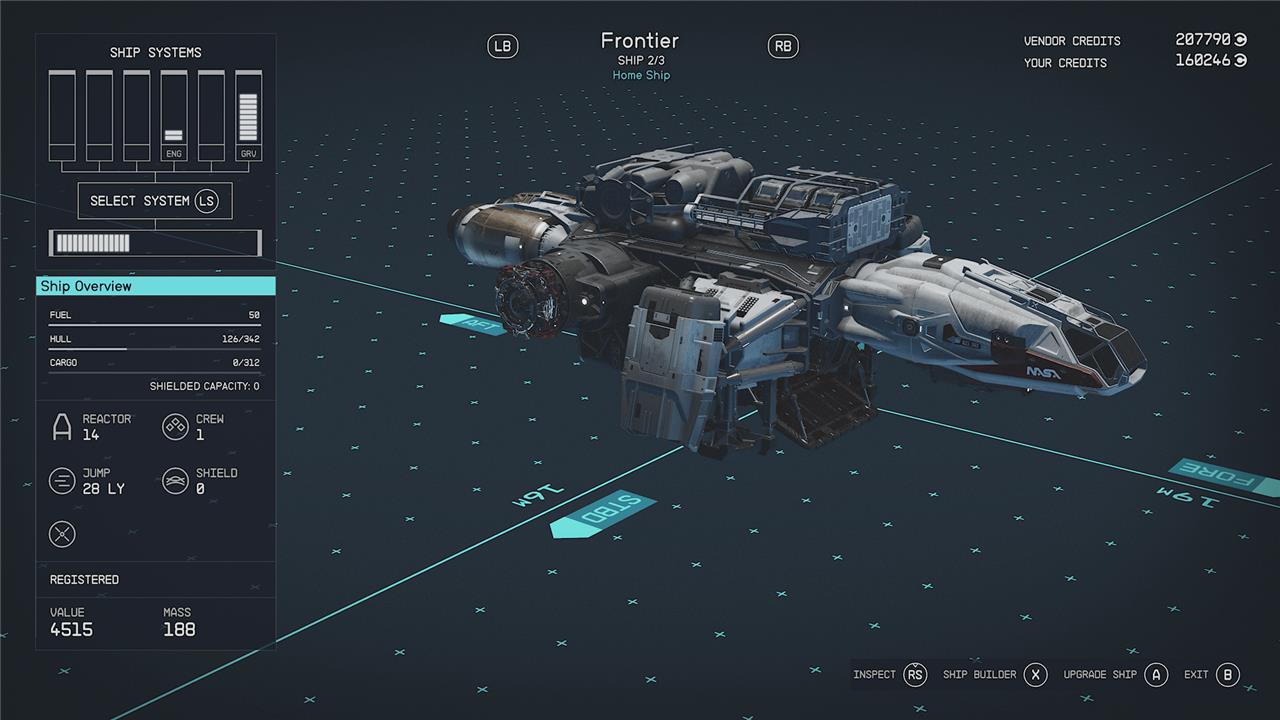
While you’ve got a lot of leeway in ship design, every ship needs a set of components that are non-negotiable. These are:
- Cockpit – limited to one
- Engine(s) – limited to four (the exact number might not be four, but we’ve received a warning every time we’ve tried to add a fifth engine)
- Reactor – limited to one
- Grav drive – limited to one
- Fuel tank(s) – no limit
- Docker – limited to one
- Bay – limited to one
- Gear – minimum of two, no upper limit
You will also need to add at least one hab. This isn’t a requirement in the same way, though. You just have to be able to move from the cockpit to both the bay and the docker, and there’s no combination of those three parts that doesn’t require a hab between them.
The reason for that involves how the parts of your ship attach to one another.
Why can’t I put attach two modules?
The reason you can’t attach two modules in Starfield’s Ship Builder is usually because one or both modules are not properly aligned or connected to the ship’s structure. The game requires all modules to be physically attached to the ship; if a module is floating or only visually close but not snapped to an attachment point, you will get an “unattached module” error. To fix this, you can use the ship builder’s feature to highlight all attached modules by double-clicking the ship or pressing the appropriate controller button (LB), which highlights connected parts in red and leaves unattached ones unhighlighted. Then, you can locate the unattached module and either drag it until it snaps green to a valid attachment point or delete it. Sometimes, repositioning the entire ship or using undo after detaching a module helps resolve attachment issues. Also, some modules, like weapons, may require structural mounts before they can be attached. This system ensures your ship is fully connected and ready for flight.
Before you go adding bits and pieces to your ship, there are a few rules to understand about what is allowed to go where – specifically, about attachment points.
There are three kinds of attachments in the Ship Builder. They’re not given names in the interface, but we’ll call them door, structural, and weapon points. The three look a little different so you can tell them apart.
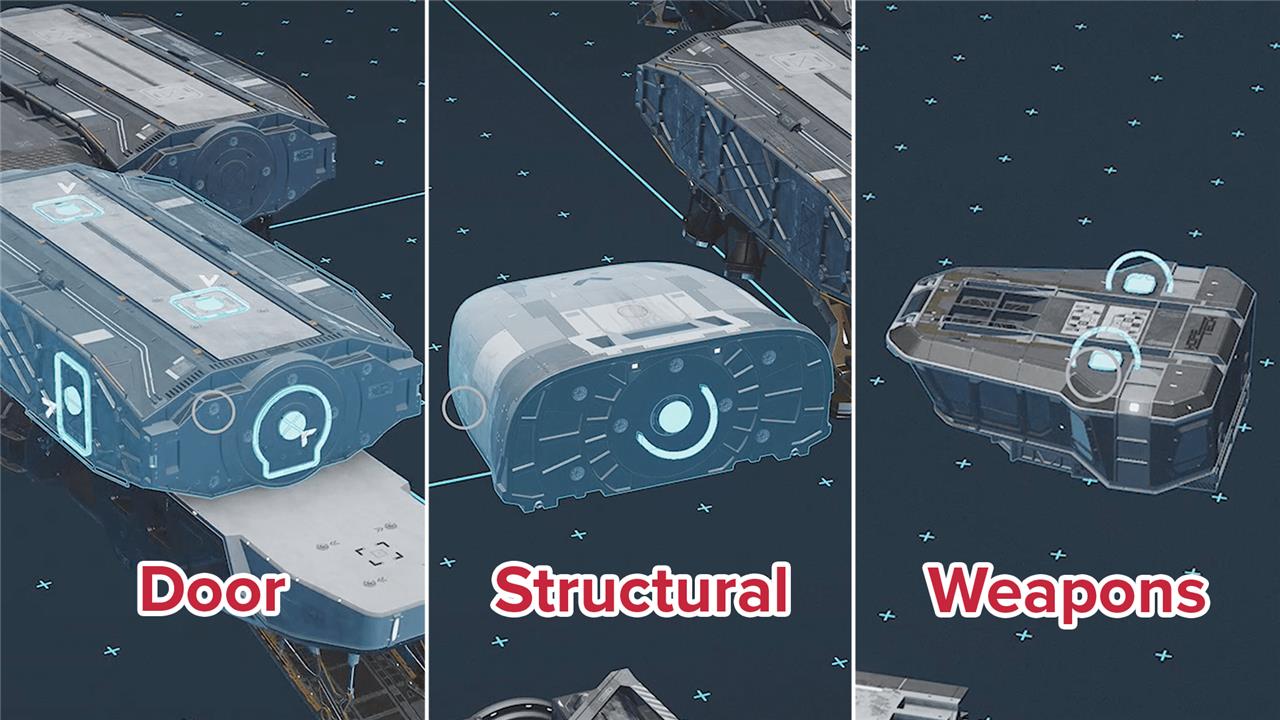
- Doors are indicated by a circular dot with an arrow bouncing over it. Doors allow people to pass through them. Usually, these will be on the sides of a component, but there are also vertical attachments (ladders). In order for a person to pass through, two doors have to line up on adjoining components – this is mainly important for pieces like the cockpit, landing bay, and docker.
- Structural points are circular dots just like doors, but without the bouncing arrow. These are places you can attach large components to your ship – things like habs or engines or cargo holds. You can place a structural attachment over top of a door (but it won’t be a door any more).
- Weapon points are square dots. You can only attach weapons (and some equipment) to these. You cannot place weapons on a structural point unless you first add an equipment plate or a horizontal weapon mount structural component.
Types of hab modules
Hab modules in Starfield are essential ship components that provide additional living and functional spaces, such as crew berths, armories, captain’s quarters, and workshops. There are various types of habs, each offering unique advantages: for example, Workshop Habs include weapon, spacesuit, and industrial workbenches for crafting; Science and Infirmary Habs add pharmaceutical and research labs; Armory Habs offer specialized storage for weapons and armor; and Living Quarters provide beds for resting. Some habs also increase crew capacity and passenger slots, while others focus on storage or control stations. Most hab modules can be purchased empty, allowing players to customize and decorate them freely to suit their ship’s needs.
Hab moduless are the parts of your ship where the people are and, more importantly for ship design, the parts you’ll move through when going from the cockpit to the docker or the bay. Since there’s no way to connect those three parts directly, you’ll need to add a hab. Many of the habs are just cosmetic, but the type of habs you choose can also determine what you can do on your ship. Let’s talk about them now:
- Companionways and Storerooms are small, cosmetic habs useful for filling in 1×1 gaps in your ship’s structure.
- All-in-One Berths have a bed and a galley (which is basically a kind of workbench for food Aid items)
- Armories have a lot of storage for ammo and weapons.
- Captain’s Quarters have a navigation console if that’s your preferred method of plotting a course.
- Computer Cores adds one crew station.
- Control Stations add four crew stations.
- Engineering Bays are cosmetic, but give you a 3×1 structure to attach other parts to.
- Infirmaries have a Research Lab and Pharmaceutical Lab workbench.
- Living Quarters add two passenger slots (useful for any Missions that require you to transport passengers) and a galley.
- Science Labs also have a Research Lab and Pharmaceutical Lab just like an Infirmary.
- Workshops add a Research Lab, Industrial Workbench, Spacesuit Workbench, and Weapon Workbench.
The brand name of any habs you choose affects the outward appearance more than the interior, but you will notice some minor cosmetic differences inside. If you’re looking for specific brands, our list on where to buy ship modules can direct you to the right storefront.
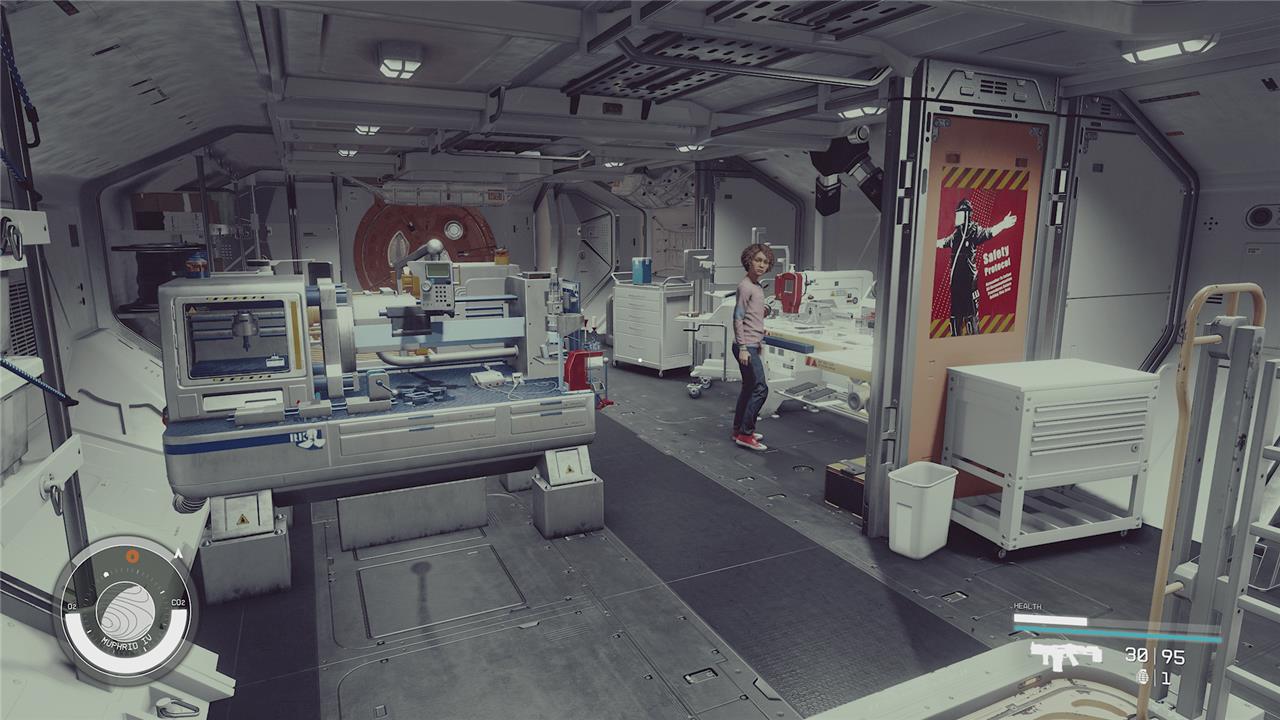
What type(s) of habs you add to your ship depends on what you want to use your ship for. If you want a mobile base for researching weapon and ship mods, add a Workshop. If you want a fully staffed ship, add a Control Station. If you’re just looking for extra attachment points to make your ship bigger, throw on an Engineering Bay.
A quick note on habs: habs will not create a doorway at every available point, and ladders between levels seem to appear where they wish. It doesn’t seem possible to plan (or change) where doorways and ladders appear.
What do ship classes mean?
Ship classes in Starfield-A, B, and C-are determined solely by the type of reactor installed on the ship, with Class A being the lowest power and Class C the highest. This classification affects which parts and modules can be equipped: Class A ships can only use A-grade parts, Class B ships can use both A and B parts, and Class C ships can use parts from all classes. To pilot higher-class ships, players must level up their Piloting skill, unlocking the ability to operate Class B and C ships at higher ranks. The class system is crucial for customizing and upgrading your ship effectively, balancing power, agility, and module compatibility to suit your playstyle in the vast Starfield universe.
Each ship has a class determined by its reactor – A, B, or C. Class A reactors put out a lot of power (for weapons and engines), but are lightweight and don’t add much hull (health) to your ship. Class C reactors put just as much (or more) power, but are much heavier and add a lot of hull to your ship. Class B ships split the difference.
In order to pilot a class B ship, you’ll have to upgrade your Piloting (Tech) skill to rank 3. Class C ships unlock at rank 4.
Many other ship components have a class associated with them, too. The reactor determines which parts you can add – class A reactors can only use class A parts, class B reactors can run A and B parts, and class C reactors can run any part.
How to balance hull, cargo, grav thrust, mobility, and mass
Balancing hull, cargo, grav thrust, mobility, and mass in Starfield’s Ship Builder involves managing trade-offs between durability, storage, speed, and maneuverability. Hull represents your ship’s health, and adding components generally increases hull but also adds mass, making the ship heavier and less agile. Cargo capacity grows with larger cargo holds, which also add to mass. Grav thrust affects your ship’s jump range, which decreases as mass increases. Mobility, driven by maneuvering thrust from engines, is crucial for handling; if your ship’s mass exceeds your thrust, mobility drops, making the ship slower and harder to control. To achieve a well-balanced ship, keep an eye on the mass-to-thrust ratio, aiming for a mobility around 100 for optimal control, and add engines to compensate for heavier builds. This balance ensures your ship is sturdy enough to survive but agile enough to maneuver and jump effectively across star systems.
All of the bits and pieces you add to your ship affect a series of stats (that you can’t really see directly). Specifically, we’ll focus on hull, cargo, grav thrust, mobility, and mass.
- Hull is a measure of how many hit points your ship has. Once your shields are down in a fight, your hull will start taking damage. When your hull hits zero, your ship explodes.
- Cargo is just the size of your cargo bay (including any added by your cockpit).
- Grav thrust is only important as a measure of whether or not your grav drive is strong enough to push your ship’s mass. You won’t actually see this number on the Ship Builder screen, but you might get a warning about it in the Flight Check menu.
- Mobility is basically a measure of your engines versus your ship’s mass. It (along with Rank 2 of the Piloting skill) determines how quickly your ship turns.
- Mass is how much your ship weighs. This affects a lot of other systems including the grav drive, landing gear, and engines (mobility).
Everything you add to your ship increases its mass and hull. At a certain point, you’ll need to upgrade your engines and your grav drive to overcome the additional mass. Those require more power to run, so you’ll have to upgrade your reactor.
Tacking on parts in the Ship Builder gets expensive fast, so you’re not always looking for the best available part. You’re looking to balance the price against what you’re designing your ship to do.
Rank up Starship Design to unlock more parts
To unlock more ship parts in Starfield, you need to rank up your Starship Design skill, ideally reaching Rank 4. This unlocks access to higher-class modules such as Class B and C parts, including advanced engines, reactors, and weapons. You can level up Starship Design quickly by repeatedly adding and removing structural components in the Ship Builder, especially at locations like the Red Mile, which offers ample customization options. Alongside maxing out Piloting and reaching character level 60, ranking up Starship Design is essential for building the best ships and accessing unique modules tied to questlines and major manufacturers.
How can I design a ship that stands out in Starfield’s vast universe
To design a ship that stands out in Starfield’s vast universe, focus on balancing unique aesthetics with optimized functionality by customizing modules through ship technicians found at spaceports. Start with a ship you own and modify it by adding or removing modules that fit your reactor’s power rating and your Starship Design skill level. Prioritize a design that matches your playstyle-whether that’s a sleek, fast explorer with enhanced fuel capacity and jump range, a heavily armed bounty hunter with high shields and weaponry, or a cargo ship with extensive storage and shielded compartments. Pay close attention to ship stats like hull durability, shield strength, reactor power, cargo space, mobility, and mass, as these affect speed, maneuverability, and combat effectiveness. Customizing your ship’s shape and modules to create a visually distinctive silhouette can also make it stand out, with community builds often inspired by iconic sci-fi designs or creative forms. Incorporating crew habitats and utility modules can further enhance your ship’s capabilities, while careful placement of weapons and engines can balance utility with style. This approach ensures your ship is not only powerful but also visually unique in Starfield’s expansive galaxy.
What unique design features can make my ship stand out visually in Starfield
Unique design features that can make your ship stand out visually in Starfield include:
-
Custom Proportions and Shapes: Designing your ship with distinctive proportions, such as a sports car or Batmobile-inspired wide engine layout, can create a memorable silhouette. Some players create unconventional shapes like hollow rectangles that defy typical ship design norms, making their ships visually striking and even tactically advantageous.
-
Modular and Realistic Aesthetic: Embracing Starfield’s “NASA punk” style-characterized by a modular, worn, and well-used look with details like scratches and dents-adds authenticity and uniqueness to your ship’s exterior. Modular design allows for creative combinations of cockpits, hulls, cargo modules, and engines to craft a personalized look.
-
Diverse Module Styles: Using different modules from various in-game manufacturers, each with unique design preferences, lets you customize both the exterior and interior appearance of your ship. Swapping modules can dramatically change your ship’s look, from sleek and smooth shapes to rugged, industrial forms.
-
Engine and Thruster Placement: Strategic placement and layering of powerful-looking engines and thrusters, such as staggered powerful engines or distinctive radiator and cowling modules, give your ship a dynamic and aggressive profile.
-
Iconic Inspirations: Recreating famous sci-fi ships, like the Halo series’ Pelican, can make your ship instantly recognizable and visually impressive.
-
Interior Design Visibility: Since Starfield allows first-person view inside your ship, designing an attractive interior with dedicated modules like weapons displays, crafting stations, or luxury quarters enhances the overall impression of your ship.
By combining these elements-unique shapes, modular parts, detailed textures, and interior flair-you can build a ship that not only performs well but also stands out visually in Starfield’s vast universe.
