
Your armor tells your story-and in Diablo 4, transmog lets you rewrite it. Swap bloodstained gear for sleek style in seconds using the Wardrobe, where every look you’ve earned can be reshaped without losing power.
How to transmog your gear in Diablo 4
To transmog your gear in Diablo 4, visit a Wardrobe located in any major town. Interact with it to access your collection of item appearances gathered from salvaged gear. Select the piece you want to customize, choose a new look from the available designs, and apply it using gold. You can also dye your armor to change its color scheme, creating a personalized style that fits your character’s theme.
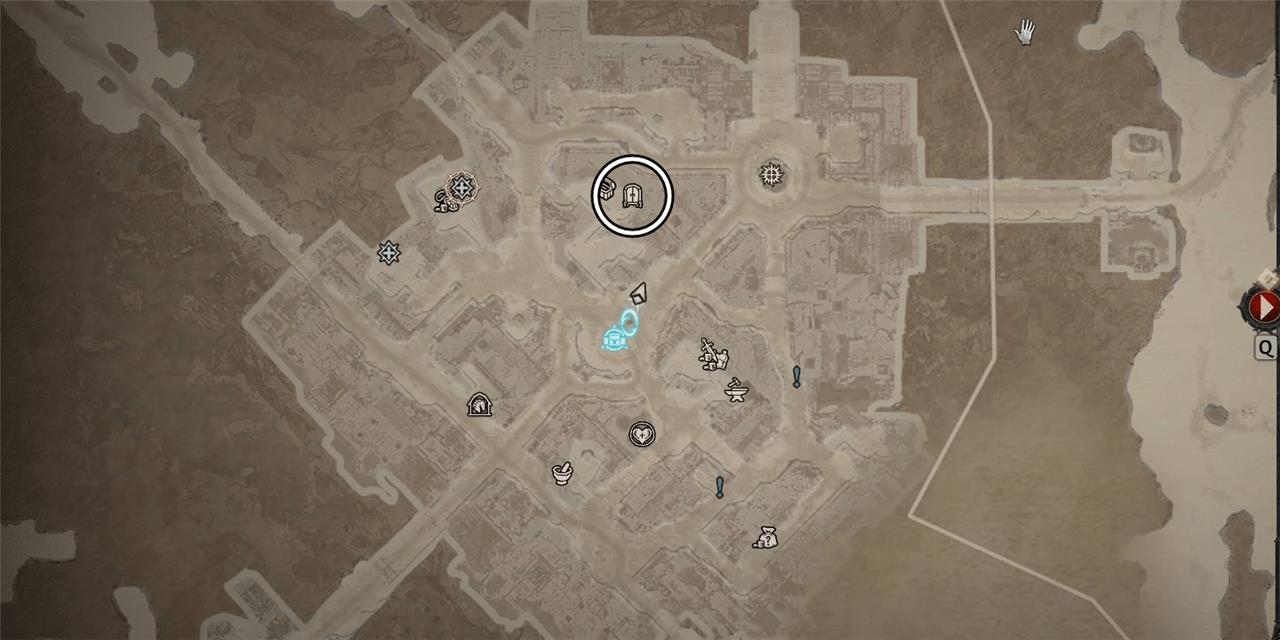
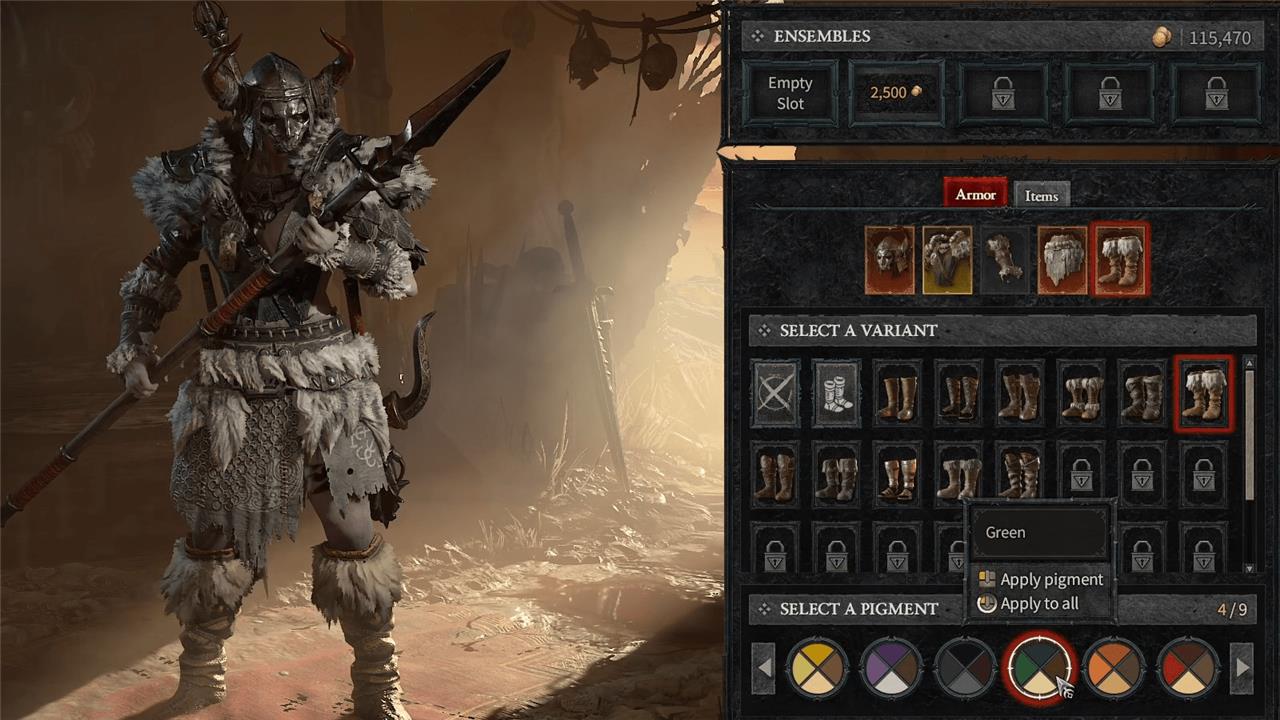
To change the appearance of your gear, head over to the Wardrobe, indicated by the wardrobe icon on the map that… looks like a wardrobe. You can find it in any major city. Interact with the wardrobe to access the transmog screen. Here, you can switch the look of your equipment by selecting the specific piece you want to transmog, and choosing one of the other gear options below it. You can also change the color of your armor by choosing a pigment at the bottom right of the screen.
If you want to get rid of your transmog, open your inventory and hover over the desired gear. Select the “Hide Transmog” option to return the piece of equipment back to its original form.
How to unlock more clothing options in Diablo 4
You can expand your wardrobe by salvaging items at the Blacksmith, which adds their appearances to your collection. Each time you dismantle a new piece of gear, its look becomes available for transmog use. Higher-tier gear often provides rare designs, so it’s worth checking drops carefully before selling them. Seasonal rewards, special events, and shop cosmetics also add unique styles that can refresh your character’s appearance.
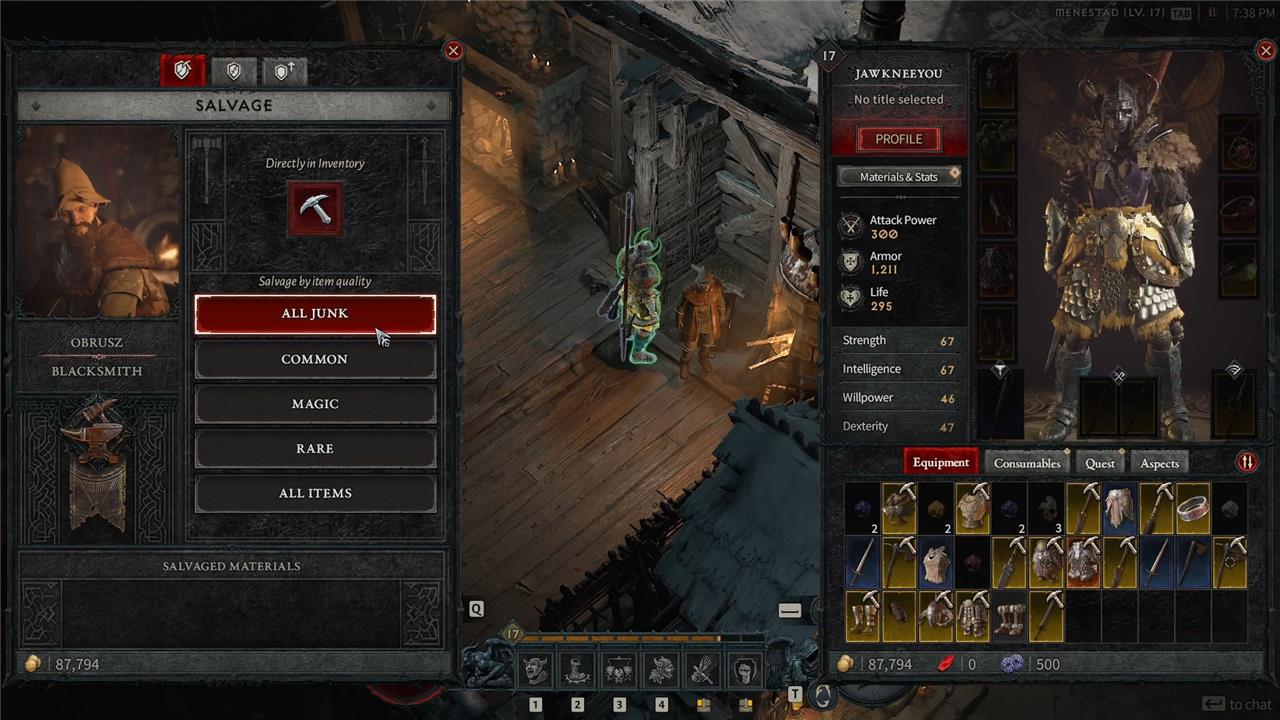
Visit the blacksmith in any town, which is indicated by a hammer-and-anvil icon on the map. Interact with the blacksmith, which will open the salvage menu on the left and your inventory on the right. In your inventory, you’ll notice that some equipment have a pickaxe in the upper right hand corner of their box indicating that a new look will be unlocked if you salvage that piece of equipment. Click on the pickaxe on the left menu, and click on any equipment in your inventory that you wish to salvage.
What gear pieces cannot be color swapped in Diablo 4
In Diablo 4, weapons cannot be color swapped with pigments in the Wardrobe; they only support appearance changes via transmog variants.
Gear Eligible for Dyeing
Pigments apply only to armor pieces like helmets, chests, gloves, pants, and boots-once a transmog variant is selected (not the default equipped look).
Exceptions and Notes
-
Accessories (rings, amulets) and back trophies lack color options entirely.
-
Default gear appearances (unsalvaged equipped items) cannot be dyed until unlocked as a variant.
-
Some unequipped variants or specific styles may show limited/no dye options due to design.
How do you salvage gear to unlock transmog colors
In Diablo 4, salvaging gear at a Blacksmith unlocks transmog appearances (looks), which may then support color swaps via pigments in the Wardrobe if the gear piece allows it-such as armor slots like helmets or chests.
Salvaging Steps
Visit a Blacksmith (anvil icon on map) and select the salvage option (pickaxe icon on left menu). Choose gear from inventory marked “Unlocks new look on salvage” (pickaxe tooltip), then confirm to break it down-this permanently adds its style to your Wardrobe collection and yields materials.
Colors After Salvage
Unlocked looks for dyeable armor pieces become eligible for pigments in the Wardrobe (bottom-right selector); weapons and accessories skip this step entirely. A confirmation pop-up appears on salvage, and you can preview/test dyes only on unlocked variants, not equipped defaults.
