
With Diablo 4’s Armory system, the days of tedious respecs and inventory chaos are over. Now, every major city and endgame hub hides a powerful tool: the Armory, where you can instantly swap between five fully customized builds per character-gear, skills, Paragon boards, and all-at the touch of a button. Whether you’re hunting bosses, diving into PvP, or experimenting with the latest meta, mastering the Armory’s locations and features is your ticket to unleashing Sanctuary’s full potential.
The much desired Armory system has arrived in Diablo 4 Season 7. The Armory feature is a quality of life update for players who want to test out multiple builds without the hassle of respeccing every time they find a new and interesting item. It’s also great for players who want to streamline their equipment and skills for different scenarios, as the Armory allows you to swap builds at the click of a button.
Find out more about what the Armory is, where it’s located, and how to use it in Diablo 4.
What is the Armory in Diablo 4
The Armory in Diablo 4 is a dedicated system that allows players to save, manage, and instantly switch between up to five different character builds per character. Introduced in Season 7, the Armory streamlines build experimentation by capturing your entire setup-including gear, skill trees, Paragon boards, glyphs, and class mechanics-so you can swap playstyles with a single click and without any gold cost. This makes it especially valuable for endgame content, as players can quickly adapt to different activities like boss fights, PvP, or farming without the hassle of manual respecs. The Armory is accessible from all major cities and key endgame hubs, marked on the map with a distinctive eye icon, making it easy to find and use whenever you want to optimize or experiment with your builds.
The Armory is a returning feature from Diablo 3 that allows you to save and swap between builds. Saving a build will take everything on your character including your equipment, skill tree, Paragon boards, and glyphs and create a copy of it for you to access at any Armory.
In the Armory, you can save up to five unique builds per character – allowing you to test different items or switch to the best build situation at hand.
Armory locations in Diablo 4
Armory stations in Diablo 4 are conveniently located in all major cities and key endgame hubs throughout Sanctuary, making it easy for players to access their saved builds wherever they are. You can find Armories in places such as Kyovashad, Cerrigar, Ked Bardu, Gea Kul, Zarbinzet, the Tree of Whispers, and the Training Grounds. For those with the Vessel of Hatred DLC, additional Armory locations are available near the Dark Citadel and Kurast Bazaar. On your map, Armories are marked with a distinctive eye-shaped icon, typically situated near other essential services like Blacksmiths and vendors, allowing for quick build swaps as you prepare for different challenges in the game.
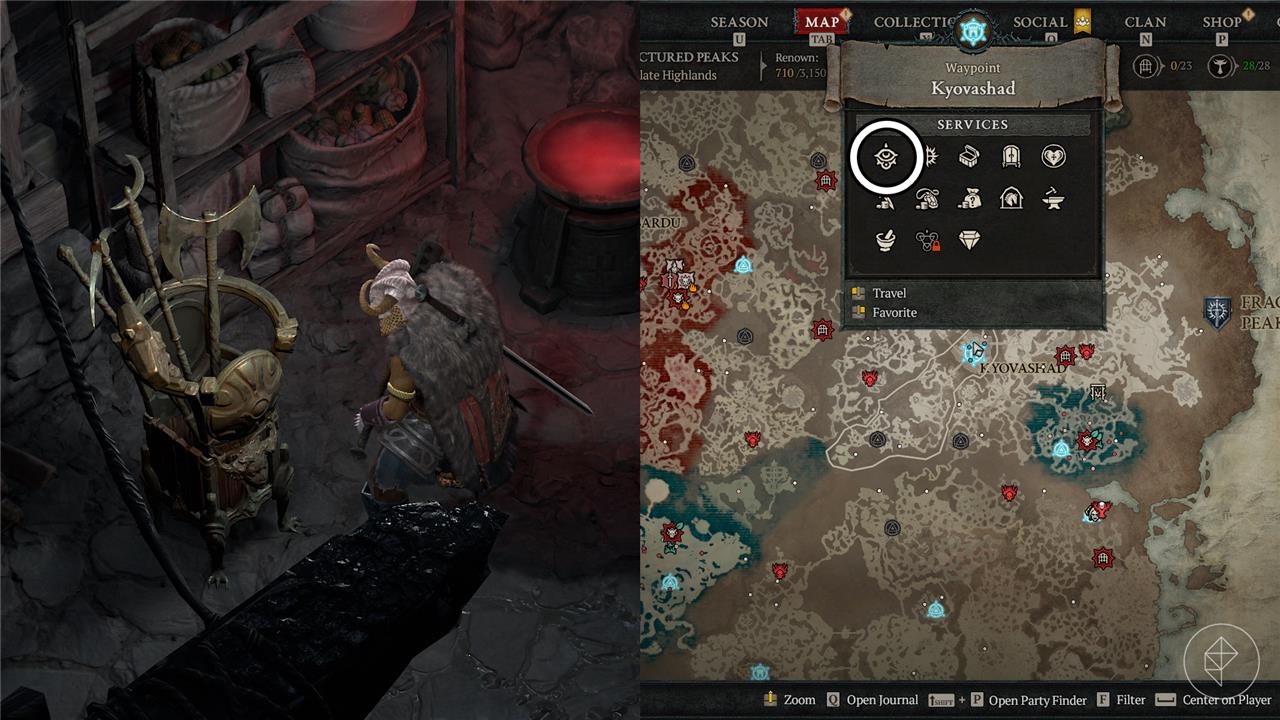
You can access the Armory in the following locations:
- Every major city
- The Dark Citadel
- The Training Grounds
- The Tree of Whispers
Armories are marked on the map by an “eye” icon, which can be seen in the image above. If you’re looking to swap your build, keep an eye out for the Armory icon on your map.
How to use the Armory in Diablo 4
To use the Armory in Diablo 4, simply visit any major city or endgame hub-look for the eye-shaped icon on your map, often near Blacksmiths and vendors. Interact with the Armory station to open its menu, where you can save your current build-including gear, skill tree, Paragon boards, glyphs, and ability hotbar-into one of five available slots per character. Saving a build tags all equipped items as favorites to prevent accidental deletion, and you can freely switch between saved loadouts at any Armory station without any gold cost. This system makes it easy to experiment with different playstyles or optimize your character for specific activities, as you can rename, edit, or delete loadouts at any time.
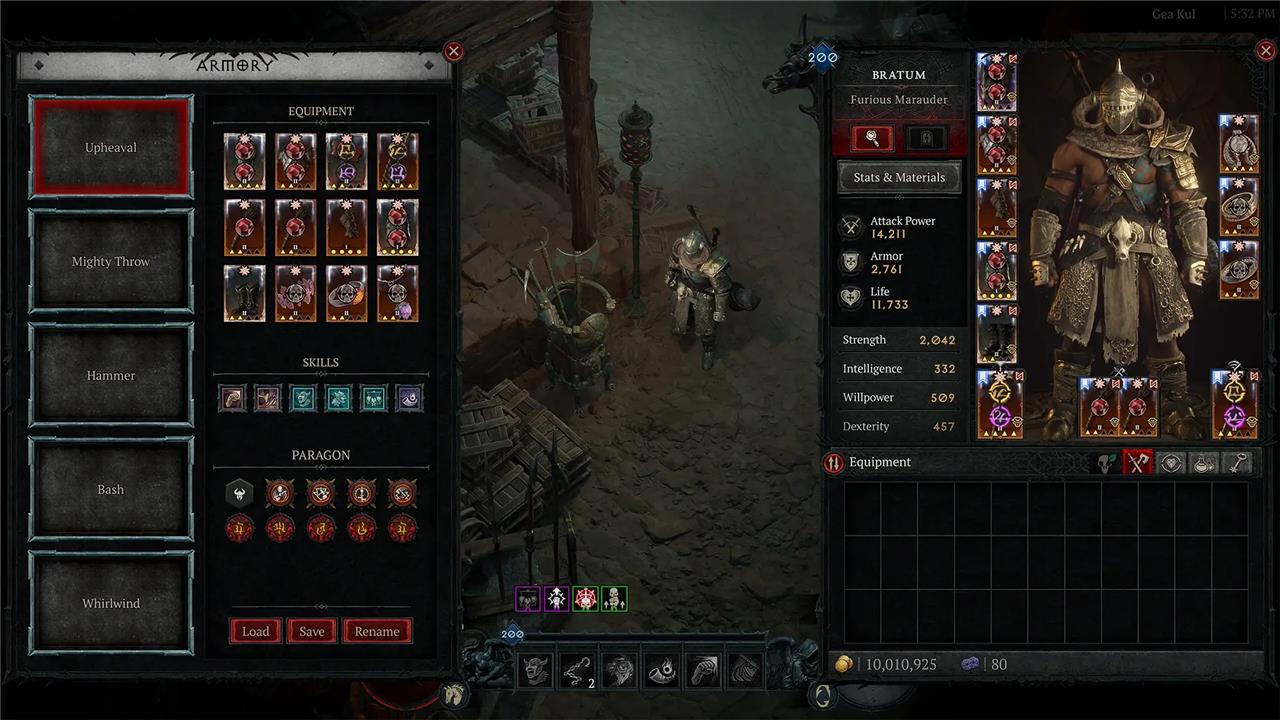
Interact with the Armory to open the Armory menu, which contains your builds on the left and your character on the right.
To save a build, select a slot in the Armory, and click “Save” to save your equipment, skills, class mechanics, Paragon boards, and glyphs to that slot. In doing so, the equipment used in that loadout will become favorited – preventing them from being salvaged.
If you want to save multiple builds, you’ll need to change your equipment to your desired loadout and save your build in a different Armory slot.
How will mastering the Armory system change my Diablo 4 gameplay
Mastering the Armory system in Diablo 4 will fundamentally transform your gameplay by making it effortless to switch between up to five fully customized builds per character, all at no cost. This means you can instantly adapt to different challenges-like swapping from a high-speed farming build to a boss-killing setup or preparing for PvP-without the hassle and time sink of manually respeccing skills, gear, or Paragon points.
The Armory also streamlines inventory management by tagging and protecting items used in your saved builds, reducing the risk of accidentally deleting crucial gear. With seamless access to your preferred loadouts in any major city or endgame hub, you’ll spend less time in menus and more time slaying demons, experimenting with strategies, and optimizing your character for every scenario Sanctuary throws at you.
How will mastering the Armory help me test new gear faster in Diablo 4
Mastering the Armory system will dramatically speed up your ability to test new gear in Diablo 4. With the Armory, you can save up to five different builds per character-including all gear, skills, Paragon boards, and class mechanics-and switch between them instantly, at no cost. This means that when you find a new piece of gear, you can quickly slot it into a saved loadout, compare its performance in real gameplay, and switch back if it doesn’t fit your needs-all without the hassle of manually re-equipping every item or respeccing your skills.
Additionally, the Armory marks items used in your builds, helping prevent accidental deletion and making it easy to keep track of which gear is tied to which setup. This streamlined process allows you to experiment with new drops or crafted items in context, accelerating your journey toward optimal builds and reducing downtime spent in menus.
