
Step into the enchanting world of Infinity Nikki and discover how to bend time itself to your will. Whether you’re chasing the perfect lighting for a breathtaking photo or need to fast-forward to a specific moment for a quest, mastering the art of changing the time of day is essential. Unlock the Pear-Pal device, engage in a charming mini-game, and watch as day turns to night-or dawn to dusk-with just a few taps. Ready to become the master of Miraland’s clock? Here’s your ultimate guide to changing time in Infinity Nikki across Mobile, PC, and PlayStation.
Passing time isn’t as easy as moving the hands on the dial, as you’ll have to play a flapping mini-game (or you can skip it, but where’s the fun in that).
Here’s how to change the time of day in Infinity Nikki.
How to change time of day in Infinity Nikki
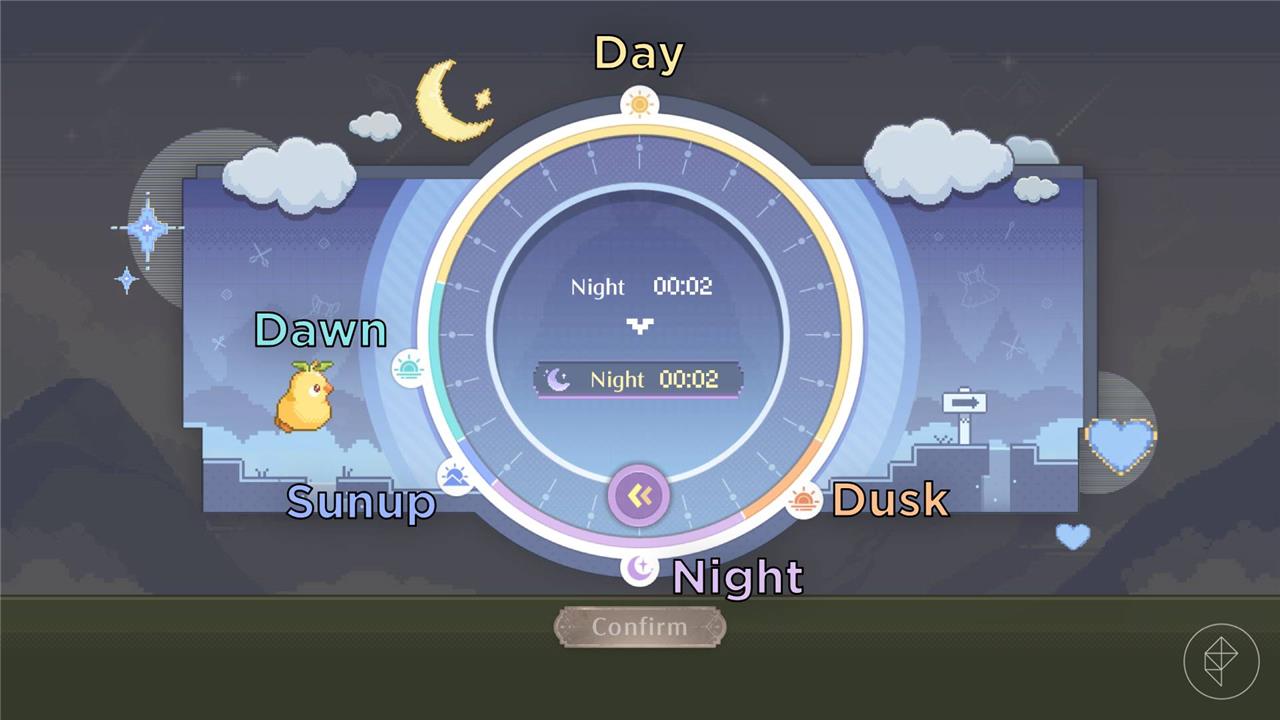
To change the time of day in Infinity Nikki, you first need to complete the “Land of Wishes” main story quest to obtain the Pear-Pal device from Dada in Florawish. Once you have the Pear-Pal, open it and select the “Run, Pear-Pal” app, where you’ll see a dial representing the current time and five generic times of day: sunup, dawn, day, dusk, and night. Rotate the dial to your desired time, then confirm your choice to start a Flappy Bird-like minigame. You can either play through the minigame or skip it to instantly change the time. This feature allows you to quickly adjust the in-game time to meet quest requirements or capture the perfect lighting for photos.
To change the time of day in Infinity Nikki, you’ll need to receive your Pear-Pal device from Dada in Florawish as part of the main quest line. Reaching this point can take anywhere from 30 to 45 minutes.
After you received the Pear-Pal, follow these steps to pass time:
- Open the Pear-Pal by pressing the “Escape” button on PC, “Start” button on console, or the dedicated button in the top-left corner of the screen.
- Select the “Run, Pear-Pal” button to see the current time in-game at the top and the desired time in-game at the bottom.
- Drag the circle embedded with arrows around the clock to your desired time.
- Select the “Confirm” button to initiate a mini-game. You can skip this mini-game entirely by selecting the “Skip” button underneath the “Confirm” button.
- Play through the mini-game or press “Escape” on PC or “Start” on console to skip it.
If you do decide to play the mini-game, your score will not effect what time it becomes, so enjoy the mini-game and try to set a high score!
You can either pass time in 30-minute increments or set the time to a period of day: day, dusk, night, sunup, and dawn.
How does participating in the mini-game affect my ability to change time in Infinity Nikki
Participating in the mini-game when changing time in Infinity Nikki does not affect your ability to set the desired time; your score has no impact on the outcome. The mini-game is essentially a fun, optional challenge that lasts about 30 seconds, after which the in-game time changes to what you selected. You can also choose to skip the mini-game entirely if you prefer to change time immediately without playing. This means you can enjoy trying for a high score without worrying about it influencing the time change itself.
Does playing the mini-game influence my ability to set specific times in Infinity Nikki
Playing the mini-game in Infinity Nikki does not influence your ability to set specific times. You simply select the desired time on the Pear-Pal device, then either play the “Run, Pear-Pal” mini-game or skip it to change the in-game time. Your performance in the mini-game has no effect on the time change; you just need to survive the 30-second run for the time to update. You can also skip the mini-game entirely after playing it once to unlock that option, allowing instant time changes without any impact on the outcome.
