
Before you leap into the chaos of Fortnite’s Battle Bus drop, why not take a moment to thank the unsung hero behind the wheel? This simple, quirky gesture has become a beloved tradition across all platforms-from PC and consoles to mobile devices. Whether you’re aiming to complete a quest or just want to join in on the fun, here’s your quick guide to showing appreciation to the bus driver and starting your match on a friendly note.
How to thank the bus driver in Fortnite
To thank the bus driver in Fortnite, simply press the emote button while you are still on the Battle Bus. The specific button depends on your platform: on PC, press the “B” key; on PlayStation, Xbox, and Nintendo Switch, press down on the D-Pad; and on mobile devices, tap the emote button on the screen. Once you do this, your name will appear in the chat confirming that you have thanked the bus driver. This gesture is not only a fun tradition but can also help complete weekly challenges that reward you with XP, making it a simple way to earn extra experience points while showing some in-game courtesy.
The Battle Bus doesn’t pilot itself, so there’s someone up there steering. And it’s only basic decency to say a quick thank you before dropping into your Battle Royale match.
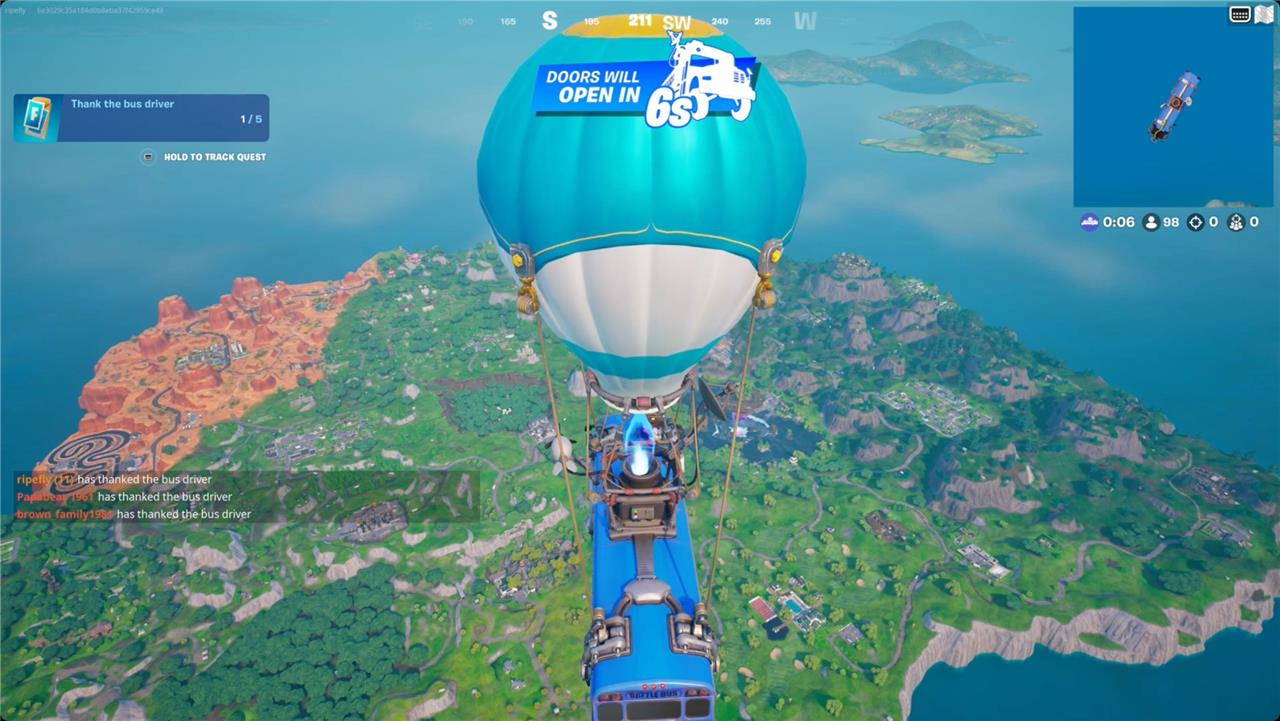
You can thank the bus driver any time between the Battle Bus launching to start the match and when you choose to jump. Thanking them is mapped to the emote button while you’re on the bus:
- On PlayStation, Xbox, and Switch, press down on the D-pad
- On PC, press B
- On mobile devices, hit the emote button in the corner of the screen.
How to complete the ’thank the bus driver’ weekly quest
To complete the “Thank the Bus Driver” weekly quest in Fortnite, you need to thank the bus driver before jumping off the Battle Bus in multiple matches. The specific button to press varies by platform: on PC, press the ’B’ key; on Xbox, PlayStation, and Nintendo Switch, press the Down button on the D-pad; and on mobile devices, tap the Emote button on the screen. To efficiently complete the quest, play consecutive matches and thank the bus driver each time before jumping. You can confirm success by seeing a message with your username indicating you have thanked the bus driver. This action will register towards the quest, which often requires thanking the driver in several matches to earn XP rewards.
Want to know the secret to making your thank you stand out in Fortnite
To make your thank you to the Fortnite bus driver truly stand out, timing and creativity are key. Instead of just pressing the emote, try coordinating with your squad to thank together right as the bus reaches the drop point-this synchronized gesture grabs more attention and adds a fun social element. Pairing your thank you with a unique emote or dance that fits your style also makes it memorable in the heat of the match. These small but thoughtful touches can turn a simple thanks into a standout moment that fellow players notice and appreciate.
What unique ways can I make my Fortnite thank you more memorable
To make your Fortnite thank you to the bus driver more memorable and unique, consider these creative approaches:
-
Coordinate with Your Squad: Thank the bus driver simultaneously with your teammates to create a synchronized and eye-catching gesture that stands out in the lobby.
-
Use Distinctive Emotes or Dances: Pair your thank you with a rare or funny emote to add personality and flair, making your gratitude more noticeable and entertaining.
-
Customize Your Emote Keybind: Set your emote button for quick access, so you can thank the bus driver promptly and consistently every match, especially useful for completing weekly challenges.
-
Combine with In-Game Challenges: Use the thank you gesture strategically to complete quests that reward XP boosts, turning a simple act into a beneficial gameplay tactic.
-
Engage with the Community: Share your unique thank you moments or creative ideas on social platforms or forums, inspiring others and becoming part of the Fortnite culture.
These methods not only make your thank you stand out but also enhance your connection with other players and the game’s lighthearted spirit.
