
Silent but deadly – the knife in Black Ops 6 isn’t just a backup weapon; it’s a game-changer that can turn the tide of battle in a heartbeat. Unlike previous Call of Duty titles, Black Ops 6 lets you equip and wield your knife as a dedicated melee weapon, allowing for stealthy takedowns and lightning-fast escapes. Mastering how to quickly draw and use your knife could be your secret weapon in close-quarters combat across PC, PlayStation, and Xbox.
Here’s how you can switch to your knife and change the key bind for your knife in Black Ops 6.
How to use the knife in Black Ops 6
To use the knife in Black Ops 6, press and hold the melee button to switch your equipped weapon to the knife. On PC, the default key is “V,” while on controllers, it is typically the right stick click (R3/RS) or Circle/B depending on your configuration. Simply pressing the melee button will perform a melee strike with your current weapon, but holding it down draws the knife for silent and quick close-quarters combat. The knife allows for faster movement and can be a strategic choice for stealth kills or when out of ammo. To switch back to your primary or secondary weapon, release the melee button or use the usual weapon swap controls. This dedicated melee weapon slot provides fluid transitions between ranged and melee combat in Black Ops 6.
On default, switching to your knife is set to hold melee, so you must hold down your melee button – “V” on PC or right analog stick on console.
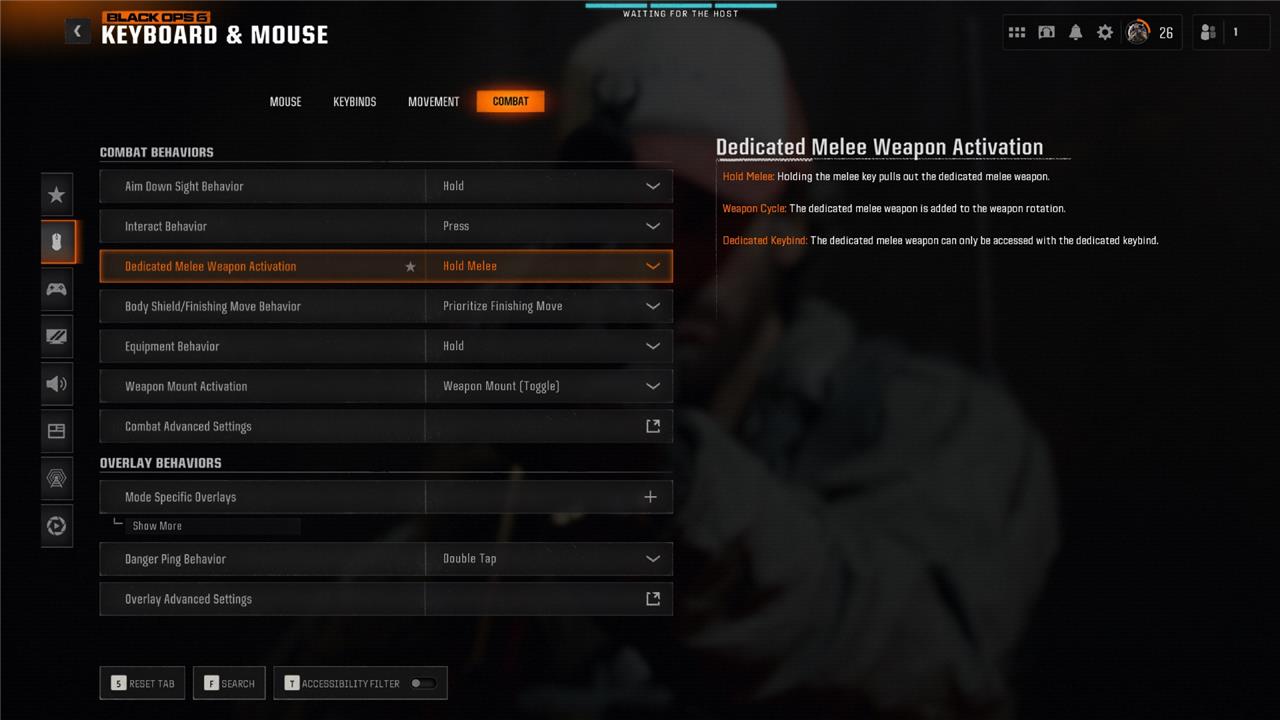
You can change how you want choose to bring out your knife in the settings:
- Open the settings menu.
- Choose Keyboard & Mouse or Controller depending on which accessory you’re using.
- Select the “Combat” tab.
- Find the “Dedicated Melee Weapon Activation” setting and change it to either Hold Melee, Weapon Cycle, or Dedicated Keybind (PC only).
Hold Melee was the default setting, so you’ll need to hold down your melee button. Weapon Cycle will add the knife to your weapon rotation, so you can scroll through your weapons to reach the knife.
On PC, you can use Dedicated Keybind, which will allow you to access your knife through a keybind. However, you will need to set a key to switch to your melee weapon in your settings.
To set up a dedicated keybind, follow the steps in the section below.
How to set up a dedicated keybind for your melee weapon in Black Ops 6
To set up a dedicated keybind for your melee weapon in Black Ops 6 on PC, first open the settings menu and select Keyboard & Mouse. Then navigate to the ’Combat’ tab and find the ’Dedicated Melee Weapon Activation’ option, where you can choose the “Dedicated Key” setting to enable a specific keybind for your knife. After that, go to the ’Keybinds’ tab, scroll to the Combat Advanced section, and assign your preferred key to “Switch to Melee Weapon.” This allows you to quickly access your melee weapon with a single press, rather than holding the melee button or cycling through weapons, enhancing your responsiveness in close combat.
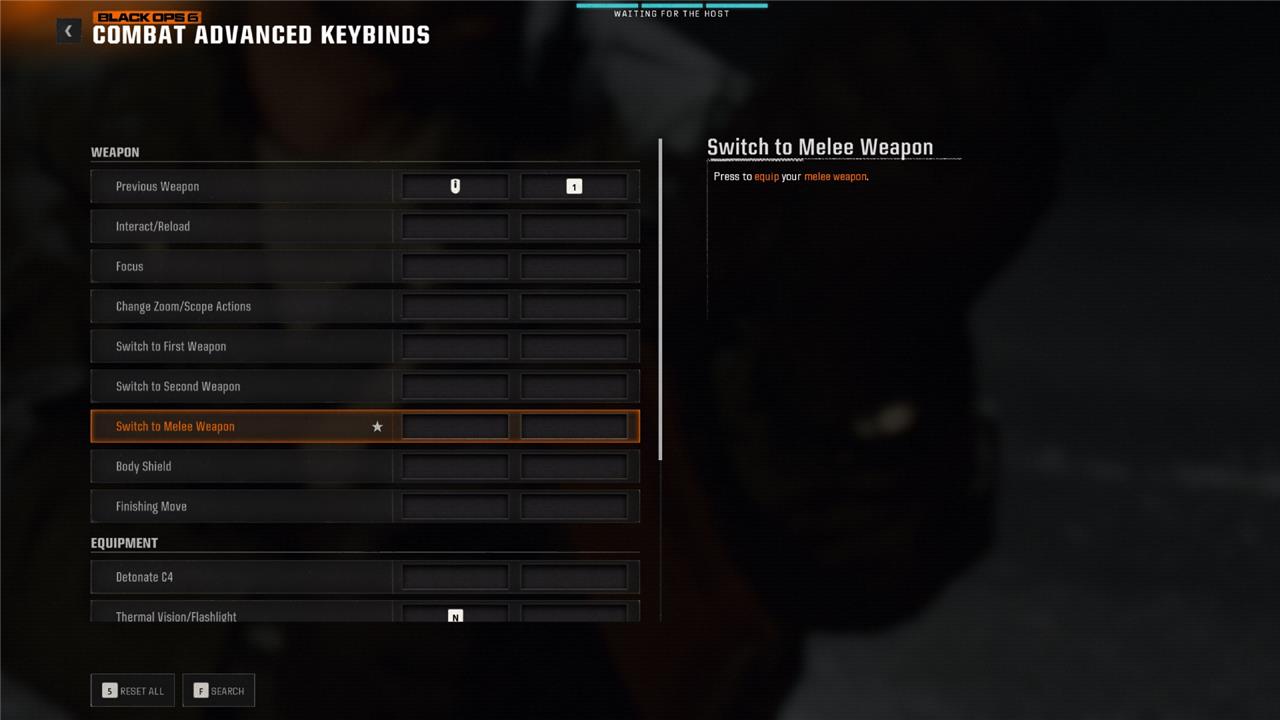
To create a dedicated keybind for your melee weapon, follow these steps:
- Open the settings menu.
- Choose Keyboard & Mouse or Controller depending on which accessory you’re using.
- Select the ’Keybinds” tab.
- Scroll down to find the “Combat Advanced Keybinds” setting.
- Select “Switch to Melee Weapon” and input your desired keybind.
How can I master silent takedowns with the Knife in Black Ops 6
To master silent takedowns with the knife in Black Ops 6, start by holding down the melee button to fully switch to your knife rather than just tapping it for a quick melee strike-this ensures you stay ready for multiple quick slashes without switching back to your gun after each hit. Combine this with tactical movement like crouch-walking or tactical sprint to move swiftly and silently, allowing you to sneak up behind enemies undetected for clean, quiet eliminations. Practice rapid switching: quickly draw your knife, slash, then switch back to your primary weapon to keep your attacks fluid and reduce reaction time from opponents. In close quarters or stealth scenarios, keep your knife equipped to capitalize on its speed and silence, finishing off weakened enemies faster than aiming a gun. Remember, timing and knowing your platform’s melee button layout are essential to avoid fumbling in critical moments. Using these techniques will make your knife a deadly tool for silent takedowns in Black Ops 6.
What are the key techniques for silent takedowns with the Knife in Black Ops 6
Key Techniques for Silent Takedowns with the Knife in Black Ops 6
-
Stealth and Surprise: Use shadows, cover, and crouch walking to reduce noise and approach enemies unnoticed. Always monitor your minimap to track enemy positions and avoid detection.
-
Flanking: Patience is vital. Sneak behind enemy lines to catch opponents off guard. Flanking allows you to isolate and eliminate enemies silently without alerting others.
-
Hold for Full Switch: Fully hold down the melee button to switch to your knife rather than tapping it. This ensures you can perform multiple quick slashes without fumbling, crucial for silent takedowns.
-
Combine with Tactical Movement: Pair knife use with crouch-walking or tactical sprint to move quickly and quietly, enabling you to close the distance stealthily and strike before the enemy reacts.
-
Quick Strikes and Execution Moves: Practice fast, precise melee attacks and learn to perform knife executions when sneaking up behind opponents to maximize silent kills.
-
Use Equipment to Distract: Employ tactical grenades like flashbangs or smoke grenades to disorient enemies, creating opportunities for silent knife takedowns while they are vulnerable.
-
Practice Timing and Reflexes: Knife combat demands sharp instincts and reaction time. Regular practice will help you execute silent takedowns smoothly and efficiently.
-
Knife Throwing: Although advanced, mastering knife throwing can extend your reach for silent kills without exposing yourself.
-
Situational Awareness: Use the knife primarily in close quarters or stealth scenarios where gunfire would give away your position. Avoid charging headfirst; instead, use the environment for cover and tactical advantage.
By integrating these techniques, you can become a formidable stealth operative in Black Ops 6, turning the knife into a powerful tool for silent and swift eliminations.
