
When your battered army limps home after a brutal clash in Civilization 7, victory depends on more than just numbers-it’s about knowing how to bring your wounded units back from the brink. Healing isn’t automatic, and without the right tactics, your forces could remain vulnerable and easy prey. Discover the essential steps and hidden tricks to restore your soldiers to fighting shape, whether you’re commanding on Nintendo, PC, PlayStation, or Xbox-and turn the tide of your next war before it’s too late.
In this Civilization 7 guide, we’ll walk you through how to heal your units and how to increase your unit healing.
How to heal units in Civilization 7
To heal your units in Civilization 7, you have two main options: use the “Skip Turn” command or the “Heal” command. The “Skip Turn” option allows your unit to recover a portion of its health each turn, but you’ll need to manually repeat this for multiple turns if the unit is heavily damaged. This approach is useful if you want to keep close control over your units, especially when they’re vulnerable to enemy attacks. Alternatively, the “Heal” command, found in the expanded unit options menu, puts the unit into a resting state where it will automatically recover health each turn until fully healed, without requiring further input from you. Units heal faster when they’re in friendly territory or within the borders of a city-state you control, and certain bonuses-like the God of Healing Pantheon or Fort Town specialization-can further increase healing rates. Remember, units cannot heal if they take any other action, including moving, during the same turn.
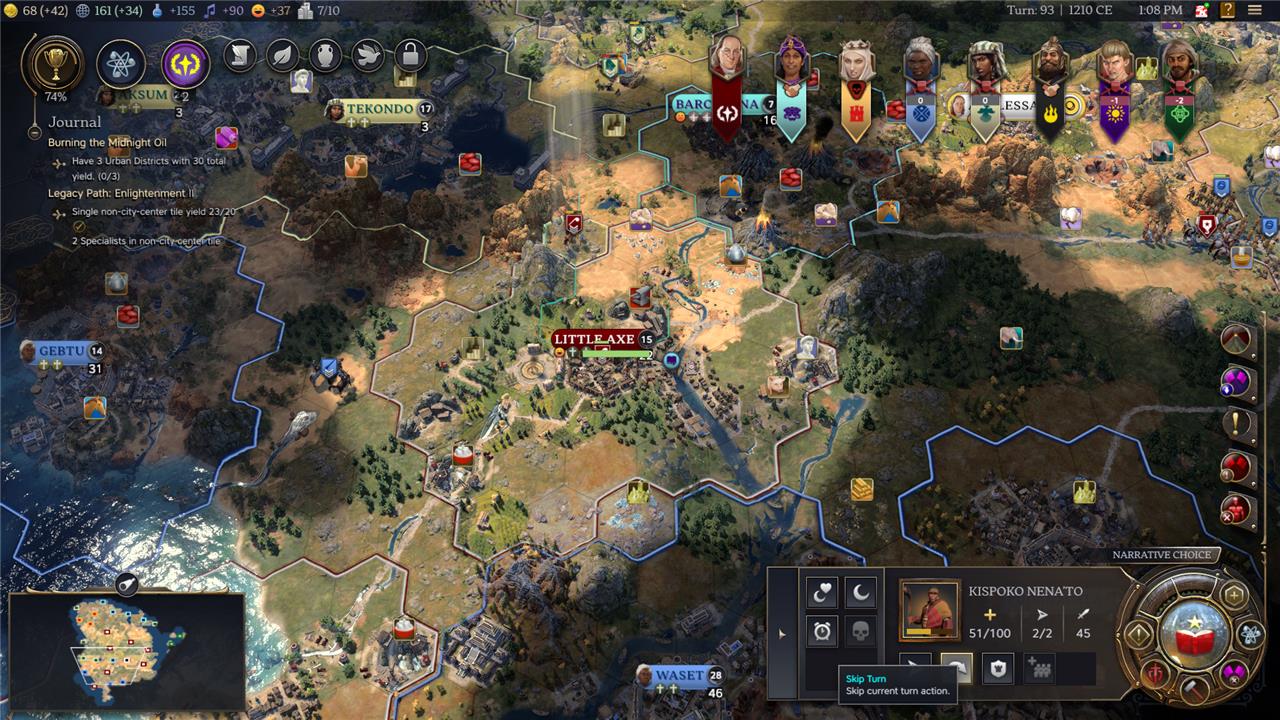
Units in Civilization 7 will heal passively if you don’t do anything with them – including moving them on the board – during their turn.
There are two commands that guarantee your soldiers will heal each turn: skip turn and heal.
Skip turn is the safer but more manual choice. It’ll only skip one turn and then prompt you to control the unit again next turn. This is a great way to micro-manage your army, allowing you to move your troops in and out of battle before they reach full health. It’s also a great way to ensure that you won’t forget a unit that’s healing up.
The simpler and more passive way to return your units to full health is to select the “heal” option, which is on the expanded arrow menu on the left side of the unit tab. This will cause your unit to basically go to sleep until enough turns have passed that it’s fully healed. This will cause the game to automatically skip past them on the next round of turn notifications.
Once a unit is fully healed, it’s essentially brand new, and there is no penalty to healing a unit back from the brink of death.
How to increase your unit healing in Civilization 7
To maximize unit healing in Civilization 7, always move your wounded units into friendly territory before initiating healing actions, as units heal significantly faster within your own borders or those of a City-State you control. Use the “Heal” command from the expanded unit menu to let a unit rest until fully recovered, or use “Skip Turn” for more manual control-both options restore health, but healing in friendly territory doubles the recovery rate compared to neutral or enemy lands. You can further boost healing by leveraging specific bonuses: the God of Healing Pantheon grants +5 healing per turn on rural tiles, and Fort Towns provide an additional +5 HP to units stationed within their borders. Promotions like the Field Medic Commander also grant healing bonuses to nearby units, even outside friendly territory. By combining these strategies-healing in safe, friendly areas and stacking healing bonuses-you can keep your army in peak condition and ready for the next engagement.
There are a variety of different bonuses to healing you can acquire. Some of these come from the religion you choose, while others might come from your town’s specialization. The Fort Town specialization, for example, allows your units to heal by 5 HP when inside that town.
The biggest and most reliable heal boost, however, comes from ensuring your units are in friendly territory while they heal. As long as you skip a turn on your unit, or select the heal option, and that unit is inside your empire’s borders, they will heal by double the amount as they will in another empire’s tile or no man’s land.
Units in Civilization 7 have a massive defenders bonus, both in their healing and resistances while in cities and towns. If you’re trying to wage war on another civilization, your best bet here is to ride out and attack a town that’s close to your own territory. This will allow you to quickly return a damaged unit to your own land and allow them to heal up before fighting again.
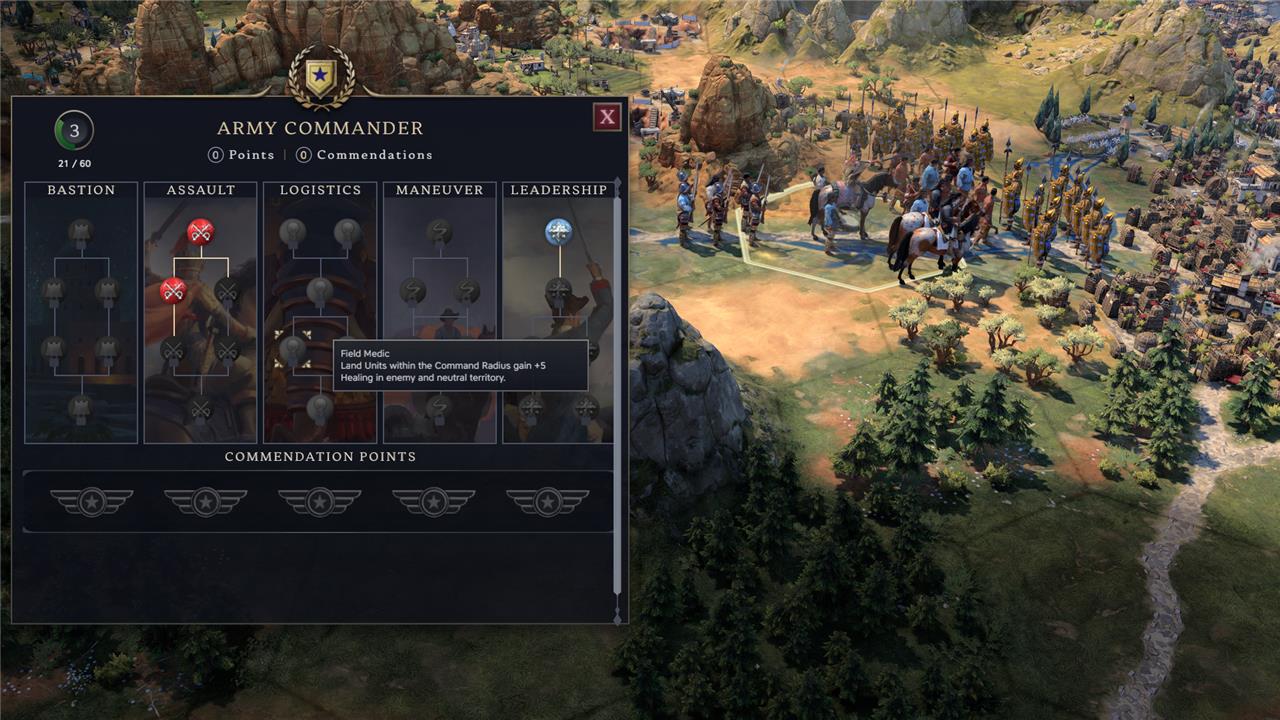
One way around that is to upgrade your army commander with the Field Medic upgrade from the Logistics tree. This will give all units in enemy and neutral territory a 5 bonus when healing. That doesn’t fully make up for the friendly zone healing, but it’s close, and can make a big difference when trying to keep your army healthy when they’re far away from home.
What secret strategies can maximize your units’ healing in Civ 7
Secret Strategies to Maximize Unit Healing in Civilization 7
1. Always Heal in Friendly Territory
-
Units heal significantly faster within your own borders or those of a City-State where you are the Suzerain. Healing in friendly territory can double the rate of recovery compared to neutral or enemy lands, making it the most reliable way to restore units quickly.
2. Use the Right Command: Heal vs. Skip Turn
-
The “Heal” command puts your unit into a dormant state until fully healed, making it a set-and-forget option for safe areas. The “Skip Turn” command is more manual, healing the unit for one turn and returning control to you each round. This allows you to react to threats or move the unit if the situation changes-ideal for healing near the front lines or when enemy attacks are likely.
3. Stack Healing Bonuses
-
Several bonuses can further accelerate healing:
-
God of Healing Pantheon: Grants +5 healing per turn on rural tiles, stacking with other bonuses for rapid recovery.
-
Fort Towns: Units stationed in Fort Towns (unlocked at 7 population) gain an additional +5 healing per turn.
-
Field Medic Commander Promotion: This commander upgrade provides healing bonuses even in enemy territory, extending your ability to recover while on the offensive.
-
4. Leverage Defensive Positions
-
Units in cities and towns not only heal faster but also benefit from defensive bonuses, reducing the risk of being picked off while recovering. If possible, retreat wounded units into these locations before initiating healing.
5. Combine Religious and Civic Upgrades
-
Some religious choices (like the God of Healing) and civic upgrades (such as those from the Logistics tree) can stack, allowing for nearly a third of a unit’s HP to be restored each turn under optimal conditions.
6. Micro-Manage for Maximum Safety
-
Use “Skip Turn” for vulnerable units so you can respond each turn if enemies approach, and reserve “Heal” for units deep in safe territory where surprise attacks are unlikely.
7. Special Situations
-
Certain world wonders, natural wonders, buildings, and civilization or leader abilities can also boost healing rates, so consider these when planning your healing strategies.
By combining these methods-healing in friendly territory, stacking bonuses, and choosing the right command-you can keep your army in top shape and maintain a decisive edge in any campaign.
How can I optimize terrain and territory for faster unit healing in Civ 7
Optimizing Terrain and Territory for Faster Unit Healing in Civilization 7
Maximize Healing in Friendly Territory
-
Units heal significantly faster when positioned within your own borders or the borders of a City-State where you are the Suzerain. Always retreat wounded units to friendly territory for the best healing rates.
Utilize Fort Towns and Specializations
-
Convert settlements to “Fort Town” specialization (available at 7 population) for an extra +5 healing per turn for units stationed there. This bonus stacks with other healing effects, making Fort Towns ideal recovery hubs.
Leverage Rural Tiles and Pantheon Bonuses
-
Adopt the “God of Healing” Pantheon to grant an additional +5 healing per turn on rural tiles throughout your empire. Combining this with Fort Towns can restore nearly a third of a unit’s HP each turn.
Prioritize Cities and Towns for Defense and Healing
-
Healing in cities and towns not only accelerates recovery but also provides defensive bonuses, keeping your units safer from enemy attacks during vulnerable turns.
Avoid Healing in Enemy or Neutral Territory
-
Healing rates are much slower outside friendly borders. Move units out of hostile or neutral lands before initiating healing whenever possible.
Commander and Policy Upgrades
-
Certain Army Commander promotions and civic upgrades (e.g., from the Logistics tree) can boost healing, sometimes even outside your borders, but these rarely match the speed of healing in friendly territory.
Summary Table: Healing Rate by Location
| Location | Healing Rate | Additional Notes |
|---|---|---|
| Own City/Town | Fastest | Defensive bonus, Fort Towns boost more |
| Own Borders (non-city) | Fast | Stack with God of Healing on rural tiles |
| City-State (Suzerain) | Fast | Same as own territory |
| Neutral Territory | Moderate | Lower healing rate |
| Enemy Territory | Slowest | Avoid unless you have special upgrades |
By consistently retreating units to friendly, specialized terrain and stacking healing bonuses, you can dramatically reduce downtime and keep your armies ready for the next engagement.
