
Infinity Nikki is stepping up its social game with the launch of Version 1.5, introducing a vibrant new multiplayer co-op mode that lets players explore hand-in-hand, share rewards, and tackle puzzles together in a dreamy new multiplayer zone called the Sea of Stars. From teleporting to friends and capturing group photos to collaborating on bubble-themed challenges and collecting rare items, this update transforms the stylish adventure into a shared journey of friendship and fun across mobile, PC, and PlayStation platforms.
Yes, Infinity Nikki’s multiplayer is a little lacking at launch. There technically is a multiplayer feature, but it might not be as deep as what you’re looking for, or what you’ve come to expect from this sort of game. But while you can’t explore the world alongside your friends, at least you can take pictures and share them with others!
Here’s what multiplayer features are available at launch and how to add your friends in Infinity Nikki.
Infinity Nikki multiplayer features explained
Infinity Nikki’s multiplayer features, introduced in Version 1.5, offer a rich co-op experience centered around exploration and collaboration in the open world of Miraland, particularly in the Sea of Stars zone. Players can team up with friends or random stylists to share materials, rewards, and exploration progress by holding hands, which enables joint collection of Whimstars, Treasure Chests, and Dews of Inspiration. The co-op mode supports activities such as fishing, bug catching, animal grooming, and battling overworld enemies, with all collected items and insights shared between participants. Communication is facilitated through chat and emotes, and players can take group photos with customizable poses. Additionally, new interactive items like the whimcycle and seesaw enhance the multiplayer experience. Multiplayer is currently limited to two players but is supported with various cooperative gimmicks, emphasizing teamwork and social interaction in Infinity Nikki’s vibrant world.
There is no co-op multiplayer in Infinity Nikki, but there is an asynchronous photo sharing feature, and you’re able to chat with your friends.
Interestingly, the PlayStation website and store stated that you’re able to play Infinity Nikkiwith up to “five online players“, but the PlayStation Store has since been updated to “1 online player” – and that seems to match our experience. (Although there hasn’t been any confirmation on co-op multiplayer by developer InFold, there also hasn’t been any refutation, so there’s still a chance one day!)
In the meantime, there is some multiplayer functionality, such as adding friends and chatting with them in the Pear-Pal app, but the biggest multiplayer feature is finding photos taken by other Nikkis around the map.
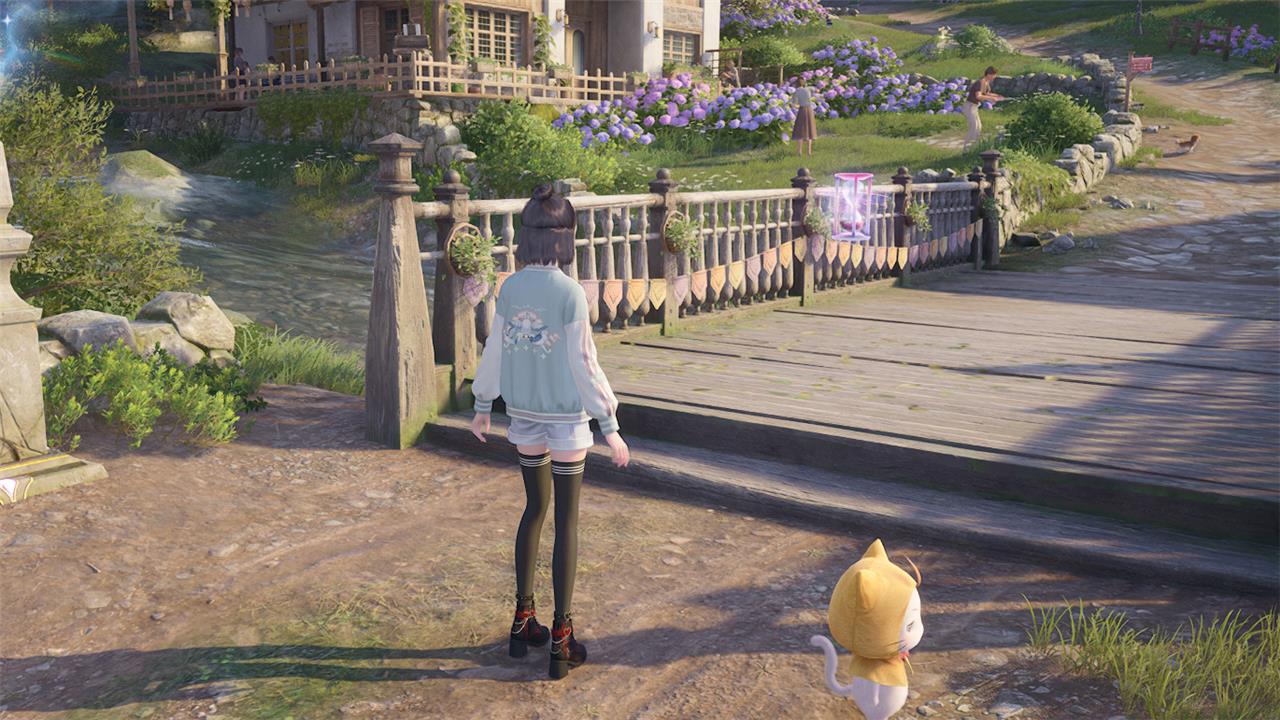
While you’re exploring the map, you may find a floating purple hourglass, which includes a photo taken by another Nikki in that exact location. Interact with the hourglass to view and like the image, add the player, or even take a photo with the other Nikki. If you decide to take a photo with them, your photo will be sent to the other player as well.
If you’re not finding any hourglasses in your world, you may need to reach Skilled Stylist and progress a bit farther in the main quest line.
How to add friends in Infinity Nikki
To add friends in Infinity Nikki, open your Pear-Pal by pressing the ESC key, then select the “add friends” option. In the top right corner, you can enter your friend’s game code to send a friend request. Alternatively, you can share your own code by clicking on the girl icon on the left side of the same tab and copying your code to send to others. Once added, you can invite friends to join your world for cooperative activities by clicking the Friends icon in Pear-Pal and sending an invitation, which they can accept to join you in exploration and co-op tasks.
To add a friend in Infinity Nikki, you’ll first need to reach the town of Florawish and speak with Dada in the Stylist’s Guild. Reaching Florawish and speaking to Dada is part of the main quest line, and can take around 30 to 45 minutes.
Afterwards, follow the steps below to add friends in Infinity Nikki:
- Open your Pear-Pal by pressing “Escape” on PC, “Start” on console, or the button in the top-left corner of the screen.
- Select the “Friends” button.
- Select the “Add Friends” button in the bottom-right corner.
- Either enter a Friend Code or select the “Get Friend Code” button in the bottom-right corner to receive a one-time use Friend Code.
While not confirmed, in our experience you’re not able to add players in other regions or servers. Unfortunately, you and your international friends may not be able to take photos together for now.
What multiplayer features will Infinity Nikki launch with on PC and consoles
At launch on PC and consoles, Infinity Nikki introduces a co-op multiplayer mode focused on select areas like the Sea of Stars and parts of Miraland, where two players can explore hand-in-hand, share materials, rewards, and exploration progress together. Players can invite friends via the Friend List or interact with “Starlight Projections” of other players to start co-op sessions. Multiplayer features include chatting in the open world, taking group photos with customizable poses, and cooperating on puzzles and activities such as collecting Whimstars and battling overworld enemies. While multiplayer is currently limited to two players and certain zones, it supports cross-platform play between PC, PlayStation, and mobile, with cross-progression syncing player progress across devices.
Will Infinity Nikki’s multiplayer include cross-platform play on PC and consoles
Yes, Infinity Nikki supports cross-platform play across PC, PlayStation 5, and mobile devices at launch. Players can enjoy multiplayer features and co-op gameplay regardless of their platform, as long as they are on the same server and logged into their registered accounts. This crossplay functionality allows friends to team up whether they are playing on PC, PS5, or mobile, providing a seamless multiplayer experience across these platforms. Additionally, the game features cross-progression, enabling players to sync their progress across all supported devices without losing any data.
