
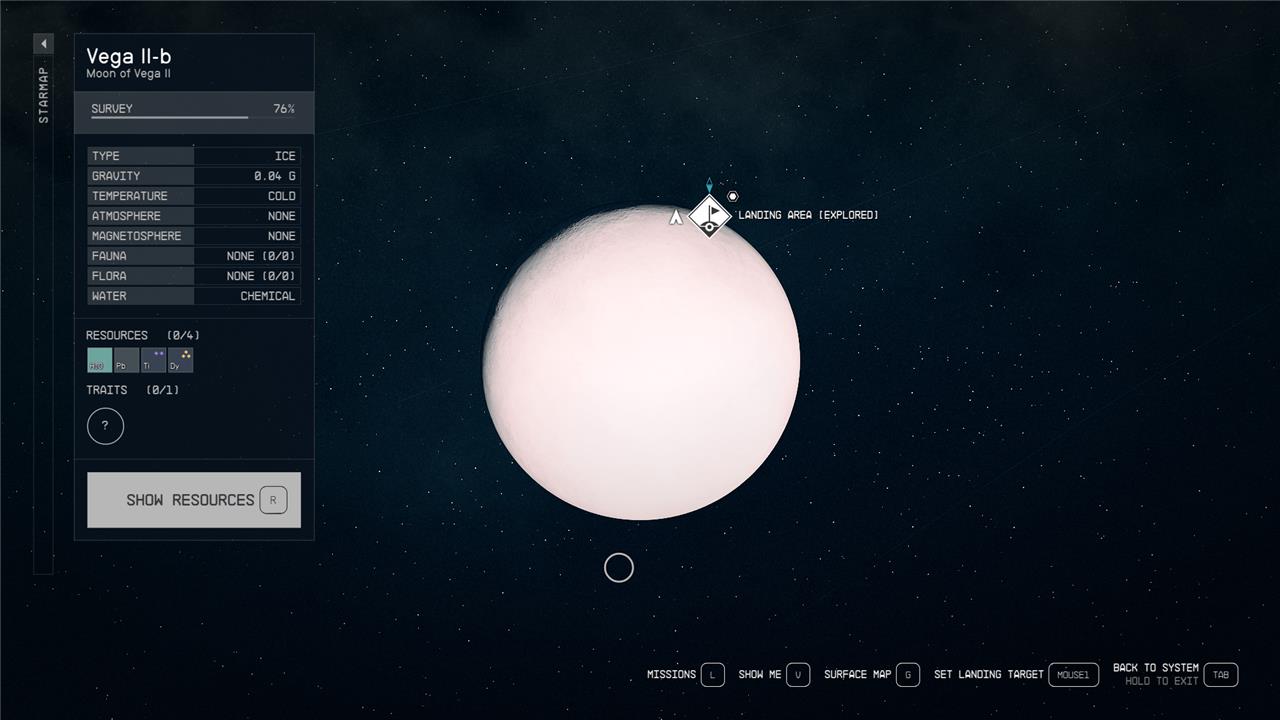
Looking to craft the toughest gear and build your outpost in Starfield? Titanium is your go-to resource, but tracking it down requires a keen eye and a bit of exploration. Whether you’re scanning distant moons like Vega II-B or mining the ice-covered surface of Titan, knowing where and how to get titanium can make all the difference in your cosmic journey.
In this Starfield guide, we’ll show you how to get titanium, where to buy titanium, and explain why you want as much titanium you can get.
Where to find titanium in Starfield
Titanium in Starfield can be found on various planets and moons across the galaxy, with some of the best locations including Pluto and Titan in the Sol system, as well as Vega II-B in the Vega system. To gather titanium, use your scanner to locate “Ti” resource nodes on the surface, then harvest them with a cutter. For more efficient collection, you can build an outpost with a titanium extractor near these deposits, which automates mining. Additionally, titanium can be purchased from merchants in major hubs like Jemison Mercantile in New Atlantis or Midtown Minerals in Akila City. Investing in scanning and geology skills will improve your ability to find and collect titanium effectively.
Titanium is classified as a “rare” material in Starfield, and you’re going to have a much better time finding it if you’ve invested in two skills: Scanning and Planetary Habitation, both of which are in the Science tree.
If you don’t have the Scanning skill leveled to the second rank, you won’t be able to see titanium deposits on planets when you’re scanning from space. However, you will be able to land on the planet and find the deposits with your hand scanner – it will just take a lot longer if you don’t know exactly where to land.
But extreme environments are the real problem with titanium, and are why you’ll need Planetary Habitation if you want to set up a titanium empire. With this skill, you’ll be able to overcome more and more extreme environments as you level it up, starting with extreme hot and cold. Unfortunately, Planetary Habitation is a Master-level Science skill, whereas Scanning is only an Advanced skill. Basically: If you really want to become a master of titanium, you’re going to need to invest a lot of points into Science.
However, there is one massive “but” in the titanium conversation, and that’s the moon Vega II-B, in the Vega system. Of all the planets we surveyed, this is the only one to have titanium and a non-extreme environment. That means that you can fly up to Vega II-B mere hours into your playthrough and plant your flag in a titanium mine. The beauty of Vega II-B isn’t just that it’s temperate, but that it’s also packed with titanium. If you haven’t leveled up the Scanning skill to the second rank yet, simply land in a space that looks empty and pull out your outpost beacon. Chances are you’ll be in range of some titanium.
Now, thankfully, you won’t be low-level forever, and you’ll eventually earn those Science skills and be able to create an outpost wherever you want. When you’re able to build on extreme environment locations, check out these heavenly bodies as well:
- Pluto in the Sol system
- Titan, a moon of Jupiter in the Sol system
- Copernicus II in the Copernicus system
- Guniibuu VI-e, a moon of Guniibuu VI in the Guniibuu system
- Guniibuu VI-d, a moon of Guniibuu VI in the Guniibuu system
- Procyon II in the Procyon A system
Where to buy titanium
Titanium can be purchased from various vendors scattered throughout the Starfield galaxy, making it a convenient option if you prefer not to mine it yourself. Most merchants, including those at key locations such as Jemison Mercantile in New Atlantis Spaceport, Midtown Minerals in Akila City, and shops in Cydonia on Mars, frequently stock titanium in sizable quantities. The price is generally around 10 Credits per unit, and inventories refresh over time, so checking back periodically can help replenish your supply. Buying titanium is a reliable and efficient way to ensure you have enough for crafting and outpost construction without the need for extensive exploration or mining.
You can (and should) buy titanium from all the usual resource shops in Starfield: Jemison Mercantile in New Atlantis, the UC Exchange in Cydonia, and the Mining League in Neon. You might also get lucky with your local Trade Authority, so it’s worth popping in to see.
Every day of in-game time you should be able to find quite a bit of titanium at Jemison Mercantile – for the low price of only 12 credits per lump, which is a steal for a rare resource. And when they run out, you can always go wait on a nearby chair or head back to your ship and sleep for 24 hours. When you return, you should be able to buy more. If not, go rest for another 24 and come back.
Titanium item ID
The Titanium item ID in Starfield is 0000556D. This ID can be used in the game’s console commands to add Titanium directly to your inventory, making it easier to obtain this valuable resource without mining or purchasing it. Titanium is a rare inorganic resource widely used in crafting and outpost construction, and having its item ID allows players to spawn it instantly if desired.
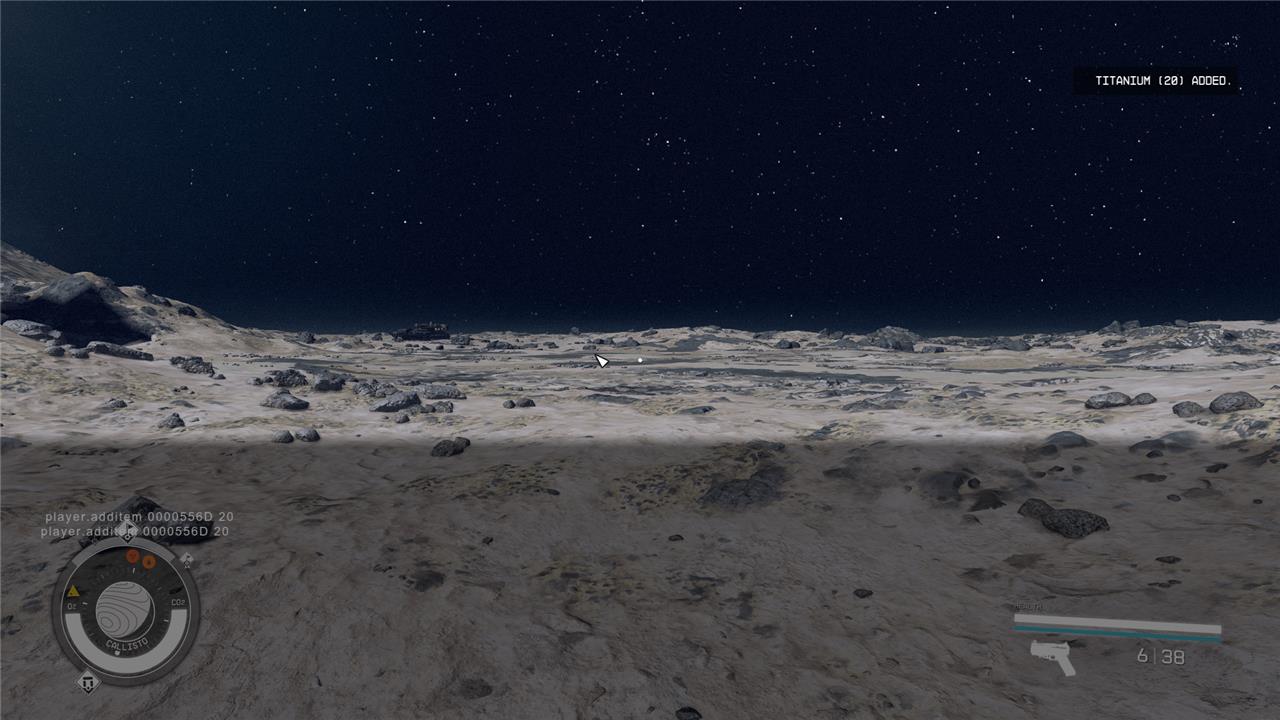
Starfield has console commands – on PC at least – that you can use to do a variety of things, like give yourself unlimited storage or, in this case, give yourself specific items.
To give yourself titanium, you’ll need to use its item ID code, which is: 0000556D.
Hit the ’ key any time during your Starfield playthrough and you’ll pull up the console command. Here is the full console command to give yourself 20 titanium in Starfield:
- player.additem 0000556D 20
You can copy/paste the code above directly into your console command, sans bullet point.
If you want to get more titanium in a single command, change the 20 on the end of the code provided above to 50, 100, even 1,000. Once you hit enter, you’ll be able to find the resource sitting in your inventory.
It’s worth mentioning that using console commands can disable achievements in Starfield, so be careful if you’re an achievement hunter.
What is titanium used for in Starfield?
Titanium in Starfield is a vital resource used primarily for crafting and research purposes. It is essential for constructing key structures like the Armillary, which is crucial for advancing the main quest. Additionally, titanium is required in various research projects such as Helmet Mods 2 and Spacesuit Mods 2, and it is used to upgrade equipment, including adding Explosive Shielding to spacesuits. Due to its strength and lightweight properties, titanium is also a preferred material for building and maintaining outposts and crafting durable weapon mods, making it indispensable for progression and customization in the game.

You’ll primarily need titanium for modding your suits and weapons in Starfield, as well as building some parts of your hab.
Turning your Equinox laser rifle into a fully automatic laser rifle, for example, will run you four titanium. Researching better turrets for your base? Nine titanium. Improved batteries and magazines for your weapons? Five titanium. And slapping an Exo Servos mod on your spacesuit will run you three titanium.
How can I efficiently farm titanium on rare planets in Starfield
To efficiently farm titanium on rare planets in Starfield, follow these key strategies:
-
Choose the right planets: Focus on titanium-rich locations such as the moon Vega II-B in the Vega system, Eridani VII-c near Alpha Centauri, and Titan in the Sol system. These places have abundant titanium deposits and more manageable environmental conditions compared to extreme weather planets.
-
Build Outposts with Extractors: Once you identify a titanium deposit via scanning, establish an Outpost nearby and construct an Extractor. This automated mining device continuously gathers titanium underground, saving you from manual harvesting. Ensure you have a power source like a Solar Array or Wind Turbine to keep the Extractor running, and connect storage containers to handle overflow.
-
Unlock Planetary Habitation Skill: Some titanium-rich planets have extreme weather that prevents Outpost construction until you unlock this skill, so prioritize it to expand your farming options.
-
Use scanning effectively: Before landing, scan planets to confirm titanium presence (marked as “Ti”) and find optimal mining spots. On the ground, use your Hand Scanner to locate titanium nodes for manual mining or Outpost placement.
-
Supplement with buying titanium: If farming proves slow, purchase titanium from merchants in hubs like New Atlantis, Cydonia, and Akila City. Shops restock over time, providing a steady alternative source.
Combining these methods-targeting the best planets, automating extraction with Outposts, and supplementing with purchases-will maximize your titanium farming efficiency in Starfield.
How do I identify the best planets for titanium extraction in Starfield
To identify the best planets for titanium extraction in Starfield, use the following approach:
-
Scan planets before landing: When exploring star systems, use your ship’s scanner to look for the “Ti” symbol, which indicates the presence of titanium deposits on a planet or moon.
-
Target known titanium-rich locations: Some of the best places to find titanium include:
-
Vega II-B (moon of Vega II in the Vega system), noted for steady and dependable titanium deposits with relatively low gravity and no extreme weather.
-
Eridani VII-c (moon in the Eridani system near Alpha Centauri), a prime farming spot where titanium is abundant and accessible for both manual mining and extractor use.
-
Titan (moon of Saturn in the Sol system), although it has extreme cold conditions requiring the Planetary Habitation skill to build outposts and extract titanium.
-
Other moons like Heilo in the Cheyenne system and Groombridge VII-B in the Groombridge system also have titanium.
-
-
Look for surface and underground deposits: Titanium appears as small rocky nodes on the surface, identifiable with your Hand Scanner, and as underground deposits marked by a steely grey coloration on the ground. Building an Outpost with an Extractor near these deposits allows automated mining.
-
Consider environmental conditions: Some titanium-rich planets have harsh weather or extreme cold, so unlocking the Planetary Habitation skill is necessary to establish outposts and extract titanium efficiently.
-
Use scanner upgrades and geology skills: Investing in Scanning and Geology skills improves your ability to detect titanium deposits from orbit and on the ground, increasing your mining efficiency.
By combining pre-landing scans for the “Ti” marker, focusing on established titanium-rich moons like Vega II-B and Eridani VII-c, and utilizing extractors on your outposts, you can identify and exploit the best planets for titanium extraction in Starfield.
