
Pokémon fans, bridge the gap between Scarlet and Violet’s open worlds and Home’s vast storage with these seamless transfer steps.
Keep in mind, you can only store up to 30 Pokémon on the free version of the app. Upgrading to the premium version costs $15.99 per year (or $2.99 a month or $4.99 for three months), and allows you to store up to 6,000 Pokémon. You do not need Nintendo Switch Online to use Pokémon Home.
Now that’s been situated, let’s get started.
How to move Pokémon between Scarlet and Violet to Home
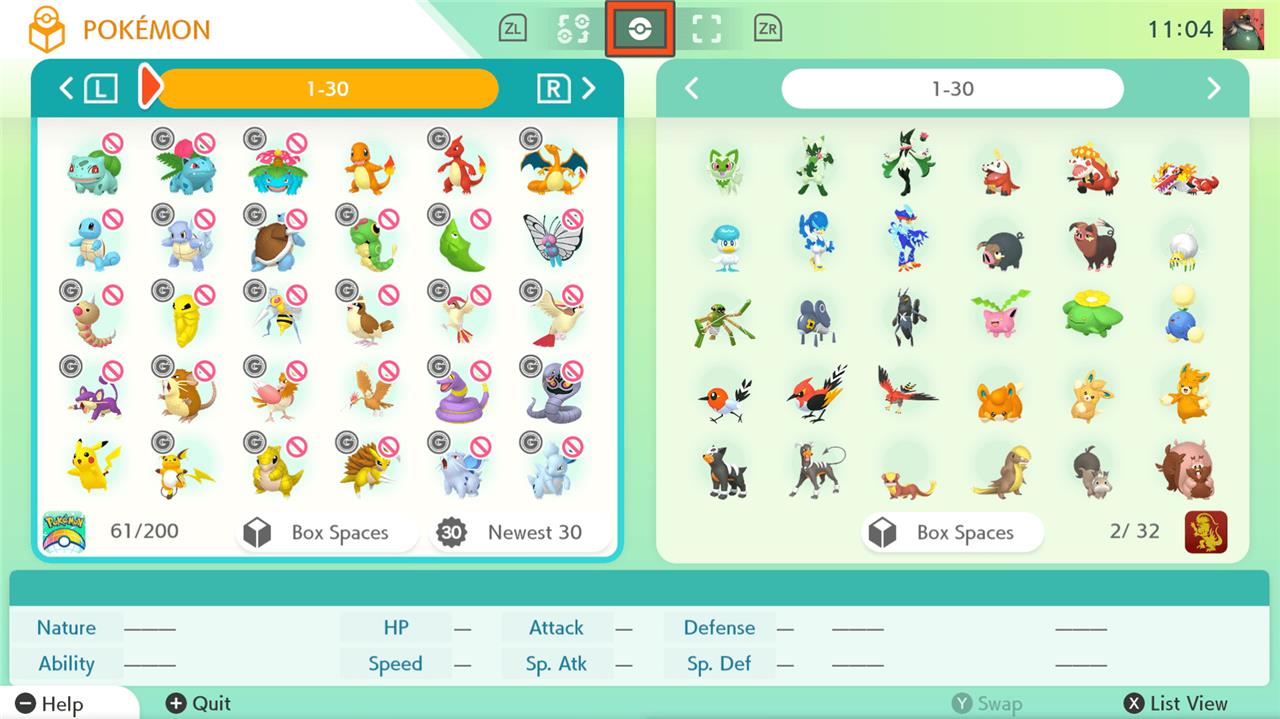
Launch Pokémon HOME on Nintendo Switch and select Pokémon Scarlet or Violet to link the save data. Drag Pokémon from the game boxes on the right to HOME boxes on the left, then press the + button to save changes. Exit HOME, return to the game, and find transferred Pokémon in the boxes.
- Download the Pokémon Home app to your Nintendo Switch.
- Login with your Nintendo Account.
- From the main menu, select “Pokémon.”
- Select Pokémon Scarlet or Violet (depending on which game you’re moving Pokémon from). You should see your save data displayed on the left.
- Once you connect to the game, just move Pokémon between your Home boxes (on the left) and your Scarlet and Violet boxes (on the right) to transfer them.
- When you’re done, press the plus button and save the changes.
Pokémon Scarlet and Violet and Home transfer limitations
Pokémon Scarlet and Violet support transfers through Pokémon Home, but some restrictions apply. Only Pokémon available in the Paldea Pokédex or otherwise programmed into the games can be transferred successfully. Creatures that do not exist in Scarlet and Violet’s data cannot enter those titles, even if stored in Home. Additionally, moves exclusive to other games are replaced with ones available in Scarlet and Violet. Players should update both the game and Pokémon Home to the latest versions to ensure compatibility during transfers.
Note that you can only transfer certain Pokémon between Home and Scarlet and Violet. The app will stop you, as the Pokémon indicated with the red crossed circle (see above) can’t be moved to Paldea.
The one of the biggest limitations is that you cannot move Pokémon from Go to Scarlet and Violet if you do not have them in Scarlet and Violet already. This means you cannot just transfer your 20 extra Groudon from Pokémon Go to Scarlet and Violet, unless you transfer a Groudon from a different game first. (We tested this, as you can see in the lead image.)
All the Pokémon from Scarlet and Violet can be moved to Home, but not necessarily to other games. Obviously, new Paldean Pokémon, like Smoliv or Quaxly, cannot go to older games like Sword and Shield.
Some Pokémon games also only allow for a one-way transfer to Home, like Pokémon Go. You can take a peek at this complicated diagram provided by The Pokémon Company for further explanation:
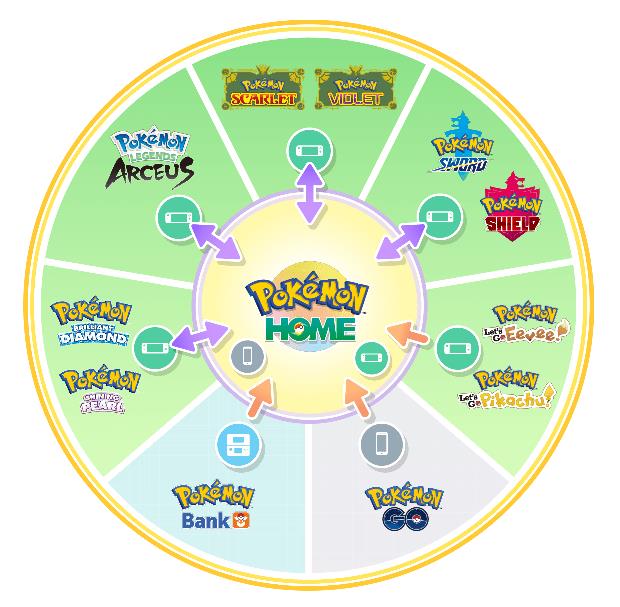
Now you can finally show of all those surplus shinies you caught in Pokémon Go in Scarlet and Violet. Or maybe you want to transfer your beloved original Typhlosion from Pokémon HeartGold? You can do that, too. (Though bear in mind it’s going to be a long process.)
Which Pokémon cannot be moved to Scarlet and Violet from Home
Certain Pokémon from Pokémon HOME cannot be transferred to Pokémon Scarlet or Violet due to compatibility restrictions tied to the Paldea Pokédex, even after DLC expansions like The Teal Mask and The Indigo Disk. These restrictions primarily affect species not coded into the games, including many Legendaries, Mythicals, regional forms, and older-generation Pokémon not added via updates. As of early 2024 data, over 290 species remain blocked, though exact lists evolve with patches.
Key Blocked Categories
-
Legendaries/Mythicals: Most from prior generations, such as Mewtwo, Rayquaza, Dialga, Palkia, Reshiram, Zekrom, Kyurem, Xerneas, Yveltal, Zygarde, Tapu Koko, and Cosmog line (prevented by a red circle icon in HOME).
-
Regional Forms: Galarian Corsola (Cursola), Galarian Slowpoke line, Hisuian forms like Typhlosion or Qwilfish, unless specifically enabled.
-
Early Gen Gaps: Kanto’s Staryu/Starmie, Jynx, Kangaskhan, Mr. Mime; Johto’s some trades like Steelix; plus select Hoenn/Sinnoh like Zangoose, Seviper.
Transfer Rules
Pokémon must match Scarlet/Violet’s dex availability (over 700+ transferable now); HOME blocks incompatible ones visually. All Scarlet/Violet Pokémon can exit to HOME, but incoming transfers require Premium HOME for bulk moves and game updates (v1.3.0+). Future patches may expand this, as DLC added ~100 more.
Are Legendary and Mythical Pokémon transferable to Scarlet and Violet
Some Legendary and Mythical Pokémon can be transferred from Pokémon HOME to Scarlet and Violet, but many cannot due to game compatibility limits, even with full DLC. Transferable ones include select older Legendaries like Articuno, Zapdos, Moltres, Mewtwo, Mew, Kyogre, Groudon, Rayquaza, and certain Mythicals, as listed on detailed compatibility charts. Non-transferable examples from prior responses include Dialga, Palkia, Reshiram, Zekrom, Xerneas, and Yveltal, shown by a blocking icon in HOME.
Transferable Legendaries/Mythicals
These are coded into Scarlet/Violet for HOME transfers:
-
Kanto: Articuno, Zapdos, Moltres, Mewtwo, Mew.
-
Hoenn: Kyogre, Groudon, Rayquaza.
-
Others: Raikou, Entei, Suicune, and some Kalos/Galar starters or variants.
Blocked Legendaries/Mythicals
Most Sinnoh/Unova Legendaries (e.g., Dialga, Palkia, Giratina, Zekrom) and newer ones remain incompatible, totaling dozens restricted by Paldea Pokédex gaps. Pokémon GO-origin Legendaries face extra hurdles unless a main-series version exists first in your save.
Checking Compatibility
In Pokémon HOME, attempt a transfer; a red circle blocks ineligible Pokémon. Updates through The Indigo Disk expanded the list to over 100+ transfer-only species, nearing full National Dex coverage barring a few holdouts.
