
Your witch or wizard’s look isn’t set in stone once you leave the character creator in Hogwarts Legacy. From changing hairstyles and facial features to experimenting with magical gear styles, customization runs deeper than you might think.
When you first start Hogwarts Legacy, you’ll be presented with the character creator that has a lot of possible customizations for your witch or wizard. You can change your face, hair, complexion, gender, and, of course, scars. You can change most of your appearance fairly early on in Hogwarts Legacy after you arrive in Hogsmeade, but you can’t change everything! Continue reading to learn more about what you can and can’t change about your character’s appearance.
Where can you change your appearance in Hogwarts Legacy?
You can change your character’s appearance in Hogwarts Legacy by visiting Madam Snelling’s Tress Emporium in Hogsmeade. This shop allows you to alter features such as your hairstyle, hair colour, complexion, scars, and eye colour for a small fee. However, major facial features and body type cannot be adjusted after the initial character creation, so players need to choose those carefully at the start of the game.
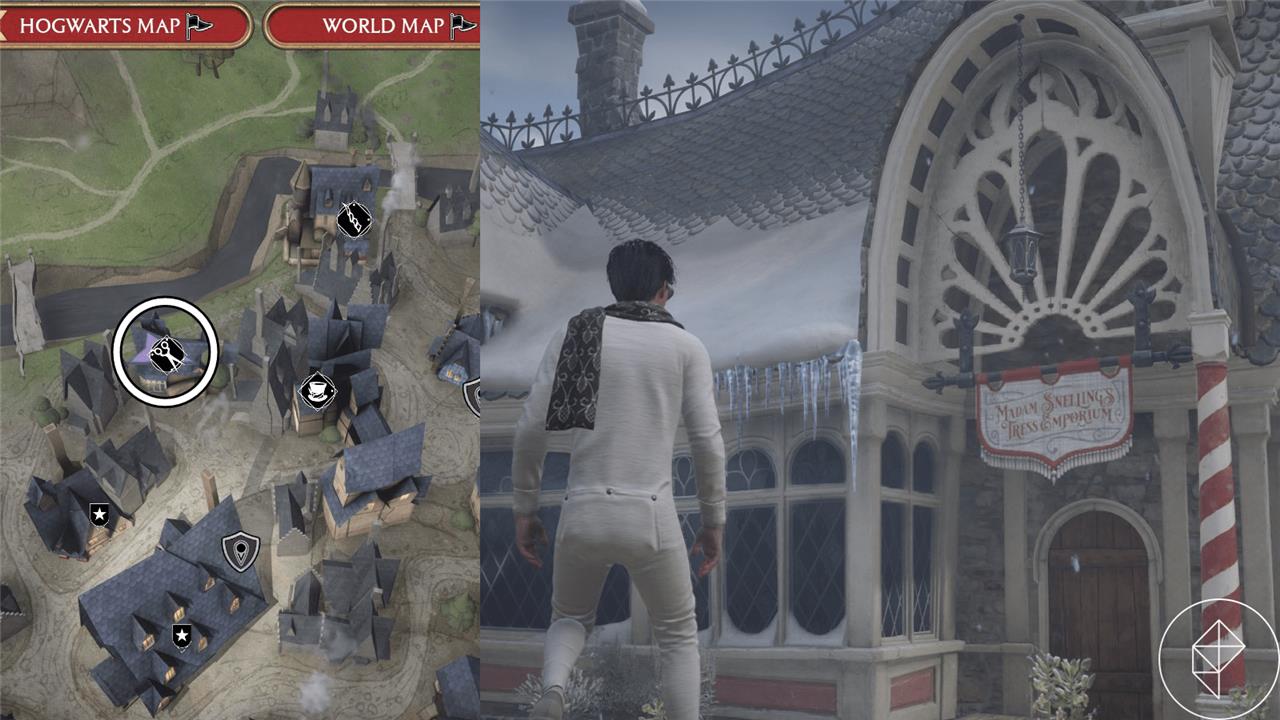
You’ll receive a quest called “Welcome To Hogsmeade” from Professor Weasley fairly early on into Hogwarts Legacy. In this quest, you’ll be taken to Hogsmeade by a friend, who’ll leave you to explore the magical enclave on your own. From here, you can visit Madam Snelling’s Tress Emporium, which is indicated on the map of Hogsmeade by the scissors icon. Interact with Calliope Snelling inside to change the appearance of your witch or wizard.
What can you change about your appearance in Hogwarts Legacy?
Players can modify their character’s hair, facial features, complexion, and voice at the beginning of Hogwarts Legacy, creating a witch or wizard that matches their style. After the game begins, certain aspects-such as hairstyles, hair color, and facial hair-can be changed later at a shop in Hogsmeade. However, core features like face shape, skin tone, and body type remain fixed once the adventure starts, so it’s worth taking extra time during initial customization to get those details right.
You can change everything, but your face shape and skin color in Hogwarts Legacy. If you’re looking to change specifically your face shape and skin color, you’re out of luck.
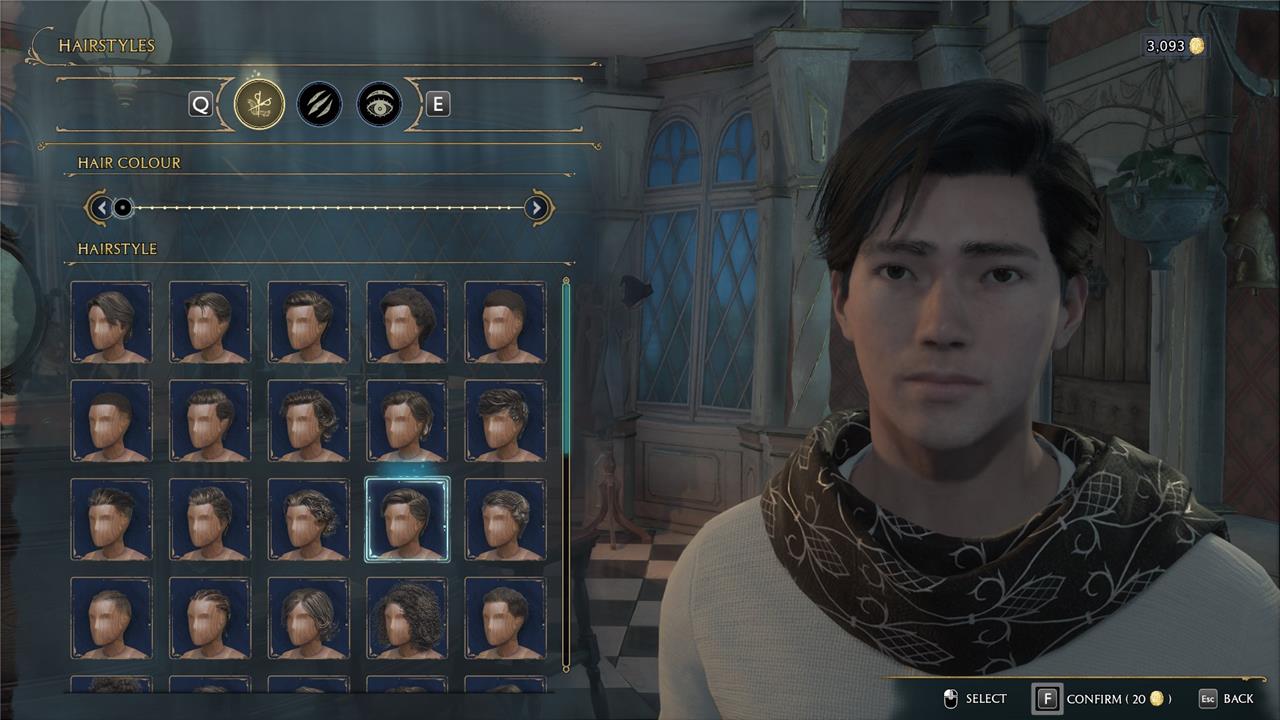
However, you can change everything else for a small cost of 20 gold. Read the list below to see all of the possible customizations after creating your character:
- Hair Color
- Hair Style
- Complexion
- Freckles and Moles
- Scars and Markings
- Eye Color
- Eyebrow Color
- Eyebrow Shape
On numerous occasions in recent years, billionaire and Harry Potter creator J.K. Rowling has taken public stances against inclusive transgender laws and trans rights, and has written fiction that has been condemned by LGBTQ organizations for its use of harmful anti-trans tropes. Hate crimes, as well as legislation that denies the rights of trans people, have become more prevalent in the U.K. since 2019, and, more recently, in the United States as well.
According to an FAQ from Hogwarts Legacy publisher Warner Bros. Interactive – the parent company of Avalanche Software, the game’s developer – Rowling is “not directly involved” with the creation of Hogwarts Legacy. Regardless, the sales and widespread attention generated by a AAA video game will benefit Rowling, and that has led some fans to decide not to buy the game. For a more in-depth explainer of the yearslong controversy leading up to Hogwarts Legacy‘s release, read AELGAMES’s breakdown.
How do you access the appearance change menu in Hogwarts Legacy
You access the appearance change menu in Hogwarts Legacy through two main systems: physical salons for facial tweaks and the Gear menu for clothing transmog.
Facial Changes
Travel to Madam Snelling’s Tress Emporium in Hogsmeade (marked by scissors on the map, available after early missions).
Speak to Calliope Snelling and select “View Services” to open the menu for hair, eyes, eyebrows, and complexion (20 Galleons).
Gear Appearance (Transmog)
Open your Wizard’s Field Guide to the Gear menu.
Equip an item, hover over its slot, and press “Change Appearance” (X on Xbox, Square on PS5, or equivalent-shows Collections and Other options for cosmetic overrides without stat changes).
What controls to press for Change Appearance on PC PS5 Xbox
In Hogwarts Legacy, you access “Change Appearance” for gear transmog via the Gear menu with these platform-specific controls.
Gear Menu Controls
Open the Wizard’s Field Guide first (Tab on PC, R1 on PS5, RB on Xbox).
Change Appearance Button
Once in Gear, hover over an equipped item’s slot and press:
-
PC: Right Mouse Button (RMB) or F.
-
PS5: Square.
-
Xbox: X.
This opens options like Collections and Other for cosmetic swaps. Facial changes use dialogue prompts at salons instead-no specific button beyond interacting (E on PC, Triangle on PS5, Y on Xbox).
