
Vegas’ desert can be unforgiving-but the console is your secret weapon. With the right commands, you can spawn gear, tweak stats, or bend the Mojave to your will in seconds.
How to use console commands in Fallout: New Vegas
Press the tilde key (~) or backquote (‘) during gameplay to open the console; a prompt appears in the bottom left. Type a command like “tgm” for god mode and press Enter to execute it. Close the console by pressing the key again, noting that commands disable achievements.[web:1][web:2][web:3]
First things first, console commands are only available for those who are playing on PC. To open the console command menu, all you need to do is press the “~” button, which you’ll find on the top left of your keyboard, just below the Esc key. Type the command you’d like to use and press Enter to activate it. Press the “~” key again to close the console command menu. Using console commands automatically pauses the game, so you don’t need to worry about enemy attacks.
Here’s a list of 10 essential console commands to use in Fallout: New Vegas.
|
Console command |
Effect |
|
tgm |
Enables god mode. You can’t take damage and you’ll get unlimited ammo. |
|
tcl |
Allows you to move through walls and objects. Very handy if you get stuck! |
|
tm |
Turn the UI display and menus on or off. |
|
fov [enter desired FOV] |
Changes your field of view. The default is 75, but you might want to boost it to 100 or so. |
|
movetoqt |
Instantly teleports you to your current quest target. |
|
set gamehour to [time] |
Change the time of day (or night). You must use the 24-hour (military) clock, so “set gamehour to 800” changes the current time to eight o’clock in the morning, while “set gamehour to 2000” changes the time to eight o’clock in the evening. |
|
player.setav speedmult [value] |
Changes the player’s movement speed. While the default value is 100, changing it to 300 or so should help you cross the wasteland much faster. |
|
killall |
Kills all nearby NPCs. It’s not limited to enemies, so use with caution! |
|
player.additem [item ID] [amount] |
Adds the desired item to your inventory. Scroll down for a list of item and weapon IDs. |
The best weapon and item commands in Fallout: New Vegas
The best weapon and item commands in Fallout: New Vegas
-
Spawn and equip top-tier weapons quickly using codes like player.additem
and player.additem 000e2c86 1 for the Lucky Revolver, or 0008f21c 1 for the Anti-materiel Rifle, enabling instant access to powerhouse armaments. -
Improve gear efficiency by spawning valuable items with minimal clutter, such as stimpaks (000237ad) and stimpacks for rapid healing, letting you push through tough sections without penalties.
-
Manipulate inventory and world state with commands to tailor encounters, like player.setlevel to raise your level, or setstage
to progress quests when stuck. -
Enhance your endurance and combat prowess by adjusting attributes or perks via commands that modify skills and karma, giving you a customized playthrough.
-
Manage companions and NPCs by targeting them and using appropriate commands to control presence, dialogue options, or dismissal, allowing flexible party setups.
To receive a free item or weapon in your inventory, you must know the item or weapon's ID to paste behind the "player.additem" command. After the ID, you may add a value to adjust the number of items you wish to receive. This may not be necessary when you're spawning a weapon, but if you want to add more bottle caps (money) to your inventory, you probably want more than one cap. In that case, you might want to enter "player.additem 0000000f 200," for example, which adds 200 caps to your inventory.
Although there are a great many items and weapons in Fallout: New Vegas, here's a selection of useful weapons, armor, and common items to get you through the wasteland. To spawn them, simply copy the full command (including the ID) from the column on the right, and paste it in the console command bar.
|
Name |
Type |
Command |
|
Bottle caps |
Money |
player.additem 0000000f |
|
Purified water |
Consumable |
player.additem 000151A3 |
|
Nuka-Cola |
Consumable |
player.additem 0001519E |
|
Super stimpack |
Consumable |
player.additem 000CCEF2 |
|
Antivenom |
Consumable |
player.additem 000E2C6F |
|
Weapon repair kit |
Consumable |
player.additem 00140A68 |
|
Assault carbine |
Weapon, rifle |
player.additem 0008F21E |
|
All-American |
Weapon, rifle |
player.additem 00106FEB |
|
Hunting shotgun |
Weapon, shotgun |
player.additem 0008ED0B |
|
Riot shotgun |
Weapon, shotgun |
player.additem 0008ED0A |
|
Lucky |
Weapon, pistol |
player.additem 000E2C86 |
|
Minigun |
Weapon, heavy |
player.additem 0000433F |
|
Gatling laser |
Weapon, heavy |
player.additem 0000432E |
|
12.7mm submachine gun |
Weapon, SMG |
player.additem 001429D1 |
|
Frag grenade |
Weapon, grenade |
player.additem 00004330 |
|
Knock-Knock |
Weapon, melee |
player.additem 00156F7C |
|
Machete Gladius |
Weapon, melee |
player.additem 0015430B |
|
Combat armor, reinforced |
Armor |
player.additem 00126500 |
|
Combat helmet, reinforced |
Helmet |
player.additem 0014722A |
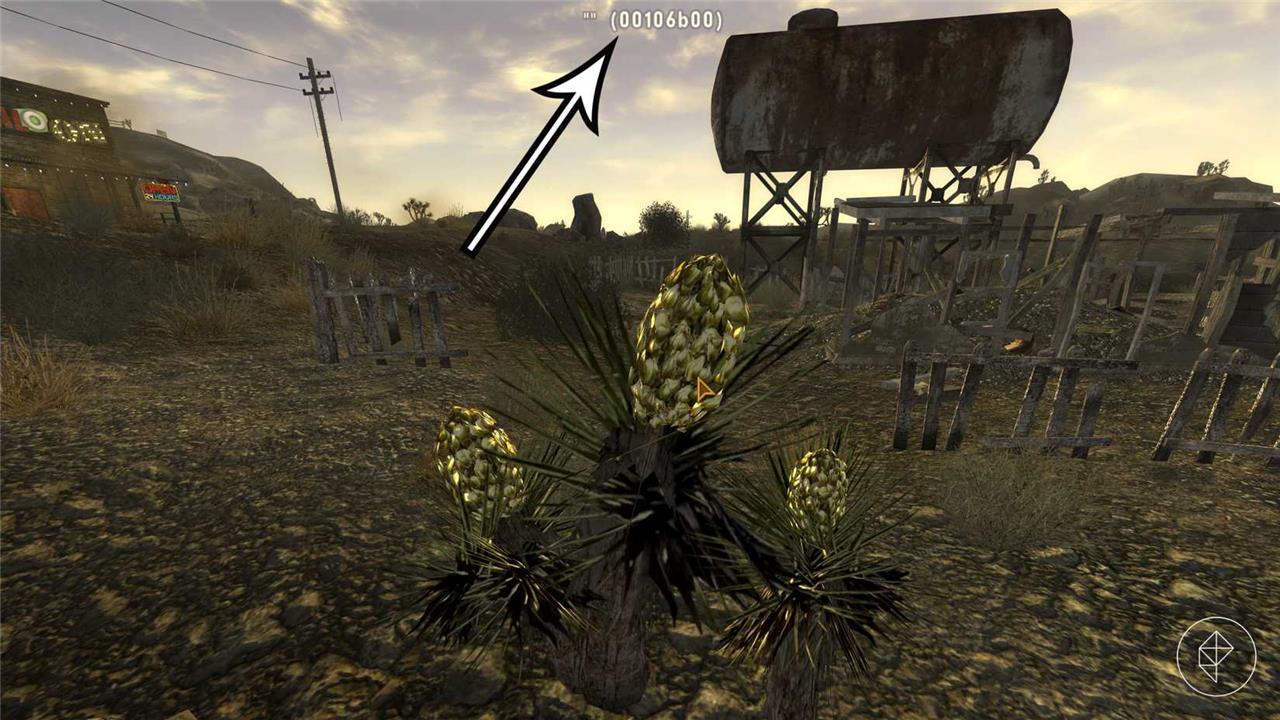
To discover an object's ID, open the console command menu and click on it; you'll see the ID displayed at the top of the screen. This lovely little cactus plant, for example, is linked to the "00106b00" object ID.
Fallout: New Vegas console commands list
Here is a concise paragraph for the subtitle:
A comprehensive guide to Fallout: New Vegas PC console commands, covering basic cheats, gameplay tweaks, and troubleshooting tips to help players customize their experience and troubleshoot common issues.
Want to try more Fallout: New Vegas cheats? Here's an extensive list of commands along with their effects.
|
Console command |
Effect |
|
activate [item ID] |
Activates any object that can be activated, like a radio. Just selecting the objects in the console command menu may not be enough, but you'll see the object's ID when you click on it. |
|
addperk [perk ID] |
Adds a specific perk. |
|
addtofaction [faction ID] [0/1] |
Select an NPC to add them to a faction. Entering "0" at the end makes them friendly and adding "1" makes them an ally. |
|
completequest |
Completes the current quest. |
|
disable |
Removes a selected object from the game, such as a car, rock, or tree (you can use this to fix glitches). To select an item, click on it after opening the console commands menu. |
|
enable |
Enable a disabled object while it's still selected. If you already exited the console commands menu, you can no longer respawn the object. |
|
fw [weather ID] |
Change the weather. For clear weather, use ID "00064609"; for cloudy weather, use "urbanovercast"; and for a dust storm, use "hvduststorm." |
|
getcauseofdeath |
Select a fallen NPC, then use this command to see their cause of death. |
|
getcurrenttime |
See the current time of day. |
|
killactor |
Select a specific NPC, then use this command to kill them. |
|
player.addperk [perk ID] |
Adds a perk to your character. |
|
player.advlevel |
Levels up your character. Beware that it only adds a new level, not experience points, so you still need to gather experience for every level you skipped this way if you wish to continue leveling the "normal" way. |
|
player.modav [skill name] [value] |
Add points to a specific skill. |
|
player.removeperk [perk ID] |
Remove a perk from your character. |
|
player.rewardxp [add amount] |
Gain character experience according to the value you added. |
|
player.setlevel [add level] |
Changes your character's main level. |
|
player.setscale [value] |
Changes your character's size. The default is 1 (don't make it too high). |
|
player.showrecipemenu [type] |
Opens a crafting menu. Here are the menu IDs you may use:
|
|
qqq |
Quit game. |
|
removefromallfactions |
Removes player from all factions (see the "reputation" command for a faction list). |
|
removefromfaction [faction ID] |
Removes a selected NPC from a faction. |
|
resetquest [quest ID] |
Resets the quest. You'll have to repeat the entire questline, but it can be helpful if a quest is bugged. |
|
resurrect |
Select a deceased NPC to resurrect. |
|
rewardkarma [number] |
Add or subtract Karma to or from your character. Choose a negative value, like "-6" to remove Karma points. |
|
savegame |
Saves the game. |
|
sethardcore [off/on] |
Use "1" to enable hard mode, use "0" to disable it. |
|
setreputation [faction/town ID] [infamy/fame] [amount] |
Change your reputation. To add fame points, use "1" in the "infamy/fame" section. To add infamy points, use "0". Here's a list of faction and towns IDs you can use:
For example, to boost your reputation in Primm by four points, you must enter "setreputation 000F2406 1 4" as a console command. |
|
sexchange |
Change your character's sex. |
|
sgtm |
Changes the time speed. The default is 1, so enter "sgtm 0.5" to make time move slower, and "sgtm 1.5" to make it faster. |
|
showbarbermenu |
Change your hairstyle. |
|
shownamemenu |
Change your character's name. |
|
showplasticsurgeonmenu |
Change your character's facial features. |
|
showsleepwaitmenu 1 |
Show the wait menu, used to pass the time. |
|
showsubtitle [0/1] |
Enter "0" to hide dialogue subtitles, use "1" to show them. |
|
showtraitmenu |
Change your character's traits. |
|
sq |
Show quest list. |
|
startallquests |
Start every quest in the game. This can seriously mess up your progress though, so only use it if you're looking for a specific quest or have already completed most of them. |
|
tai |
Turns AI (NPCs) on or off. |
|
tcai |
Turns combat AI on or off. You can use it to stop a battle. |
|
tdetect |
Toggles NPC detection. |
|
tdm |
Enables demigod mode. Unlike god mode, you don't get unlimited ammo. |
How do I add specific items by item IDTo add specific items by item ID in Fallout: New Vegas on PC, you use the player.additem console command. Basic syntax
Finding item IDs
Useful tips
How to add items by form ID in Fallout New Vegas consoleTo add items by Form ID in Fallout: New Vegas, use the player.additem command in the console. Basic syntax
Details about Form IDs
Optional variants and tips
If you tell which exact item you want (e.g., a named weapon or armor), a ready-to-paste command can be written for it.  |