
Bring back the pixel charm of the ‘90s with a few simple tweaks that make your Game Boy and GBA titles on the Nintendo Switch look like they’re running on the original handhelds – complete with authentic colors, grain, and nostalgic glow.
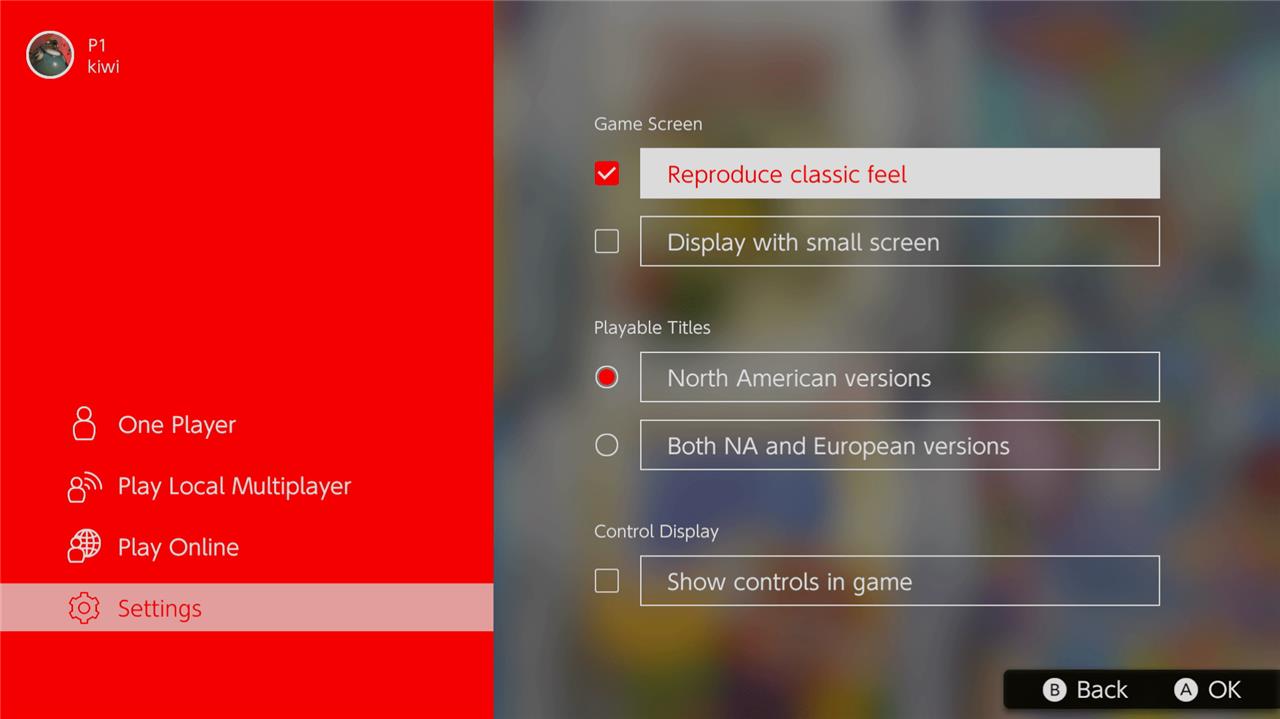
Doing so will add a grid-like texture over the games. You can see a comparison below, with the left image showing the “classic feel” and the right image showing the game without.
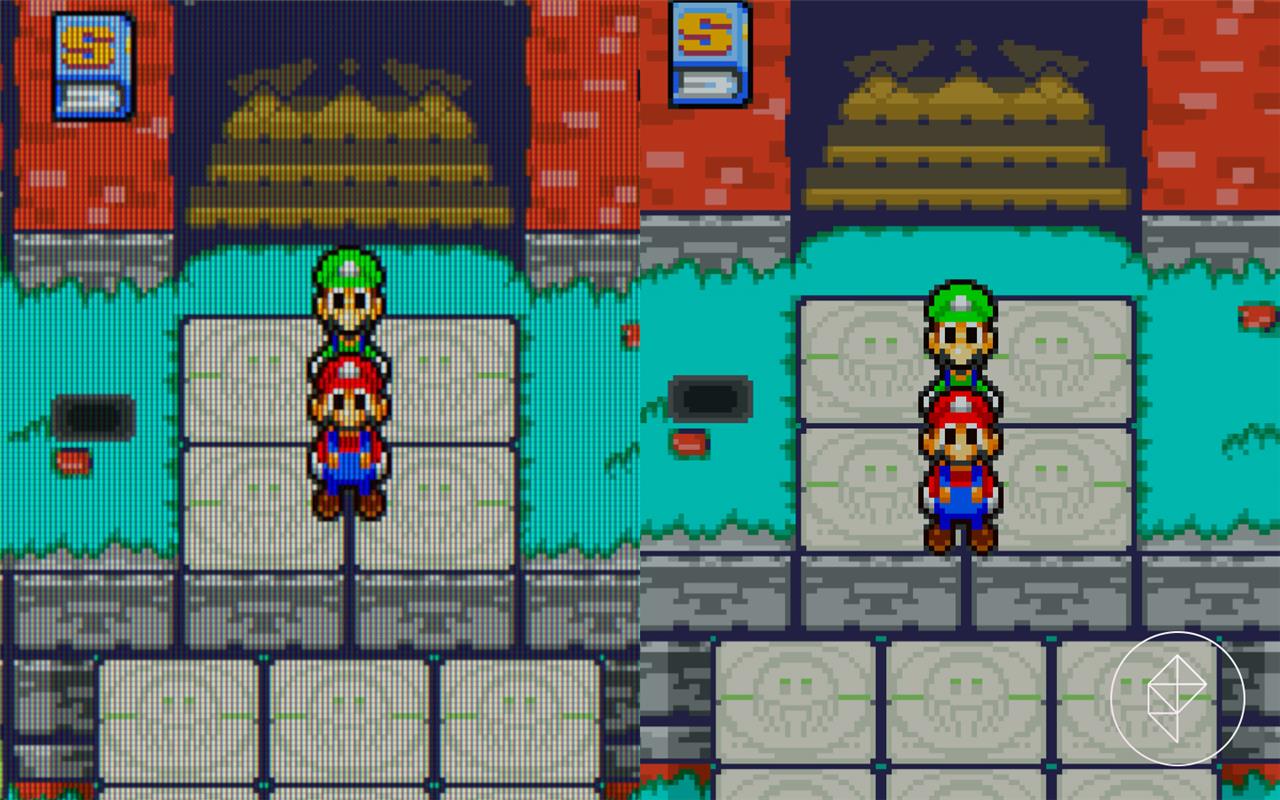
Whether this makes the game look better or worse is a personal preference, but this helps games look closer to how they were originally intended to be seen.
There are also similar settings for the NES and Super Nintendo games. You can choose to play with different visual options, and even slap a CRT filter over it if you want, which will add that old-school blur.
The ability to play Game Boy and Game Boy Advance games is a recent addition to the Nintendo Switch Online package, as announced in Wednesday’s Nintendo Direct. There’s only a handful of games available to play right now, with more certainly coming in future updates. The Game Boy games can be played with a basic Nintendo Switch Online subscription, but Game Boy Advance games require the Nintendo Switch Online Expansion Pack subscription.
Which Game Boy and GBA games are available on Switch Online
Nintendo updates the Game Boy and Game Boy Advance libraries regularly, so the exact list changes over time and I can’t see the current full catalog right now. I can, however, summarize how it’s structured and the kinds of games you can expect, plus how to check the live list on your Switch.
How the libraries are organized
-
Game Boy / Game Boy Color: Included with the base Nintendo Switch Online plan, accessed via the “Game Boy – Nintendo Switch Online” app.
-
Game Boy Advance: Included only with Nintendo Switch Online + Expansion Pack, via the “Game Boy Advance – Nintendo Switch Online” (sometimes called Nintendo Classics) app.
Examples of Game Boy games on NSO
Launch and early GB lineup highlights included:
-
Tetris
-
Super Mario Land 2: 6 Golden Coins
-
The Legend of Zelda: Link’s Awakening DX
-
Gargoyle’s Quest
-
Game & Watch Gallery 3
-
Alone in the Dark: The New Nightmare
-
Metroid II: Return of Samus
-
Wario Land 3
-
Kirby’s Dream Land
Nintendo’s official page now lists additional GB and GBC titles such as Donkey Kong Land and other classics, with more added over time.
Examples of GBA games on NSO
The initial and expanded GBA lineup (Expansion Pack tier) includes:
-
Super Mario Advance 4: Super Mario Bros. 3
-
Mario & Luigi: Superstar Saga
-
Mario Kart: Super Circuit
-
WarioWare, Inc.: Mega Microgames!
-
Kuru Kuru Kururin
-
The Legend of Zelda: The Minish Cap
-
Metroid Fusion
-
Super Mario Advance, Super Mario Advance 2: Super Mario World, Yoshi’s Island: Super Mario Advance 3
-
Fire Emblem and Fire Emblem: The Binding Blade (Japan-only)
-
Kirby & the Amazing Mirror, Golden Sun, Golden Sun: The Lost Age
-
F-Zero: Maximum Velocity, F-Zero: GP Legend, F-Zero Climax (some Japan-only)
-
Wario Land 4, Fire Emblem: The Sacred Stones, and several others like Mother 3 and Densetsu no Starfy entries in Japan.
How to see the current full list on your Switch
To see every available Game Boy and GBA game for your own region:
-
On the HOME Menu, open Nintendo eShop.
-
Search for “Game Boy – Nintendo Switch Online” and “Game Boy Advance – Nintendo Switch Online”.
-
Open each app’s page; the description shows an up-to-date list of included games for your region.
-
After downloading the apps, open them; the full selectable library is visible from the main menu.
If you tell me which series you care about (Zelda, Mario, RPGs, etc.), I can pull out just those and explain which entries are on Switch Online and which you’d still need to play elsewhere.
How to access and play these Game Boy games on Switch Online
To play the Game Boy and Game Boy Advance titles on Nintendo Switch Online, you need the right subscription and the two classic-games apps, then you just launch games from those apps.
1. Check your subscription
-
Game Boy (GB/GBC) games: Included with any Nintendo Switch Online membership.
-
Game Boy Advance (GBA) games: Require Nintendo Switch Online + Expansion Pack.
You can view or upgrade your membership:
-
On the HOME Menu, open the Nintendo Switch Online icon.
-
Go to Membership options / Renew / Change Membership to see or upgrade to the Expansion Pack if needed.
2. Download the Game Boy apps
You only do this once; they then sit on your HOME Menu like any other game.
-
Open Nintendo eShop on your Switch.
-
Go to Search/Browse and type “Game Boy”.
-
Download:
-
“Game Boy – Nintendo Switch Online” (or “Game Boy – Nintendo Classics”).
-
“Game Boy Advance – Nintendo Switch Online” (or “Game Boy Advance – Nintendo Classics”) if you have the Expansion Pack.
-
-
Wait for the download to finish; both appear on your HOME Menu.
3. Launch and pick a game
-
On the HOME Menu, open the Game Boy or Game Boy Advance app.
-
You’ll see a library of available classic games; move with the left stick and highlight the one you want.
-
Press A to open its details, then Start (or A again) to launch the game.
From here, games behave like normal Switch titles but with extra virtual console features.
4. Basic controls inside GB/GBA apps
While in a game:
-
ZL + ZR: Open the classic-games menu (suspend/resume, save states, online options, screen filters).
-
Save: Use in-game saves as normal; you can also create suspend points from the menu to save anywhere.
-
Exit game: From the classic-games menu, choose Close or Return to Game Selection.
5. Playing online or with friends
Many GB/GBA games support local or online multiplayer in the apps.
-
From the game-selection screen, you can start an online session to invite friends who also have Nintendo Switch Online and the same app.
-
Some titles let you share the screen or “pass the controller” virtually so another player can take over.
If you tell me which specific game you want to start with, I can walk you step-by-step from the HOME Menu to actually getting into that game.
