
Exploring Hytale with friends turns its blocky adventures into shared stories and chaotic fun. Here’s how to set up multiplayer worlds, connect online, and keep your squad together across your favorite servers.
How to play Hytale online with friends
Playing Hytale online with friends is simple and fun. First, launch the game and access the multiplayer menu from the main screen. You can join a public server, where many players share the same world, or create a private one for your own group. To invite friends, share the server’s IP address or use the friend system if the server supports it. Make sure everyone has the same game version and any required mods installed. Once connected, you can explore, build, and complete quests together in real time.
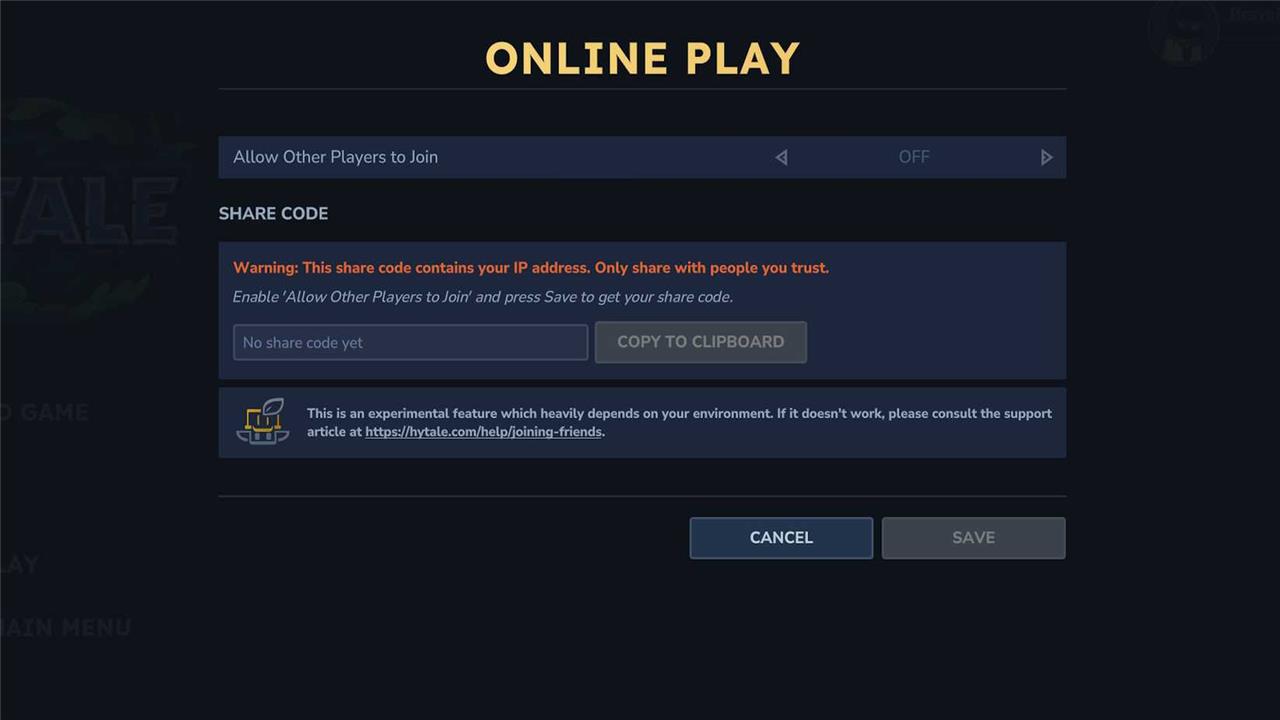
When you initially start a world in Hytale, it’ll pop into being with just you in it. You can invite other players to join your world by following these steps:
- Press the Escape key to open the main menu.
- Choose “Online Play.”
- Turn the “allow other players to join” option on.
- Click “save” to accept the option change.
- A code will appear in the field, which you can copy and share with whomever you want to join the server.
- You can also choose to include a password with the code. If you do toggle that option on, click “save” again to re-generate your code and password.
Hytale codes include your IP address, so it’s recommended you only share them with people you actually know and wouldn’t mind if they have access to your IP address.
You can also join a friend’s world if you have their world code.
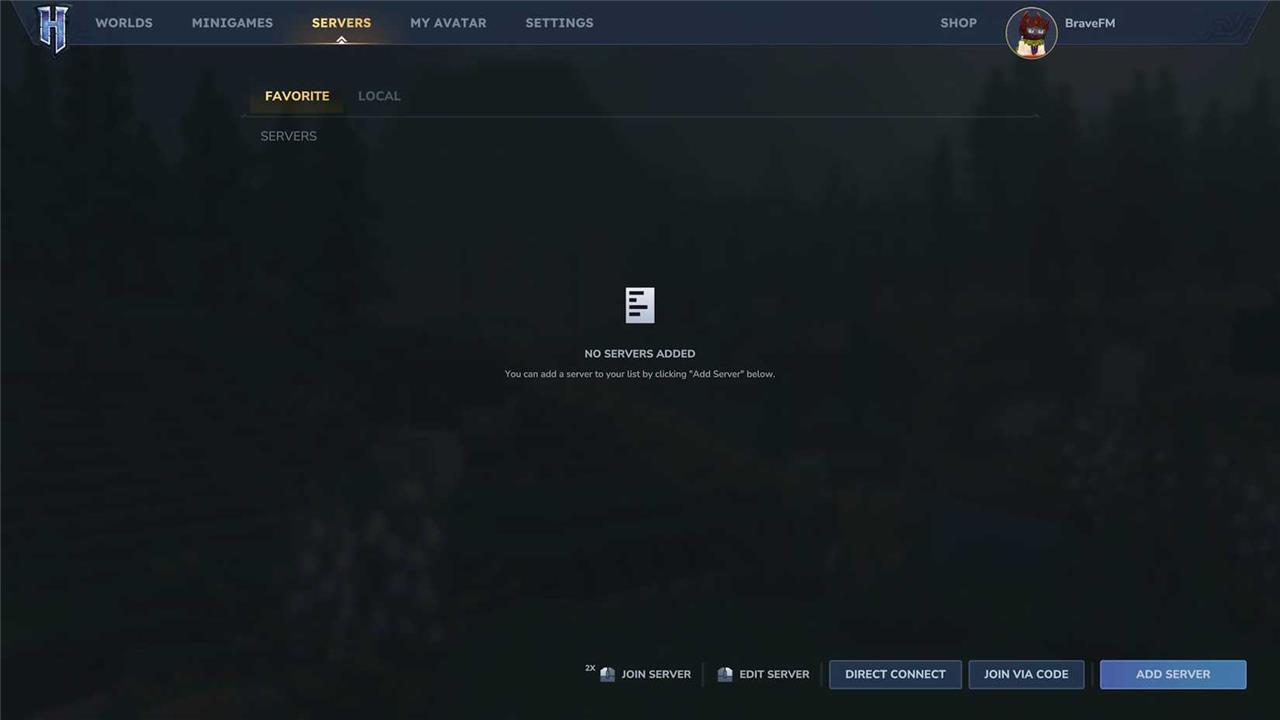
- From the main menu, before joining a world, choose “servers.”
- Choose “join via code” and enter an invitation code to join your friend’s world.
- Choose “connect” to join.
Hytale‘s worlds aren’t persistent, which means if the server’s host isn’t online and in the world, you can’t access it. They also render the game themselves, which Hypixel says can potentially impact performance. To keep your server up and running and combat the performance loss, you can play on a dedicated server. If you’re trying to join a dedicated server, choose “add server” and input the name and connection address to join.
Does Hytale have dedicated servers?
Hytale supports dedicated servers, allowing players to host their own persistent worlds with custom settings, rules, and mods. These servers enable smoother multiplayer experiences, giving hosts more control over gameplay and performance. Players can join public servers or create private ones to play exclusively with friends. Hypixel Studios has also announced plans to provide official tools for managing and customizing dedicated servers, making online play more flexible and community-driven.
Hytale supports dedicated servers, though as of the initial early access launch, Hypixel Studios is not running any dedicated servers itself. Your options are purchasing from a third-party server host or setting it up yourself. Hypixel partnered with a handful of server hosting groups that had their servers “thoroughly tested” to help ensure smooth performance. Note that these tests were carried out before Hytale launched and not in conditions mirroring the stress public play would put them under.
- Nitrado
- Apex Hosting
- GPORTAL
- Shockbyte
- Dathost
Dedicated servers have higher player caps and, Hypixel Studios says, are likely to perform more efficiently when more people are playing, since they don’t have to render the game as well like a standard server does. All of these hosts charge a rental fee. You’re also free to use other third-party server platforms, such as Oracle, though you’ll be responsible for customizing and maintaining them.
Hytale also lets you set up and host a dedicated server on your own, without going through a third party. The process is rather involved, though Hypixel published a manual outlining how to complete each step. Setting up a server on your own can be fairly complicated, and will still require you to run the server on your device. We only recommend that you run a server if you have a powerful computer or a spare that you’re willing to leave on.
Set up a password-protected Hytale world for friends only
Password-protecting a Hytale world restricts access to invited friends only, using the game’s built-in share code system with an optional password. This leverages UPnP for easy peer-to-peer connections without port forwarding.
Hosting Steps
Load or create your world, then press ESC to open the pause menu and select “Online Play.” Toggle “Allow other players to join” to On, enter a strong password in the provided field (optionally include it in the share code for convenience), and click Save to generate the code.
Sharing Securely
Copy the share code (which reveals your IP-share only with trusted friends via direct messages) along with the password if not embedded. The host must keep the world running for others to join.
Friends Joining
Friends select “Servers” from the main menu, click “Join via code” (bottom right), paste the code, enter the password if prompted, and hit Connect. Switch hosting roles if connection issues arise due to network differences.
How to generate and share a Hytale share code securely
Hytale share codes enable secure multiplayer sessions by linking directly to the host’s world, but they embed your IP address, requiring careful sharing. Generate them through the in-game menu after enabling online play, then distribute via trusted channels only.
Generating the Code
Enter your world, press ESC for the pause menu, and select “Online Play.” Toggle “Allow other players to join” on, optionally add a password (which can embed into the code), then click Save to auto-generate the share code-copy it from the field.
Secure Sharing Methods
Send the code privately through Discord DMs, Signal, or encrypted email rather than public chats or forums to prevent strangers from accessing your IP and joining. Include the password separately if not embedded, and regenerate codes for new sessions to limit exposure.
Additional Precautions
Use a VPN to mask your real IP if hosting frequently, and enable two-factor authentication on your Hytale account for login security. Avoid sharing with untrusted contacts, as codes grant direct network access while active.
