
Barbarians swing an arsenal, not just a single blade-but Diablo 4 never tells you clearly how to make the right weapon come out on command. Here’s how to control which axe, hammer, or sword your skills use, so every shout and strike hits exactly the way you planned.
In this Diablo 4 guide, we’ll teach you how to manually make skills switch weapons while using the Barbarian.
How to switch weapons as a Barbarian
The Barbarian class in Diablo 4 can equip multiple weapon types and automatically switch between them based on the skill used. Each combat skill is linked to a specific weapon or weapon set, such as dual-wielded weapons for Frenzy or a two-handed axe for Hammer of the Ancients. To manually assign or change weapon bindings, open the Skills menu and select the weapon icon next to each ability. This allows you to control which weapons are used, letting you tailor your setup for maximum damage or preferred playstyle.
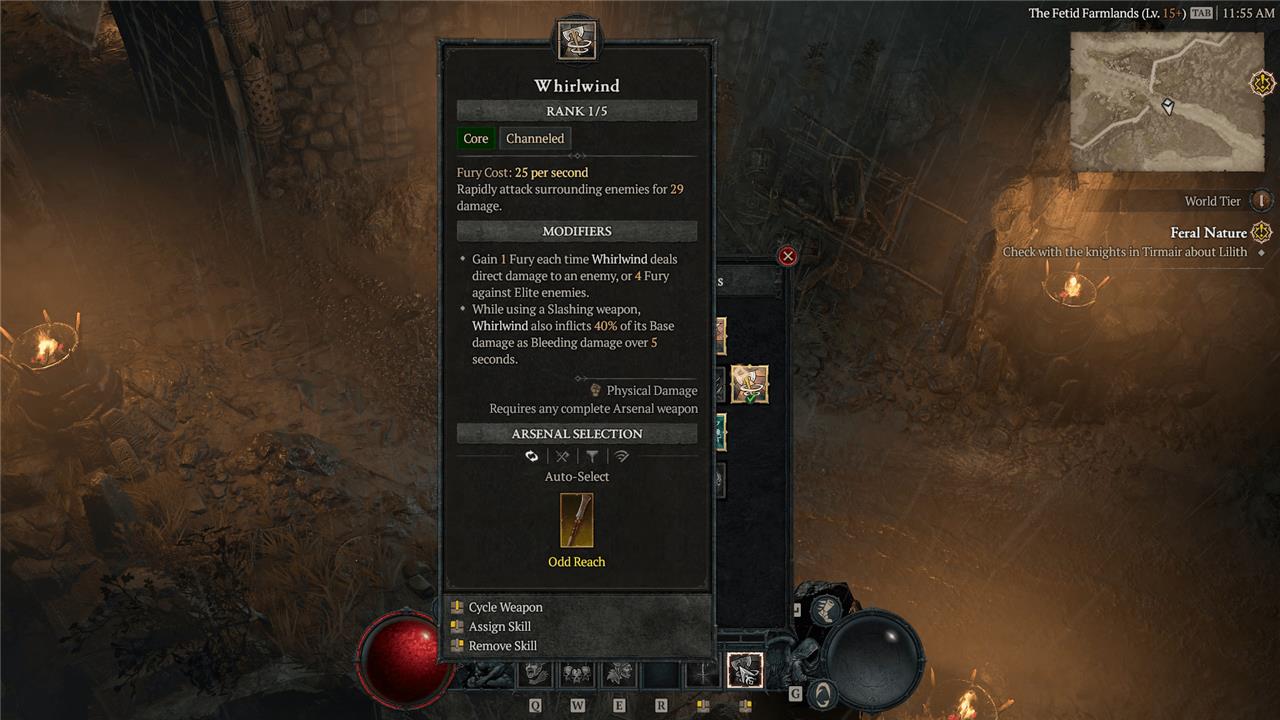
Before we get into why you want to switch your Barbarians’ weapons, let’s get into how. This is one of those complex game systems that’s actually very easy to use … as long as you stumble upon it and discover that it’s there, as it’s just as easy to miss.
When you go to the skill assignment menu (which you can get to via the skill tree), you’ll be able to move around any of the skills you’ve invested in on your bar. But when you hover over the skill you’re trying to assign, you’ll see a special, Barbarian-only window that tells you which of your weapons your attack will use: your bludgeoning two-hander, your slashing two-hander, or your dual-wielding one-handed weapons.
Normally, the game will do the math for you and automatically choose the weapon that would do the highest damage. But if you want to choose for yourself, you’ll see a prompt in the menu to “cycle weapon” (X on PlayStation and the mouse wheel on PC). When you do this, you should see your “Arsenal Selection” rotate between the three options.
This assignment will only affect the skill you changed it on and will stay that way until you change it back.
Why you’d want to switch weapons
Switching weapons lets Barbarians adapt to different combat needs on the fly. A two-handed axe crushes single tough foes with massive damage spikes, while dual-wielding maces shreds groups through rapid hits. Players swap to match enemy types, boost skill power via specific gear bonuses, or counter boss mechanics that demand reach or speed. This flexibility keeps builds strong across Diablo 4’s varied fights.
Now if you’re sitting there thinking, If the game does the math for me, why would I ever change my weapon manually? we can’t really blame you. Blasting through enemies as efficiently as possible is kinda the point of Diablo 4. However, there are some passive skills that only work when using certain weapon types.
For example, very early in the Barbarian skill tree, you can invest in the Endless Fury passive, which reads: “Basic Skills generate more Fury [your resource] when using a two-handed weapon.”
Aha, now it’s all coming together. If you’re using a skill like Lunging Strike and you have two badass dual-wielding weapons that are better than the rest of your Arsenal, the game will automatically select those for your attack. And if you’ve invested in Endless Fury, you’d be wasting those skill points on a passive you weren’t using. By forcing Lunging Strike to instead use one of your two-handed weapons, you’ll be able to take advantage of Endless Fury despite your amazing dual-wielding weapon.
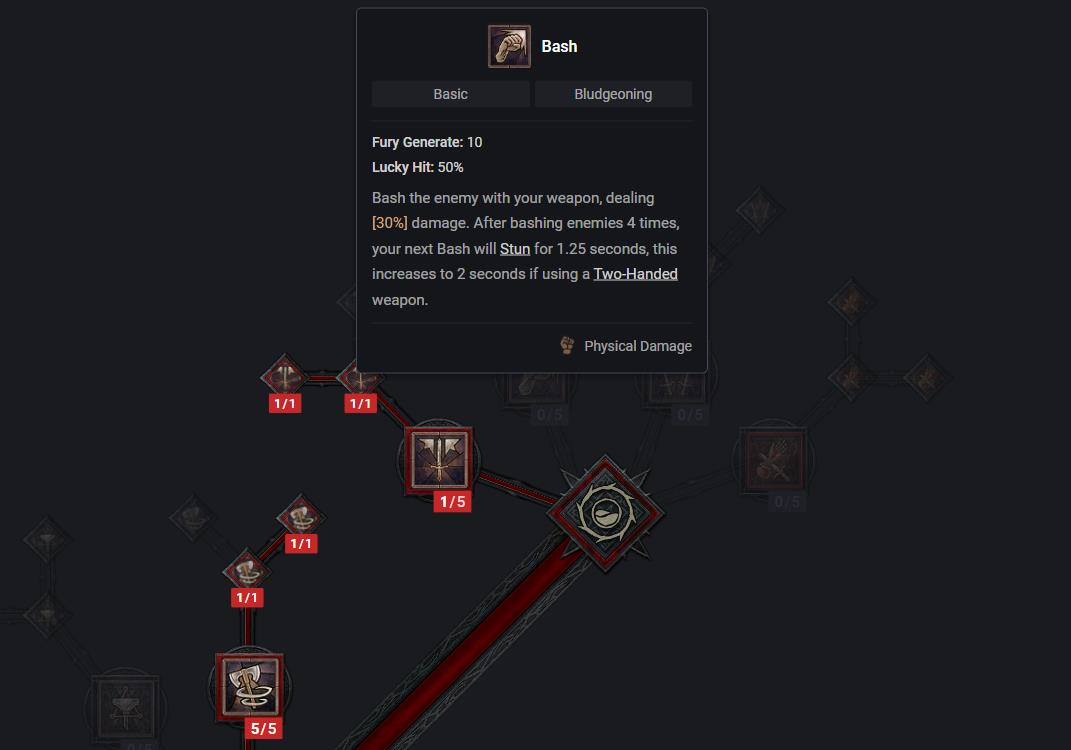
It’s worth noting here that some skills can also function with any kind of Arsenal weapon, but have unique effects depending on the weapon you’re using. Bash, for example, stuns an enemy for 1.25 seconds every four hits. But if you’re using a two-handed weapon, you’ll up that stun to two seconds.
Finally, it’s important to understand that you can’t cycle weapons for every skill. Abilities like Flay require a slashing weapon, while Hammer of the Ancients can only be used by your two-handed bludgeoning weapon. However, unless the skill specifically states that it requires a certain weapon type, you can always use the weapon cycle system to select the means of your enemy’s destruction.
How to assign a specific weapon to a Barbarian skill on PC
Barbarians in Diablo 4 assign specific weapons from their Arsenal to skills via the skill menu on PC, cycling through options like Dual-Wield, 2H Bludgeoning, or 2H Slashing for compatible abilities. This ensures the chosen weapon’s perks (e.g., bleed from 2H swords) apply during use.
Accessing Skill Assignment
Press S to open the Skills menu, then switch to the Skill Assignment view (bottom tab). Hover your cursor over the desired skill icon on the hotbar or assignment grid.
Cycling Weapon Types
Press the middle mouse button (scroll wheel click) to cycle: Auto-Select → Dual-Wield → 2H Bludgeoning → 2H Slashing (skips incompatible types). Confirm by dragging to hotbar if needed; the tooltip updates to show the selected weapon type’s icon.
Tips for Specific Weapons
Equip weapons in all Arsenal slots first via inventory (right-click assign). Changes apply instantly in combat as skills auto-pull the assigned type; reassign anytime for builds like Whirlwind on dual-wield or Hammer on bludgeoning.
Show keyboard controls for Arsenal weapon assignment
Barbarians assign Arsenal weapons to skills using specific PC keyboard controls in Diablo 4’s skill menu. These controls allow cycling through weapon types without leaving the interface.
Opening the Menu
Press S to open the Skills menu, then navigate to the Skill Assignment tab at the bottom. Hover your mouse cursor over the skill icon you want to modify on the hotbar or grid.
Cycling Weapons
Press the middle mouse button (scroll wheel click) to cycle through options: Auto-Select → Dual-Wield → 2H Bludgeoning → 2H Slashing. The tooltip updates instantly to reflect the change and shows the assigned weapon type’s icon.
Additional Controls
-
Drag the skill to your hotbar after assignment if needed.
-
Exit with Esc or S again; changes save automatically and apply in combat. Re-equip weapons in inventory first for full options.
